


Klaviyo Pricing 2026: Plans, SMS Costs and Your Real Monthly Bill

- Klaviyo bills by active profiles, meaning every contact it can email, subscribed or not. The Email plan was $20 a month at 500 profiles, $100 at 5,000 and $400 at 25,000 when we checked on November 25, 2026.
- SMS is billed on top. Since July 13, 2026, Klaviyo prices mobile messages in dollars per message instead of credits, with rates that depend on country, channel and number type.
- The real cost is the stack and the list. Klaviyo has no native loyalty program, so price a loyalty app on top, and suppress dead profiles before renewal because suppressed profiles stop counting.
Klaviyo pricing looks simple: pick a plan, slide to your list size, read the number. The bill you actually pay depends on three things the slider does not show: how many of your contacts count as active profiles, whether you send SMS, and which apps you still need next to Klaviyo. This guide covers every Klaviyo plan with the prices we read on November 25, 2026, the billing rules that push the number up, and four real monthly bills, including the full stack with reviews and loyalty.
A note on who is writing: we make Trio, a Shopify app that combines email marketing, reviews and loyalty. We compare it with Klaviyo near the end, including the cases where Klaviyo is the better buy. If you want the wider field first, start with our ranking of the best email marketing platforms for Shopify stores.
Klaviyo pricing plans at a glance (2026)
Klaviyo sells four plans, and all of them scale with your active profile count. Here is what each includes, read from the official Klaviyo pricing page at 500 profiles, the lowest paid step.
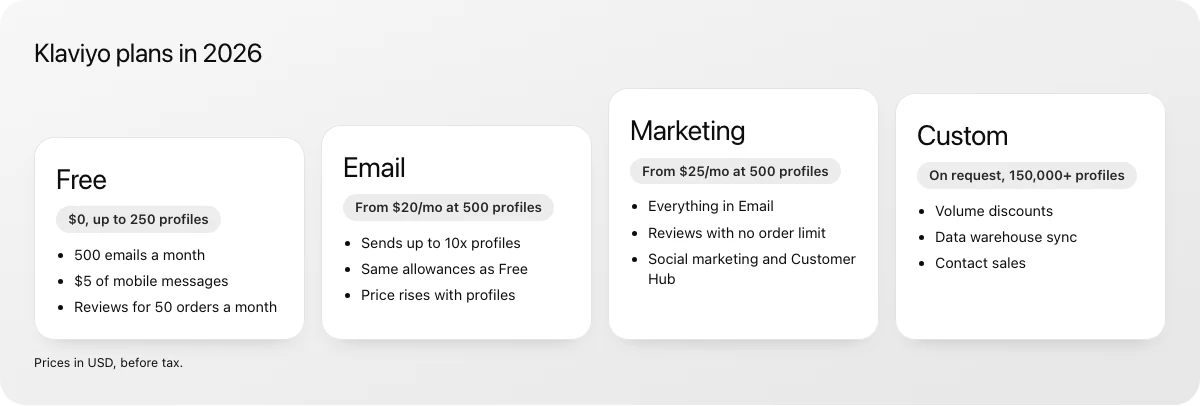
| Plan | Price at 500 profiles | Email sends a month | What it adds |
|---|---|---|---|
| Free | $0 (up to 250 profiles) | 500 | Email, $10 of Composer AI usage, $5 of mobile messages, reviews for 50 orders a month, 10 Customer Agent resolutions, 10 Helpdesk tickets |
| $20 | 5,000 | The same allowances, with paid sending | |
| Marketing | $25 | 5,000 | Reviews with no order limit, social marketing and Customer Hub for 500 profiles |
| Custom | On request | Custom | 150,000+ profiles, volume discounts, data warehouse sync |
The gap between Klaviyo plans is narrower than the names suggest. Email and Marketing send exactly the same volume. The extra money on Marketing buys reviews without an order cap, social marketing and Customer Hub. When we checked, Klaviyo also showed a limited offer: the first month of Marketing for $1, up to 5,000 active profiles, under eligibility terms.
If your reviews already run in another app, the Email plan is usually the one to price. If you want Klaviyo to handle reviews too, compare Marketing with a dedicated app first: our list of the best free product review apps for Shopify shows how much a free plan covers today.
Klaviyo cost by list size
Your Klaviyo cost follows one number: active profiles, not emails sent or orders. These are the steps Klaviyo showed on November 25, 2026. The slider has more steps in between, so run your exact count there before you commit.
| Active profiles | Email plan | Marketing plan | Email sends a month | Email plan per 1,000 profiles |
|---|---|---|---|---|
| 500 | $20 | $25 | 5,000 | $40 |
| 1,000 | $30 | $40 | 10,000 | $30 |
| 2,500 | $60 | $80 | 25,000 | $24 |
| 5,000 | $100 | $130 | 50,000 | $20 |
| 10,000 | $150 | $195 | 100,000 | $15 |
| 25,000 | $400 | $505 | 250,000 | $16 |
| 150,000+ | Custom | Custom | Custom | n/a |
The last column is our own division of Klaviyo's prices. Three things stand out:
- The unit price stops falling at 10,000. It drops from $40 to $15 per 1,000 profiles, then edges back up to $16 at 25,000.
- The Marketing premium grows with you. It is $5 at 500 profiles and $105 at 25,000.
- Sends are capped at 10 times your profiles. That covers a weekly campaign to the whole list plus your flows. Send more and the overage rules below kick in.
Growth is where budgets break. Say you have 2,500 profiles today ($60 a month on Email) and add 300 a month. In 12 months you reach 6,100 profiles, past the 5,000 step, so your bill lands somewhere between the $100 and $150 steps, close to double today's price. The slider gives the exact figure for 6,100.
How to estimate your Klaviyo bill in four steps
- Count your emailable contacts, not your subscribers: in Shopify, every customer with an email address who has not unsubscribed or bounced will count once synced.
- Add your expected growth for 12 months and read that profile count on the Klaviyo pricing slider, on Email or Marketing.
- Add your mobile messaging plan if you text customers, using the SMS formula further down.
- Add every app Klaviyo does not replace, usually a loyalty app and, past 50 orders a month on Email, a reviews app.
How Klaviyo bills you: active profiles, sends and auto-upgrades
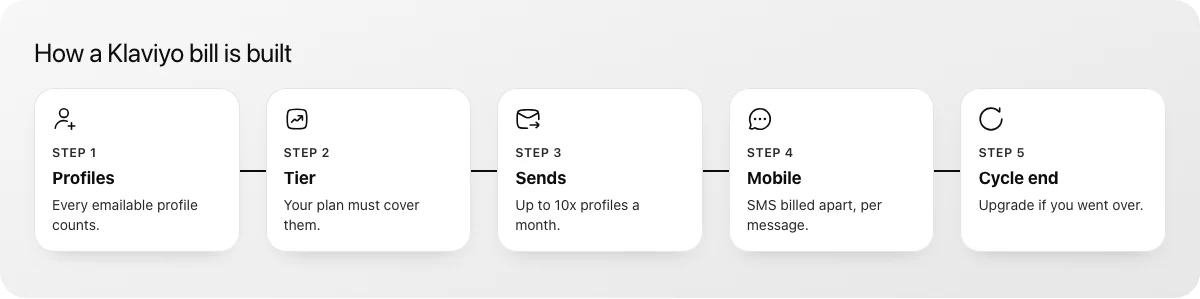
What counts as an active profile
Klaviyo's billing guide defines an active profile as "any profile, regardless of consent status, that can be emailed through Klaviyo." A customer who bought once in 2023 and never subscribed still counts if Klaviyo holds their email and has not suppressed it. When you connect a Shopify store with years of orders, your starting count is roughly your number of customers with an email address, not your number of subscribers.
What does not count: suppressed profiles, deleted profiles, and profiles with only a phone number. One exception if you buy Klaviyo's advanced data platform add-on: that product is billed on total profiles, suppressed ones included.
What happens when you go over
Klaviyo handles the two limits differently:
- Profiles: on a paid plan, Klaviyo does not stop you from adding people. It "automatically upgrades" you to a plan that covers your count at the end of each billing cycle. On the Free plan, you cannot send email until you are back under 250.
- Sends: you pick one of three preferences: an automatic upgrade to the next tier (on by default when you first buy), flexible overages (a one-time charge for the extra volume this cycle, at your plan's rate), or none (sending stops until the next cycle).
- Downgrades: they do not happen by themselves unless you turn on auto-downgrade, which checks your profile count shortly before renewal. Downgrades are not refunded.
Plans renew monthly, billed in advance. Klaviyo's App Store listing also states that charges may be billed by Klaviyo outside your Shopify invoice, so check your card statement, not only your Shopify bill.
The Klaviyo free plan: what you really get
The Klaviyo free plan gives you 250 active profiles and 500 emails a month. That is two emails per profile per month at a full list, enough for a welcome email and one newsletter. On top, Klaviyo lists $10 of Composer AI usage, $5 of mobile messages, reviews for 50 orders a month, 10 Customer Agent resolutions and 10 Helpdesk tickets.
It fits a new store testing email for the first time. It breaks the day you sync a customer base above 250 emailable profiles, because sending stops until you upgrade or suppress. Count your Shopify customers with an email address before you connect.
Other free plans at the same size, for comparison:
- Omnisend Free: 250 contacts, 500 emails a month, no SMS.
- Mailchimp Free: 250 contacts, 500 sends a month (250 a day), no automation flows.
- Shopify Messaging: the first 10,000 emails a month free on eligible Shopify plans, then $1 per 1,000.
- Trio Free: 250 contacts, 500 emails a month, email campaigns, unlimited text reviews and a points program with up to 3 rewards. Automations start on the paid plans.
Klaviyo SMS pricing after the July 2026 switch
Most guides on Klaviyo SMS pricing still quote credits per message. That model is gone: Klaviyo now bills dollar-based, per-message rates.
Here is what changed, according to Klaviyo's help center:
- Plans are now dollar amounts. You buy a monthly mobile messaging plan up front, and usage shows in dollars instead of credits.
- Rates are per message, and per segment for SMS. A text that splits into two segments costs twice the segment rate. Larger plans get lower rates.
- Rates vary by channel, country and number type. SMS, MMS, WhatsApp and RCS each have their own rates, and US and Canada SMS and MMS are priced separately for toll-free and short code numbers.
- Carrier fees are included in the rates, with no separate line.
- Timing: new customers and free mobile plans switched on July 13, 2026. Paid subscribers move at their next billing date after August 13, 2026.
Klaviyo does not publish the per-message rates in that article. You see yours in the app under Settings, then Billing, then Overview: click View on the Mobile messaging card, then See rates. In the US and Canada, read the row for your number type, toll-free or short code. The App Store listing still shows the older $15 plan with 1,250 credits, so trust your Billing page over any third-party table.
To budget SMS, use this formula with your own rate: SMS subscribers × texts per month × segments per text × your segment rate. For example, 2,000 subscribers receiving four campaigns a month at two segments each means 16,000 billable segments. Cutting each text to one segment halves that number.
Trio is email-only today. If SMS is a real revenue channel for you, Klaviyo, Omnisend and Shopify Messaging all sell it in the same tool as email.
Hidden Klaviyo costs the plan price leaves out
The pricing page shows one number. These are the costs that sit around it:
- Customers who never subscribed: they count as active profiles if Klaviyo can email them.
- The 50-order review cap: Free and Email include reviews for 50 orders a month. Past that, you move to Marketing or use a separate reviews app.
- No native loyalty program: Klaviyo relies on apps such as Smile.io, LoyaltyLion or Yotpo for points and VIP tiers. Smile.io, for example, costs $79 a month up to 1,000 monthly orders and $199 for VIP tiers. Our comparison of loyalty programs for Shopify prices the main options.
- Mobile messaging: SMS is a separate plan on paid tiers.
- Send-based auto-upgrade: it is on by default, so one heavy month can move you up a tier until you downgrade.
- The 90-day suppression lock: once you unsuppress a profile that you suppressed by hand, you cannot manually suppress it again until 90 days after the previous suppression, according to Klaviyo's suppression guide (the rule is inactive in an account's first 30 days). A careless bulk unsuppress can leave dead profiles on your bill for up to three months.
Four real Klaviyo bills, with the full stack
Most stores want email, reviews and a loyalty program with referrals. Here is what that costs at four sizes, with list prices checked on November 25, 2026, no SMS, and order volumes that decide the loyalty app's plan. In the first column we price Judge.me's $15 Awesome plan, because its Klaviyo integration sits on that plan. Trio is our product.
| Store size | Klaviyo Email + Judge.me + Smile.io | Klaviyo Marketing + Smile.io | Trio (our app) |
|---|---|---|---|
| 1,000 profiles, 150 orders a month | $45 ($30 + $15 + Smile Free) | $40 ($40 + Smile Free) | $29 (Starter) |
| 5,000 profiles, 600 orders a month | $194 ($100 + $15 + $79) | $209 ($130 + $79) | $79 (Growth) |
| 10,000 profiles, 1,000 orders a month | $244 ($150 + $15 + $79) | $274 ($195 + $79) | $199 (Scale) |
| 25,000 profiles, 2,500 orders a month | $614 ($400 + $15 + $199) | $704 ($505 + $199) | $199 (Scale) |
| SMS in the same tool | Add-on | Add-on | ✗ |
| VIP tiers | From Smile.io Growth ($199) | From Smile.io Growth ($199) | Growth and up |
Monthly prices in USD, before tax. Klaviyo prices from klaviyo.com, Judge.me and Smile.io prices from their App Store listings and pricing pages. Trio prices from our pricing page, where Starter covers 1,000 contacts, Growth 5,000 and Scale 25,000, each with up to 10 emails per contact a month.
Read it honestly. At 1,000 profiles, the stacks are within $16 of each other, and Trio Starter does not include referrals, which start on Growth. At 10,000 profiles on email alone, Klaviyo Email is cheaper than Trio: $150 against $199, because Trio's Growth plan stops at 5,000 contacts. The gap opens at 5,000 and 25,000 profiles, where an order-based loyalty price stacks on a profile-based email price.
What the table cannot price is depth. Klaviyo offers SMS, WhatsApp, push, sign-up forms, predictive analytics, product recommendations and segmentation that Trio does not match: Trio segments by subscriber status, signup source and signup date, plus three loyalty presets. If those features drive your revenue, the Klaviyo stack earns its price. If you mainly need campaigns, the core flows, photo reviews and a points and referral program working from one customer record, that is the gap Trio was built for.
How to lower your Klaviyo bill without losing revenue
Most savings come from the profile count, not the plan choice. These are the moves, with the exact clicks from Klaviyo's help center.
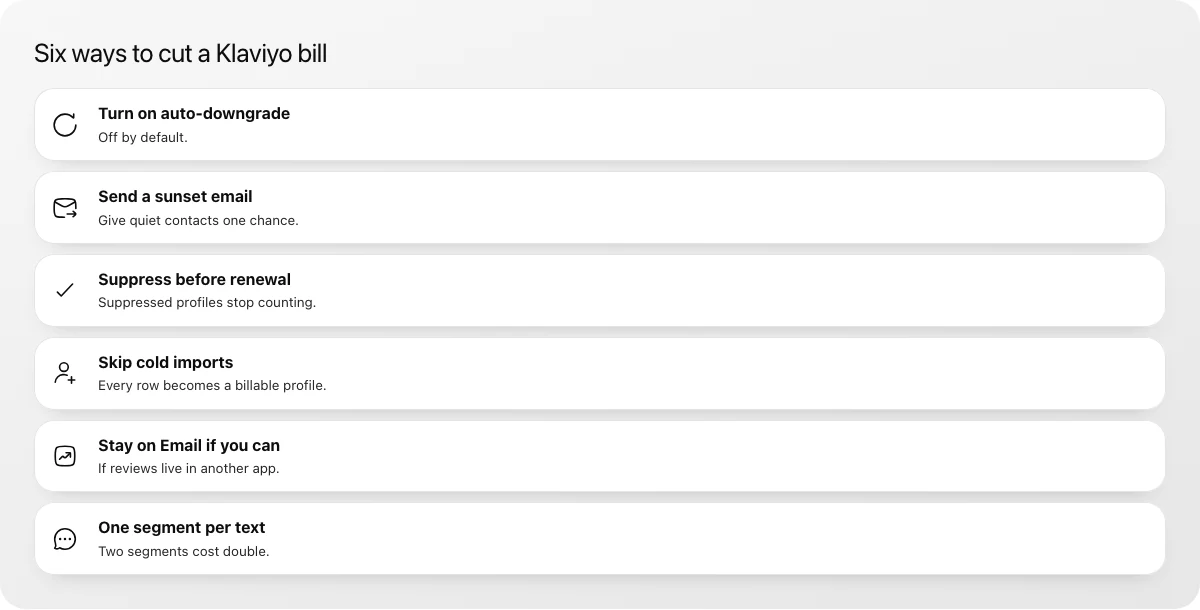
1. Turn on auto-downgrade
Select your account name in the lower left, go to Billing, then Preferences. Auto-downgrade cannot run with send-based auto-upgrade, so first switch your Email upgrade preference to "Flexible overages" or "None" and click Update. Then, in the Profiles auto-downgrade section, select "Auto-downgrade profiles" and click Update. You need Owner or Admin rights with billing permissions, on a paid plan not billed through a contract. The steps are in Klaviyo's guide to auto-upgrade and auto-downgrade billing.
2. Send a sunset email to quiet contacts
Build a segment of people with no clicks and no orders in the last six months. Use clicks rather than opens, because privacy features in some mail apps record opens that never happened. Then send one honest email that asks them to click to stay.
You haven't clicked our emails in a while, and that's fine.
Click below to stay on the list. If we don't hear from you in 14 days, we'll stop sending you marketing emails.
Keep me on the listIt's been a while. Come back and save 20% on your next order.
Shop our bestsellers today.
Shop now3. Suppress before the renewal check
Fourteen days later, check the segment again: anyone who clicked has dropped out of it. Then go to Audience, then Lists & segments, open the action menu next to the segment, choose "Suppress current members", pick "Suppress inactive profiles" or "Suppress everyone", and confirm with "Suppress profiles". Suppression does not change your plan by itself, so pair it with auto-downgrade or a manual downgrade.
4. Skip cold imports
An old trade-show list or a contest export becomes billable the moment it lands, and it hurts deliverability too.
5. Pick the plan for what you use
Marketing makes sense if you will run reviews in Klaviyo past 50 orders a month. Otherwise, the Email plan and a free reviews app cost less.
6. Keep texts to one segment
Short copy and short links keep each SMS at one billable segment.
Before you cut anything, check that your revenue flows are live, starting with your abandoned cart email sequence. Cost cuts should never touch the emails that bring orders, and a permanent sunset flow keeps the list lean after the first cleanup.
Is Klaviyo worth the price? A decision table
Klaviyo is a strong product. Its App Store rating is 4.7 from 3,474 reviews, and it leads on data depth. The question is whether you will use that depth. To understand what the platform does beyond email, read our Klaviyo review with pros and cons.
| Your situation | Best value | Why |
|---|---|---|
| Under 250 contacts, testing email | A free plan: Klaviyo, Omnisend, Shopify Messaging or Trio | All cover a first list at $0 |
| SMS or WhatsApp is a real channel | Klaviyo or Omnisend | Texts and email in one tool and one profile |
| Data-led DTC brand past 10,000 profiles | Klaviyo | Predictive analytics, product recommendations, Composer |
| Reviews past 50 orders a month, inside Klaviyo | Klaviyo Marketing | Reviews with no order cap, on the same profiles as email |
| Large list, few sends a month | Shopify Messaging | Billed per email, not per profile |
| Email, reviews and loyalty with one bill | Trio | The three modules share customer data, priced by contacts |
If you are weighing Klaviyo against its closest rival, our breakdown of Omnisend plans and real costs uses the same method. And if you also pay for a reviews and loyalty suite, see what Yotpo really costs before you renew.

Trio's paid plans start at $29 a month with a 14-day free trial, billed in USD through Shopify, and annual billing gives two months free. Limits are enforced: Trio warns you before you reach your plan's email quota, refuses a campaign that would exceed it, and does not add contacts beyond your cap. You can see how the email marketing module handles campaigns and flows, then decide on your own numbers.
Whatever you pick, price it at the list size you will have in 12 months, not the one you have today. With Klaviyo, the bill follows your profile count, so a clean list is the cheapest upgrade you will ever make.
Frequently asked questions
- How much does Klaviyo cost per month?
- Klaviyo is free up to 250 active profiles and 500 emails a month. On November 25, 2026, the Email plan cost $20 a month at 500 profiles, $30 at 1,000, $100 at 5,000, $150 at 10,000 and $400 at 25,000. The Marketing plan cost $25 to $505 at the same sizes. SMS is billed separately.
- Does Klaviyo have a free plan?
- Yes. The Klaviyo free plan covers 250 active profiles and 500 emails a month, plus small allowances such as $5 of mobile messages, $10 of Composer AI usage and reviews for 50 orders a month. If your profile count goes over 250, you cannot send email until you are back under the limit or upgrade.
- How much does Klaviyo SMS cost?
- Since July 13, 2026, Klaviyo sells mobile messaging as a dollar-based plan with per-message rates instead of credits. Rates vary by country, channel (SMS, MMS, WhatsApp, RCS) and, in the US and Canada, by toll-free or short code number. Carrier fees are included, and you see your exact rates under Settings, then Billing, then Overview.
- What counts as an active profile in Klaviyo?
- Any profile with an email address that Klaviyo can email, whatever its consent status. That includes Shopify customers who never subscribed to marketing. Suppressed and deleted profiles do not count toward your email plan, and a profile with only a phone number does not count as an email profile.
- What happens if I go over my Klaviyo plan limit?
- On a paid plan, Klaviyo does not block new profiles. It moves you to a plan that covers your profile count at the end of the billing cycle. For email sends, your billing preference decides what happens, which can be an automatic upgrade, a one-time flexible overage or a sending stop until the next cycle.
- What is the difference between Klaviyo's Email and Marketing plans?
- Both send the same number of emails, 10 times your profile count each month. The Marketing plan adds reviews with no order limit, social marketing and Customer Hub. It cost $5 more than the Email plan at 500 profiles and $105 more at 25,000 when we checked.
- Is Klaviyo worth it for a small Shopify store?
- It is worth it when you will use what makes it different, such as SMS, deep segmentation, predictive analytics and product recommendations. If you mainly send a newsletter and a few automations to a small list, cheaper options do the job, including free plans from Klaviyo, Omnisend, Shopify Messaging and Trio.
- How can I lower my Klaviyo bill?
- Turn on auto-downgrade in Billing preferences, run a sunset email to unengaged contacts, then suppress the ones who do not respond before your renewal date. Avoid importing old lists, keep SMS to one segment per message, and stay on the Email plan if your reviews already live in another app.
- Is Klaviyo cheaper than Omnisend?
- At small sizes they are close. Omnisend's Standard plan starts at $16 a month for up to 500 contacts, against $20 for Klaviyo Email at 500 profiles, and Omnisend Pro starts at $59 for 2,500 contacts, against $60 for Klaviyo Email. Omnisend offers SMS on Pro, billed per message, while Klaviyo sells mobile messaging as a separate plan.
- Does Klaviyo include a loyalty program?
- No. Klaviyo has no native points or VIP program, so stores pair it with a loyalty app such as Smile.io, LoyaltyLion or Yotpo, each billed separately. Trio, our app, includes email, reviews and loyalty in one plan, but it does not offer SMS.
Related articles
Omnisend pricing at 1,000 to 25,000 contacts, where Pro costs barely more than Standard, SMS rates and which trial codes are real. Check your true cos…
November 25, 2026CompareWhat Is Klaviyo? Pros, Cons and Our Verdict for Shopify Stores (2026)What is Klaviyo and what does it do for a Shopify store? Features, real costs by list size, what 3,400+ merchant reviews say, pros and cons. Read our …
November 25, 2026CompareYotpo Pricing: Plans & Real Costs (2026)Yotpo pricing in 2026: every Reviews and Loyalty plan, real monthly costs from 50 to 5,000 orders, the bundle math and hidden fees. See what you'd pay…
November 25, 2026