


Abandoned cart email: the complete guide for Shopify stores (2026)

- Send two or three reminders, about 1 to 4 hours, 24 hours and 72 hours after the shopper leaves, and stop the moment they order.
- Answer the reason people leave (extra costs, delivery time, returns, trust) before you offer anything, and keep any discount for the last email once the margin math says it pays.
- Judge the flow on revenue per recipient and a holdout test, not on open rates.
An abandoned cart email is the automated reminder a store sends when a shopper leaves without finishing an order. It reaches people who were one step from paying, which is why it is the first flow we tell stores to build in our ecommerce email marketing guide.
Most articles on the topic give you a list of tips and a gallery of other brands' emails. This guide covers what they skip: what Shopify can actually detect, which objection each email should answer, the margin math that tells you whether a discount pays, the legal and deliverability thresholds, and a way to measure the flow that does not flatter it.
What abandoned cart emails are, and what Shopify can actually catch
Three different triggers get called "abandoned cart," and they reach very different numbers of people.
| Trigger | Fires when | What it needs | Distance to a sale |
|---|---|---|---|
| Browse abandonment | A known visitor views a product and leaves | A visitor you can already identify, such as a subscriber who arrived from your email | Far |
| Cart abandonment | A known visitor adds to cart but never starts checkout | Same as above | Closer |
| Checkout abandonment | A shopper types an email at checkout and does not finish | An email entered at checkout | Closest |
According to the Shopify Help Center, a checkout counts as abandoned when it stays incomplete for more than 10 minutes after the customer provides an email. That is why most abandoned cart emails on Shopify are, technically, abandoned checkout emails. An anonymous visitor who fills a cart and closes the tab leaves nothing to write to, whatever tool you use.
Two consequences follow:
- Your reachable pool is set before you write a word. Every subscriber you collect earlier turns a future anonymous cart into one you can recover.
- A checkout reminder is not a cart reminder. A shopper who reached checkout has already seen shipping and the total, so cost is the likely objection. A shopper who stopped at the cart may not have seen either yet.
Why shoppers leave: match each cart abandonment email to an objection
Baymard Institute surveys US online shoppers about why they abandoned a checkout. Once you set aside the 42% who were just browsing, the remaining answers read like a brief for your emails. Respondents could pick several reasons, so the shares add up to more than 100%.
| Reason given (Baymard) | Share | What the email should do | Which email |
|---|---|---|---|
| Extra costs too high (shipping, tax, fees) | 40% | Give the shipping cost or the free-shipping threshold in the second line | 1 |
| Delivery too slow | 20% | Give the delivery window in days | 1 |
| Did not trust the site with card details | 19% | Show a review of that product, the payment options and a real contact | 2 |
| Site wanted an account | 18% | Say guest checkout works, and turn it on if it does not | 1, plus a store fix |
| Checkout too long or complicated | 17% | Link straight back to the filled-in checkout | All |
| Returns policy not good enough | 13% | State the return window and who pays return shipping | 1 or 2 |
| Could not see the total up front | 12% | Show the full total, shipping included | 1 |
| Card declined | 10% | List the other payment methods you accept | 2 |
The table carries two lessons. First, some reasons are store problems no email can fix: 17% also cite site errors or crashes, and forced account creation is a setting, not a copy issue. Second, no listed reason is "I was waiting for a discount." Price shows up as surprise costs and hidden totals, which is a transparency problem first. That is why the first email answers questions and any discount waits.
Abandoned cart email timing: what each of the three emails says
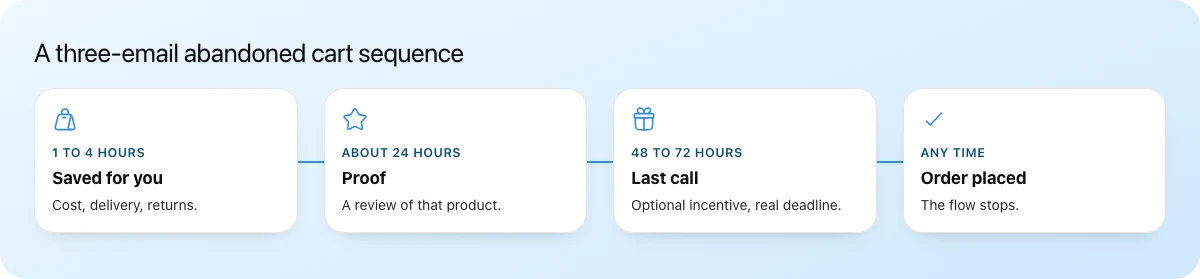
Two or three emails are enough to start. Add a fourth only if your own data shows the third still brings orders.
Pick the first delay by product type
Klaviyo's benchmark page suggests a first reminder 2 to 4 hours after abandonment. Treat that as a default and adjust it to how people buy:
- Impulse or low-price items (roughly under $50): about 1 hour. Interest fades quickly.
- Considered purchases (furniture, electronics, gifts over roughly $150): 3 to 4 hours, or the next morning. People compare prices and ask someone else first.
- Reorders of a known product: about 1 hour. The decision is already made; something interrupted it.
Email 1: saved for you (1 to 4 hours)
Remind, then remove friction: the product with its variant and price, what shipping costs, when the order arrives and how returns work. One button back to the checkout. No discount.
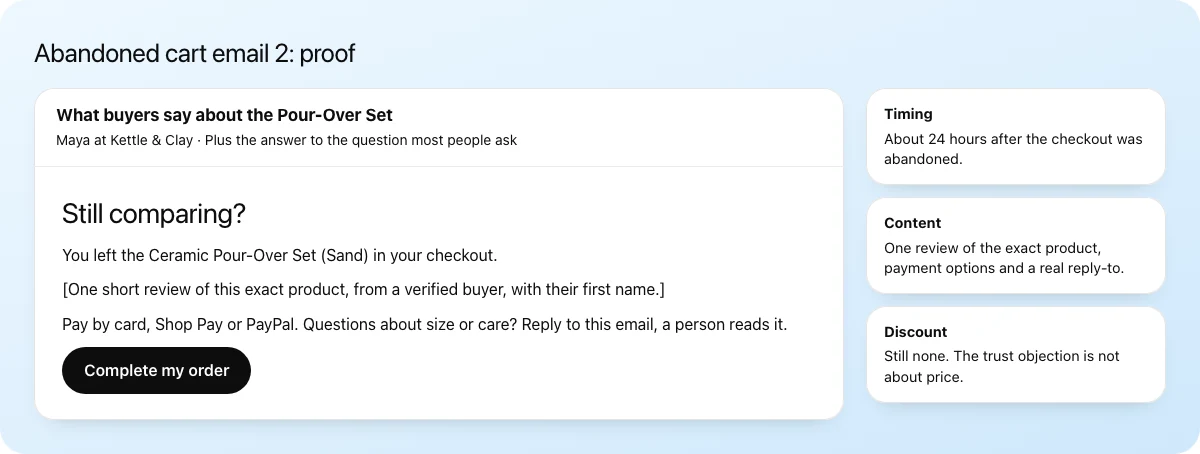
Email 2: proof (about 24 hours)
The shopper has had a day to compare, so send evidence: one short review of the exact product, the payment methods you accept and an invitation to reply. Replies are buying signals. If you collect reviews with a Shopify reviews app, this email is where they earn their keep.
Email 3: last call (48 to 72 hours, optional)
The only email where an incentive can make sense, and only if it passes the margin test below. Otherwise, help: two similar bestsellers, a size guide, the reply-to. Any deadline must be real, such as the date a single-use code expires.
Here are the three emails as outlines you can paste into any editor:
EMAIL 1 - 1 to 4 hours after abandonment
Subject: Your {product} is saved
Preheader: {shipping cost or threshold}, arrives in {N to M} days
Body: You left the {product} ({variant}) at checkout.
      Shipping {cost or threshold}, {N to M} business days.
      Returns: {free / paid} for {N} days.
Button: Return to checkout

EMAIL 2 - about 24 hours after abandonment
Subject: What buyers say about the {product}
Body: One short review of this exact product. Payment options.
      "Questions? Reply to this email. A person reads it."
Button: Complete my order

EMAIL 3 - 48 to 72 hours after abandonment (optional)
A (code passes the break-even test): "{X}% off the {product}, until {day}"
  Single-use code, real expiry date, total after the code.
B (no code): "Still deciding on the {product}?"
  Two similar bestsellers, a size or care guide, the reply-to.
Button: Return to checkout
For more wording, borrow from our abandoned cart subject lines, and see full designs in these abandoned cart email templates and examples.
12 abandoned cart email best practices, with the reason behind each
What the email shows
- The exact item: image, variant, quantity and price. "You forgot something" makes the shopper do the work.
- One button that opens the filled-in checkout, not your homepage.
- The total cost in the first lines, since extra costs are the top reason shoppers leave.
- A sender name that belongs to a person, and a reply-to address someone monitors.
When the flow stops
- Check for an order before every send. A reminder for something already bought looks careless and costs trust.
- Respect quiet hours. A reminder at 3 a.m. local time is easy to delete and easy to resent.
- Avoid stacking flows: a new subscriber in your welcome series should not get two emails a day.
- Keep repeat abandoners away from the code. If a shopper received a cart discount in the last 60 days, send them the no-code version. Otherwise you teach people to abandon on purpose.
What to test before launch
- Place a real test order on your phone: abandon it, wait for each email, click every button and confirm the checkout reopens with the right items.
- Use single-use codes that expire. A public code ends up on coupon sites and discounts orders that would have happened anyway.
- Read the email with images off. Some email clients hide images until the reader allows them, so the text alone must carry the product name, the cost and the button label.
- Write a plain subject line that names the product.
Should your abandoned cart emails include a discount? Do the math first
A discount lowers the margin on every order the email brings in, including orders that would have happened anyway. Work out how many extra orders it must create to break even.
The formula is short. With the discount (d) and your gross margin (m) both expressed as a share of the price, the code must lift orders from that email by d ÷ (m − d) just to earn the same profit.
A worked example: your third email reaches 1,000 shoppers and, without a code, 20 of them order (2%). The average order is $80 and the gross margin is 50%, so each order earns $40, or $800 in total. With a 10% code, each order earns $32. To get back to $800 you need 25 orders, a 2.5% order rate. The code must lift orders by 25% before it earns a single extra dollar.
| Discount | Lift needed at 40% margin | at 50% margin | at 60% margin |
|---|---|---|---|
| 5% | +14% | +11% | +9% |
| 10% | +33% | +25% | +20% |
| 15% | +60% | +43% | +33% |
| 20% | +100% | +67% | +50% |
The table assumes everyone who orders from that email uses the code, close to reality when the offer sits in the subject line. To check it on your own store, run email 3 with and without the code for a few weeks and compare profit per recipient, not orders: the version with the code almost always wins on orders. Ways to keep the cost down:
- Put the code in the last email only, so buyers from emails 1 and 2 pay full price.
- Offer free shipping instead of a percentage. It answers the top objection directly, and when your average shipping cost is below 10% of the order value, it is cheaper than a 10% code.
- Show what the order is worth in points. If you run a loyalty program, "you'll earn 80 points on this order" rewards the purchase without cutting its price today.
Compare the two versions of a first reminder. Move the slider:
You left the Ceramic Pour-Over Set (Sand) at checkout.
Shipping is $6, free over $60, and it arrives in 3 to 5 business days.
Not right for you? Returns are free for 30 days.
Return to checkoutYou forgot something!
Use code SAVE15 for 15% off everything in your cart.
Shop nowCompliance and deliverability for cart abandonment emails
Treat the reminder as a marketing email
The FTC's CAN-SPAM compliance guide judges an email by its primary purpose. Transactional messages facilitate a transaction the customer already agreed to. An unfinished checkout is not an agreed transaction, so the safe reading is that a cart reminder is commercial. That means:
- An accurate sender name and a subject line that matches the content.
- A valid physical postal address in the footer.
- A clear way to opt out, honored within 10 business days.
The FTC lists penalties of up to $53,088 for each email in violation. Outside the US the bar is usually higher: EU and UK rules generally require marketing consent before you send, which is why many stores email only shoppers who ticked the marketing box at checkout. This is general information, not legal advice. Check the rules where your customers live.
Keep your sender reputation clean
Google's email sender guidelines ask senders to keep the spam rate reported in Postmaster Tools below 0.10% and never let it reach 0.30%. Every sender needs SPF or DKIM. Above 5,000 messages a day to Gmail accounts, you need SPF, DKIM and DMARC, plus one-click unsubscribe on marketing messages. Honest subject lines and a visible unsubscribe link keep complaints low.
Measuring abandoned cart email revenue: attribution and holdout tests
Open rates tell you little since Apple Mail Privacy Protection can register opens nobody made. Measure what happens after the click.
| Metric | How to calculate it | What it tells you |
|---|---|---|
| Recovery rate | Recovered checkouts ÷ abandoned checkouts emailed | The headline result of the whole flow |
| Click rate | Unique clicks ÷ emails delivered | Whether the content and the button work |
| Placed order rate | Attributed orders ÷ emails delivered | Which email in the sequence earns |
| Revenue per recipient | Attributed revenue ÷ recipients | The fairest way to compare emails and tools |
| Discount cost per recovered order | Total discounts ÷ recovered orders | Whether email 3 is buying orders or giving margin away |
| Spam complaint rate | Complaints ÷ emails delivered | Whether the flow is hurting deliverability |
Benchmarks help for a first sanity check. Klaviyo, an email platform that competes with Trio, publishes these figures for its own customers:
Two warnings before you compare numbers. First, every tool credits revenue with its own attribution window. Trio, for example, credits an order to an email only when the customer clicked a Trio email in the 5 days before ordering, and opens do not count. A tool that counts opens or uses a longer window will report bigger numbers for the same emails.
Second, attributed revenue is not the same as extra revenue. Some shoppers would have come back on their own. The only clean way to measure the difference is a holdout test: leave about 10% of abandoned checkouts without emails for four weeks and compare their order rate with the emailed group. Volume matters: with a few hundred abandoned checkouts a month, four weeks gives the holdout too few orders to read, so run it for two or three months. If your tool has no holdout setting, alternate weeks on and off for a rough read, away from sales and holidays.
Abandoned cart email setup on Shopify: built-in tool or app
With Shopify Messaging, built into Shopify
Shopify's own tool covers abandoned checkout emails. The Help Center path:
- Go to Apps > Messaging > Automations.
- In "Abandoned checkout emails by Shopify", click the actions icon, then Edit settings.
- Select "Send abandoned checkout emails automatically", choose who receives them under "Send to" and the delay under "Send after".
- Save, then click "Customize email" to edit the template.
You can also recover one checkout by hand from Orders > Abandoned checkouts: open it and click the customer's email. Shopify warns that anyone with that link can continue the checkout, so send it only to that customer.
With an email app
An app makes sense when you want a multi-step sequence, reviews or points inside the email, or one tool for every flow. Trio is our product; the other facts come from each vendor's App Store listing and pricing page, checked in November 2026.
| Shopify Messaging | Klaviyo | Omnisend | Trio (ours) | |
|---|---|---|---|---|
| Abandoned cart or checkout flow | ✓ | ✓ | ✓ | ✓ |
| Free tier | 10,000 emails a month; abandoned checkout emails always free | 250 profiles, 500 emails a month | 250 contacts, 500 emails a month, cart automation included | 250 contacts, 500 emails a month, no automations |
| Paid entry point for this flow | $1 per 1,000 emails after the free allowance | Email plan from $20 a month (500 profiles) | Standard from $16 a month (500 contacts) | Starter at $29 a month (1,000 contacts) |
| SMS reminders | yes, paid per message | yes, paid add-on | yes, on Pro | no, email only |
| Reviews and loyalty in the same app | ✗ | reviews (order caps on lower plans), no loyalty | ✗ | ✓ |
Shopify Messaging is the cheapest way to start, and Klaviyo or Omnisend are the stronger choice if you want SMS in the sequence. Prices change, so check the details in our Klaviyo pricing breakdown and Omnisend pricing breakdown before you decide. For the rest of your flows, see our guide to Shopify email automation.
With Trio
In Trio's email marketing module, the abandoned checkout automation is included from Starter (see plans). You choose up to three reminders and their delays, can add an optional coupon, and Trio checks for new abandoned checkouts every 30 minutes and holds sends during quiet hours at night. Each email can include a review quote and the customer's points balance, which covers emails 2 and 3 without a discount.

Pre-launch checklist for your abandoned cart emails
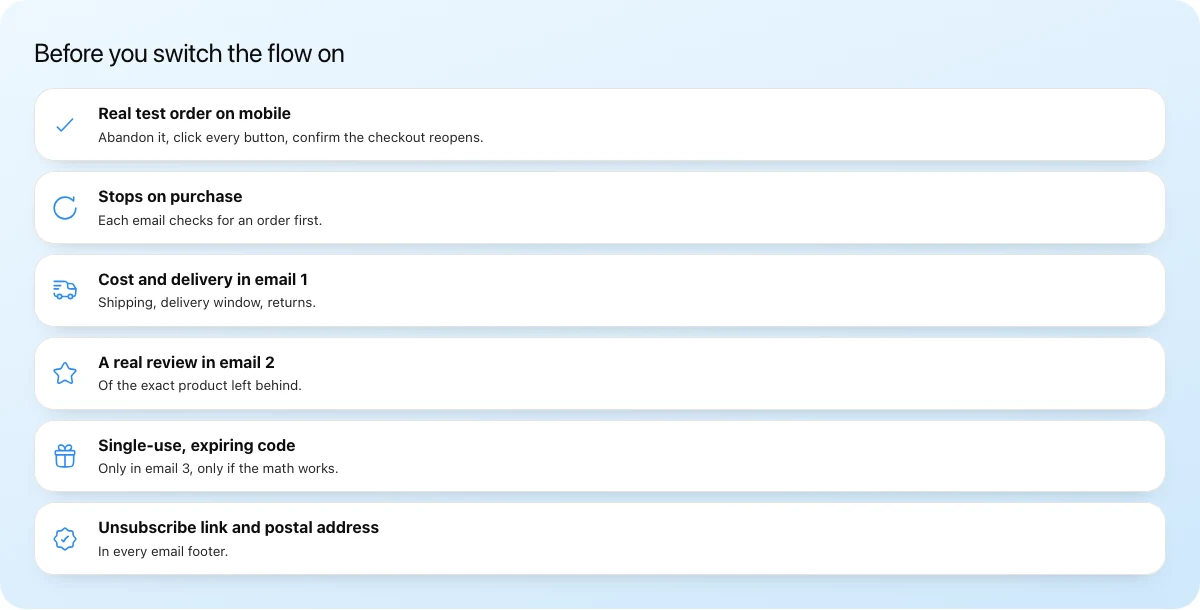
Start with two emails that answer questions, add the third once you have a few weeks of data, and run a holdout before you trust the revenue figure. When a recovered shopper does order, hand them to a good post-purchase email: the next order is where a recovered cart becomes a customer.
Frequently asked questions
- What is an abandoned cart email?
- It is an automated email sent to a shopper who added products to a cart or started checkout but did not finish the order. It shows what they left, answers the usual questions about cost, delivery and returns, and links straight back to their checkout.
- When should I send an abandoned cart email?
- Send the first reminder 1 to 4 hours after the shopper leaves, closer to 1 hour for low-price impulse items and nearer 4 hours for considered purchases. Send the second about 24 hours after abandonment and the optional third at 48 to 72 hours, then adjust the delays to your own results.
- How many abandoned cart emails should I send?
- Two or three. A single reminder leaves orders behind, and beyond three each extra email reaches fewer interested shoppers while raising the risk of unsubscribes and spam complaints. Stop the sequence as soon as the shopper places an order.
- Should abandoned cart emails include a discount code?
- Not in the first email. Answer cost, delivery and returns first, and keep any code for the last reminder. Check the break-even before you add one - with a 50% gross margin, a 10% code needs about 25% more orders from that email just to earn the same profit.
- Are abandoned cart emails legal?
- Yes, if you follow the email rules where your customers live. In the US, treat the reminder as a commercial email under CAN-SPAM - honest sender and subject line, a physical postal address and an opt-out you honor within 10 business days. EU and UK rules generally require marketing consent first. This is general information, not legal advice.
- What is the difference between an abandoned cart email and an abandoned checkout email?
- A cart email targets someone who added items but never started checkout. A checkout email targets someone who typed an email at checkout and left. Shopify records a checkout as abandoned when it stays unfinished for more than 10 minutes after the shopper enters an email, and since checkout is where most shoppers give their email, most Shopify cart emails are really checkout emails.
- Does Shopify send abandoned cart emails automatically?
- It can. In Shopify Messaging, go to Apps, Messaging, Automations, edit the "Abandoned checkout emails by Shopify" automation, select "Send abandoned checkout emails automatically", choose who receives it and the delay, then save. Shopify states that abandoned checkout emails are always free in Shopify Messaging.
- Why are my abandoned cart emails not sending?
- The usual causes are a shopper who never entered an email (so no abandoned checkout exists), a shopper who is not subscribed while your automation sends only to subscribers, an order completed before the delay ended, or an automation that is switched off. Open Orders, Abandoned checkouts in Shopify to see which checkouts were recorded.
- What is a good abandoned cart email click rate?
- Klaviyo's 2026 benchmark puts the average abandoned cart email click rate at 6.0%, and 11.3% for the top 10% of its customers. That is one vendor's data, so compare your flow with its own past results and track revenue per recipient alongside clicks.
- What should an abandoned cart email say?
- The exact item with its image, variant and price, the shipping cost and delivery time, the return policy and one button back to the filled-in checkout. The second email adds a real review of that product and an invitation to reply with questions. Leave urgency out unless the deadline is real.
Related articles
Copy 20 abandoned cart email subject lines sorted by reminder, with preheaders, real send data and a simple way to test them on Shopify. Pick your thr…
November 25, 2026Email marketingBest abandoned cart emails: 15 free templates to copy, and when to send eachThe best abandoned cart emails as 15 free templates: subject, preview, body and button for each reason shoppers leave, plus send timing. Copy them now…
November 25, 2026Email marketingEcommerce email marketing: the complete 2026 guide for Shopify storesEcommerce email marketing step by step: which flows to build first, starting schedules, copyable emails, deliverability rules and costs. Start free wi…
November 25, 2026