


Omnisend vs Mailchimp: An Honest Comparison for Shopify Stores (2026)

- Omnisend Standard was cheaper than Mailchimp Standard at every list size we priced on November 25, 2026 ($20 vs $45 a month at 1,000 contacts), and its Free plan already includes welcome and abandoned cart automations and 24/7 live chat.
- Mailchimp Essentials is the cheapest paid plan at 500 contacts and from 5,000 contacts up, but it caps automations at 4 steps, and Mailchimp bills unsubscribed and non-subscribed contacts too. It fits stores whose marketing goes well beyond email.
- Neither has product reviews or a loyalty program. Trio (our product) puts email, reviews and loyalty in one app from $29 a month, without SMS, web push or pop-ups.
Omnisend vs Mailchimp is a choice between an email platform built for online stores and the best-known general email tool. Both start free at 250 contacts, both connect to Shopify, and both are rated 4.7 or higher on the Shopify App Store. They split on three things a store owner feels every month: what you pay at your list size, how much automation each plan unlocks, and which contacts you are billed for. We read both pricing pages in USD, both App Store listings and Mailchimp's billing rules on November 25, 2026, priced seven list sizes, and turned the result into a verdict, a five-step way to choose and a migration plan.
A word on bias: we make Trio, a Shopify app that combines reviews, email marketing and a loyalty program, so we compete with both tools on email. Trio appears only in the last section, with a plain list of what it does not do. Everything before that compares two third-party tools on their own terms. If you are still weighing more than two options, start with our roundup of email marketing apps for Shopify stores.
Omnisend vs Mailchimp: the quick verdict
If you only read one section, read this one.
- Choose Omnisend if you run a Shopify store and want automation from day one. Its Free plan already runs welcome and abandoned cart flows, Standard was cheaper than Mailchimp Standard at every list size we priced, and 24/7 live chat covers every plan.
- Choose Mailchimp if email is one part of a wider marketing mix, with landing pages, social posting, surveys and a marketing CRM, or if you mostly send newsletters. Essentials is the cheapest paid plan at 500 contacts and from 5,000 contacts up, as long as four-step automations are enough.
- Look beyond both if you also want product reviews and a loyalty program. Neither includes them, so two more apps sit on top of either bill.
Two findings surprised us. First, Mailchimp's entry plan is not always the cheap one. Its tiers jump from 500 to 1,500 contacts in one step, so a store with 1,000 contacts pays $26.50 for Essentials and $45 for Standard, against $20 for Omnisend Standard. Second, Mailchimp counts unsubscribed and non-subscribed contacts toward your tier, while Omnisend bills only the contacts who received messages. For a Shopify store that has synced years of customers, that rule can move you up a tier before you send a single email.
Omnisend vs Mailchimp at a glance
This table covers the criteria that change the decision. Prices are monthly list prices in USD before promotions.
| Criterion | Omnisend | Mailchimp |
|---|---|---|
| Free plan | 250 contacts, 500 emails and 500 web push a month, welcome and abandoned cart flows | 250 contacts, 500 sends a month (250 a day), no automation flows |
| Paid plans | Standard from $16, Pro from $59, Custom on request | Essentials from $13, Standard from $20, Premium from $350 |
| Price at 1,000 contacts | $20 Standard, $59 Pro | $26.50 Essentials, $45 Standard |
| Price at 10,000 contacts | $132 Standard, $150 Pro | $110 Essentials, $135 Standard, $350 Premium |
| Who counts toward the bill | Contacts who received messages; unsubscribed not billed | Subscribed, unsubscribed and non-subscribed contacts |
| Emails per month | Standard 12x your list; Pro unlimited, fair use up to 60x your list | Essentials 10x, Standard 12x, Premium 15x your contacts |
| Automations | Pre-built flows on Free; custom workflows on paid plans | Essentials up to 4 flow steps; Standard and Premium up to 200 |
| SMS | Pro only, US rates from $0.009 to $0.007 | Credit blocks on paid plans, select markets, approval required |
| Web push | ✓ | Not listed |
| Pop-ups, forms and pages | Pop-ups, spin-to-win, Forms AI, landing pages | Pop-up and signup forms, landing pages |
| AI | Forms AI, AI segment builder, MCP; product recommender and personalized send time on Pro | Generative AI on Standard and Premium, not on Essentials |
| Product reviews | ✗ | ✗ |
| Loyalty program | ✗ | ✗ |
| Human support | 24/7 live chat and email on every plan | Free: email for 30 days; Essentials and Standard: 24/7 email and chat; Premium: phone and priority |
| Shopify App Store rating | 4.7 from 3,242 reviews | 4.8 from 1,605 reviews |
| Billing | Shopify, plus possible charges billed by Omnisend | Shopify, plus possible charges billed by Intuit Mailchimp |
| Switching help | Free migration in up to 5 days | Migration help only for some new Premium accounts, in their first 30 days |
| Trial and promotions | 30% off when you prepay 3 months | 14-day trial of Essentials or Standard; 15% off the first 12 months from 10,000 contacts |
Sources: the Omnisend pricing page, the Mailchimp pricing page in USD, both Shopify App Store listings and Mailchimp's help center, all checked on November 25, 2026.
Omnisend vs Mailchimp pricing at every list size
Omnisend shows a list-size slider and Mailchimp a contact selector, so we read each step from both pages in USD. The table shows monthly list prices. For Mailchimp, a list size inside a tier pays the tier price: 1,000 contacts sits in the 501 to 1,500 tier.
| Contacts | Omnisend Standard | Omnisend Pro | Mailchimp Essentials | Mailchimp Standard | Mailchimp Premium |
|---|---|---|---|---|---|
| 500 | $16 | $59 | $13 | $20 | $350 |
| 1,000 | $20 | $59 | $26.50 | $45 | $350 |
| 2,500 | $44 | $59 | $45 | $60 | $350 |
| 5,000 | $81 | $90 | $75 | $100 | $350 |
| 10,000 | $132 | $150 | $110 | $135 | $350 |
| 25,000 | $282 | $400 | $270 | $310 | $620 |
| 50,000 | $413 | $715 | $385 | $450 | $815 |
Compared plan for plan, Omnisend Standard is cheaper than Mailchimp Standard at every size: 20% less at 500 contacts, 56% less at 1,000, 27% less at 2,500 and 19% less at 5,000, narrowing to 2% at 10,000 and about 8% to 9% at 25,000 and 50,000. That is the fair match, because both plans unlock full multi-step automation.
Mailchimp Essentials changes the picture. It undercuts Omnisend Standard at 500 contacts and from 5,000 up, by $6 a month at 5,000 and $28 at 50,000. The catch is that Essentials limits each flow to 4 steps and leaves out Mailchimp's generative AI features. Over a year at 1,000 contacts, the three options cost $240 on Omnisend Standard, $318 on Mailchimp Essentials and $540 on Mailchimp Standard. Our breakdown of Omnisend plans and real costs goes further into each tier.
The billing rule that changes the math
Mailchimp's help article on how Mailchimp plans are priced says subscribed, unsubscribed and non-subscribed contacts all count toward your contact total, while archived, cleaned and deleted contacts do not. Omnisend's pricing page says you are billed for subscribers and non-subscribers who received automated messages, and that unsubscribed contacts are not billed.
Here is what that means in practice. A store storing 1,400 subscribers plus 900 unsubscribed or non-subscribed contacts in Mailchimp has 2,300 billable contacts, which lands in the 1,501 to 2,500 tier: $45 for Essentials or $60 for Standard, instead of $26.50 or $45. The fix is simple: archive contacts you no longer email before your billing date. Do it on a schedule, because new non-subscribed contacts keep arriving.
Tier steps, overages and promotions
Four rules move the bill more than the headline price:
- Coarse Mailchimp tiers. The first steps run 0 to 500, 501 to 1,500 and 1,501 to 2,500, so 501 contacts cost the same as 1,500.
- Uneven Omnisend steps. Standard costs $30 at 2,000 contacts and $44 at 2,500, then $132 at 10,000 and $150 at 10,500. Cleaning your list before a renewal can drop you a step.
- Overages. On paid plans, Mailchimp does not interrupt service when you go over your limits and adds an overage charge to your bill; on the Free plan, sending is put on hold above 250 contacts. Omnisend offers an upgrade when Free or Standard users exceed their sending limit and asks you to confirm it first.
- Promotions. Omnisend takes 30% off when you prepay three months, and Mailchimp takes 15% off the first 12 months from 10,000 contacts. Both expire, so decide on list prices.
SMS costs on each platform
Omnisend sells SMS on Pro only. US texts cost $0.009 each at $10 to $49.99 of monthly SMS spend, $0.0085 from $50, $0.008 from $1,000 and $0.007 from $10,000, and MMS reaches US and Canadian numbers only. Sending 2,000 US texts a month adds about $18, on top of a Pro plan that starts at $59.
Mailchimp sells SMS as credit blocks on any paid plan, Essentials included, in select markets. You apply, get approved, then buy blocks that renew each month; unused credits expire and do not roll over. The pricing page does not list block prices, so price your own volume in the account before you commit.
Features compared: automations, channels, forms and AI
On a basic newsletter, the two tools feel similar: drag-and-drop editors, templates, signup forms and scheduling. The gaps open around automation depth, store-specific features and the extra channels each plan includes.
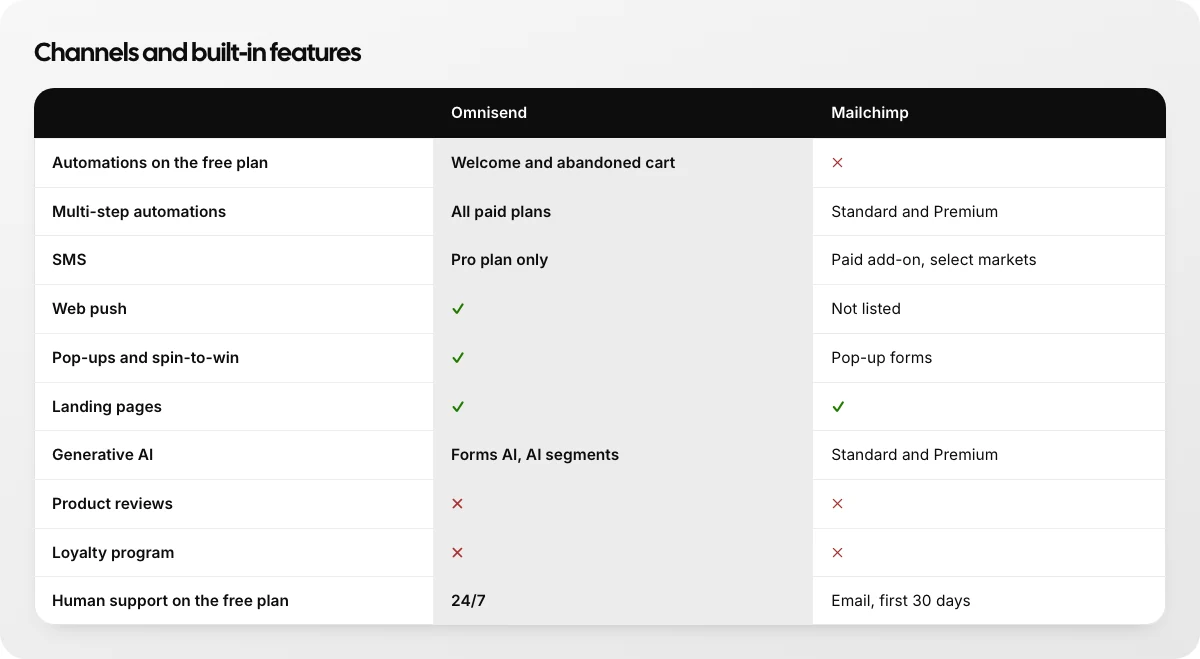
Automations
This is the biggest functional gap for a store. Omnisend's Free plan covers pre-built ecommerce workflows such as welcome and abandoned cart, and paid plans add custom workflows. Mailchimp's Free plan has no automation flows; Essentials allows flows of up to 4 steps; Standard and Premium raise the limit to 200. On Mailchimp's paid plans, the Shopify app supports abandoned cart, welcome and back-in-stock automations. If you are building your first flows, our guide to ecommerce email marketing lists the ones that usually earn the most.
Segmentation and reporting
Omnisend offers pre-built segments and an AI segment builder; personalized send times, advanced reporting and an AI product recommender come with Pro. Mailchimp Standard adds send time optimization and behavioral targeting, and Premium adds advanced segmentation and multivariate testing. Mailchimp's Shopify app also syncs Shopify segments and customer events for targeting, and reports attributed revenue inside Shopify.
Editor, templates and deliverability
Both ship drag-and-drop editors and ready-made templates, and Mailchimp's editor and template library remain its best-known strength, the reason many owners start there. On deliverability, neither vendor publishes a figure you can compare, and third-party inbox tests change from run to run. On both, inbox placement depends mostly on your domain authentication and list hygiene.
Channels, forms and AI
Omnisend bundles email, web push and, on Pro, SMS, with pop-ups, spin-to-win wheels and Forms AI for list growth. It also offers an MCP connection, so you can work with it from ChatGPT or Claude. Mailchimp covers email, SMS credits, pop-up and signup forms, landing pages, social posting and surveys, which is why it suits businesses that market well beyond a store. Its generative AI features come at no extra cost on Standard and Premium but are not included on Essentials. Neither tool has native product reviews or a loyalty program.
Shopify integration, support and App Store ratings
Both install from the Shopify App Store and pull customers, orders and products from your store to power their automations. Four details separate them day to day.
Billing sits in two places. Both App Store listings state that external charges may be billed by the vendor outside your Shopify invoice. Budget from your Shopify bill and from the vendor account, especially for SMS and overages.
Integration style differs too. Omnisend is built around ecommerce events from the start, with ready-made flows for carts and orders. Mailchimp's app maps Shopify data into audiences, segments and customer events; the setup has a few choices worth getting right, which we walk through in our guide to the Mailchimp Shopify integration. Mailchimp's pricing page also lists 300+ integrations on every plan, Free included, which helps if your stack reaches beyond Shopify.
Support is the clearest gap. Omnisend lists 24/7 live chat and email support on every plan, Free included. Mailchimp gives Free accounts email support for their first 30 days, Essentials and Standard 24/7 email and chat, and Premium phone and priority support, with phone calls during business hours and in English. Mailchimp Standard includes one personalized onboarding session and Premium four.
Ratings are close. Mailchimp scores 4.8 from 1,605 reviews and Omnisend 4.7 from 3,242 (Shopify App Store, November 25, 2026). At that level, ratings do not separate them; your list size and automation needs do.
Which one should you choose? A five-step method
Most comparisons stop at "Omnisend for ecommerce, Mailchimp for everyone else". That does not tell you what to do this week. Run these five checks with your own numbers instead.
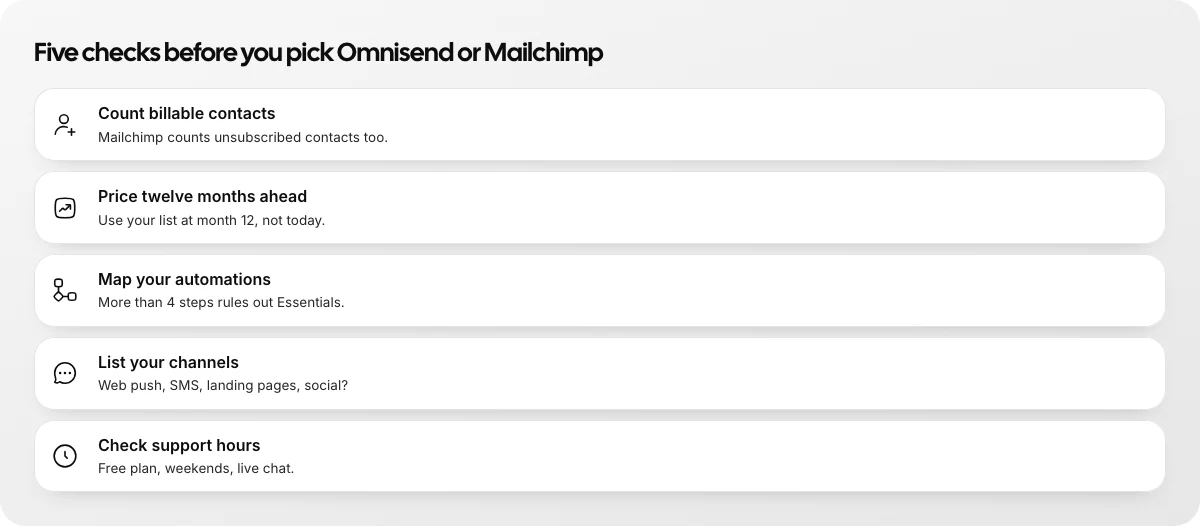
- Count billable contacts both ways: every stored contact except archived and cleaned ones for Mailchimp, contacts who receive messages for Omnisend.
- Price twelve months at the list size you expect at month 12, and note the tier steps you will cross.
- Write down the flows you need. If any has more than 4 steps, compare Mailchimp Standard, not Essentials.
- List the channels you will really use this year. Web push and spin-to-win point to Omnisend; social posting, surveys and a marketing CRM point to Mailchimp; SMS and landing pages work on both.
- Decide how much human help you need, especially on a free plan, then add the reviews and loyalty apps you pay for and compare whole stacks.
Mailchimp vs Omnisend for small businesses
For a small business, the free plans decide a lot. Both stop at 250 contacts and 500 emails a month, but Omnisend Free already recovers abandoned carts, while Mailchimp Free cannot run any automation flow. Between 500 and 1,500 contacts, Omnisend Standard is the cheapest way to get real automation. Omnisend Free also includes A/B testing and landing pages. A small business that mainly sends a monthly newsletter and also wants social posting, surveys or a simple CRM gets more breadth from Mailchimp Essentials.
| Your situation | Our pick | Why |
|---|---|---|
| Under 250 contacts, Shopify store | Omnisend Free | Abandoned cart and welcome flows, 24/7 support |
| Under 250 contacts, newsletter only | Either free plan | Same 250 contacts and 500 emails |
| 500 to 1,500 contacts, automations needed | Omnisend Standard | $20 vs $45 for Mailchimp Standard at 1,000 |
| 5,000+ contacts, simple flows only | Mailchimp Essentials | Cheapest paid plan from 5,000 contacts |
| 2,500+ contacts, SMS planned | Omnisend Pro | $59 to $90 up to 5,000 contacts, with SMS access |
| Social posting, surveys and a CRM matter | Mailchimp Standard | Broader marketing toolkit, 300+ integrations |
| Email, reviews and loyalty, no SMS | Trio (our product) | One plan from $29, covered below |
If Klaviyo is also on your shortlist, our comparisons of Klaviyo vs Omnisend and Klaviyo vs Mailchimp use the same method.
How to migrate from Mailchimp to Omnisend (or back)
Switching is low risk if you keep the old tool sending until the new one is proven. Most Shopify stores move from Mailchimp to Omnisend, so the plan below is written that way, with notes for the reverse.
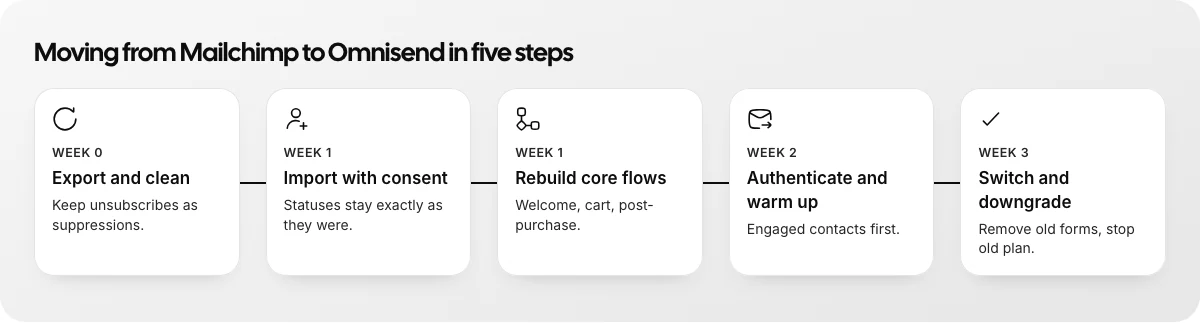
- Export and clean. Export your Mailchimp audience with each contact's status. Keep unsubscribed contacts as a suppression list so nobody who opted out gets emailed again, and drop contacts who have not opened in months.
- Import with consent intact. Connect Shopify to Omnisend, then import contacts with their subscription status. Omnisend's pricing page advertises a free migration in up to 5 days that moves automations, forms, segments and templates, so ask for it if your account qualifies.
- Rebuild the money flows first. Welcome, abandoned cart, post-purchase and win-back usually earn the most. Build and test them in Omnisend while Mailchimp's flows keep running.
- Authenticate and warm up. Set up SPF, DKIM and DMARC for your sending domain, send to your most engaged segment first and widen over a couple of weeks.
- Switch and downgrade. Turn off Mailchimp's flows, remove its forms and theme embed so shoppers never see two pop-ups, then downgrade to Mailchimp Free or cancel. Check both your Shopify bill and the Mailchimp account for final overage charges.
Going the other way, from Omnisend to Mailchimp, three notes apply. Archive unsubscribed contacts after the import, because Mailchimp bills them. Choose Standard rather than Essentials if any flow has more than 4 steps. And plan to replace web push and spin-to-win, which Mailchimp's pricing page does not list; Mailchimp's own migration help is limited to some new Premium accounts.
Where Trio fits: reviews, email and loyalty in one app (our product)
Trio is our product, so read this section with that in mind. It brings product reviews, email marketing and a loyalty program together in one Shopify app, on one customer record. Plans are Free, Starter ($29 a month), Growth ($79) and Scale ($199), billed in USD through Shopify, with a 14-day free trial on paid plans. You pay by contact list size, not per module; quotas are on Trio's pricing page.
Trio makes sense in one specific case: you are about to add a reviews app and a loyalty app next to Omnisend or Mailchimp, and SMS is not in your plans. Here is that stack at 5,000 contacts and up to 500 orders a month, at list prices checked on November 25, 2026:
| Stack at 5,000 contacts | Reviews | Loyalty | Monthly total | |
|---|---|---|---|---|
| Omnisend Standard + Judge.me Awesome + Smile.io Essential | $81 | $15 | $15 | $111 |
| Mailchimp Standard + Judge.me Awesome + Smile.io Essential | $100 | $15 | $15 | $130 |
| Mailchimp Essentials + Judge.me Awesome + Smile.io Essential | $75 | $15 | $15 | $105 |
| Trio Growth (our product) | Included | Included | Included | $79 |
Be fair to the alternatives: under 200 orders a month, the free plans of Judge.me and Smile.io bring the Mailchimp Essentials stack to $75 and the Omnisend stack to $81, about the same as Trio Growth, and Judge.me's free plan already includes unlimited photo and video reviews. VIP tiers change the math: Smile.io puts them on its $199 Growth plan, while Trio includes VIP tiers and referrals from Growth. Sending volume differs too: Trio Growth allows 50,000 emails a month at 5,000 contacts, against 60,000 on Omnisend Standard or Mailchimp Standard. Our guide to the best review apps for Shopify prices those apps in full.

What Trio does well: photo reviews from Starter and video reviews from Growth, review import from Judge.me, Loox, Yotpo or Trustoo files on Starter and up, automations for welcome, post-purchase, abandoned checkout, win-back and points expiry from Starter, and emails that can show each customer's points balance and quotes from your reviews.
What Trio does not do, so you can rule it out quickly:
- No SMS, WhatsApp or web push. Trio is email-only today.
- No pop-ups, spin-to-win or form builder, only an email-capture section you place in your theme.
- No browse abandonment and no predictive analytics. Segments use subscriber status, signup source and signup date, plus three loyalty presets (loyal, at-risk, lost).
- The Free plan has campaigns but no automations; A/B tests start on Growth and sending from your own domain on Scale.
- No native integration with Omnisend or Mailchimp, so Trio replaces your email tool rather than plugging into it.
- Above 25,000 contacts, pricing is on quote, and Trio has only been on the App Store since May 2026.
The bottom line: Omnisend is the better fit for most Shopify stores, because it automates from the free plan, costs less than Mailchimp Standard at every size and answers around the clock. Mailchimp is worth it when your marketing goes beyond the store, or when Essentials' simple flows are enough at 5,000 contacts and up. Trio is worth a look when the real bill is three apps rather than one. If you have already ruled Omnisend out, our guide to an Omnisend alternative lists the other options.
Frequently asked questions
- Is Omnisend better than Mailchimp?
- For most Shopify stores, yes. Omnisend includes welcome and abandoned cart automations on its Free plan, offers 24/7 live chat on every plan and was cheaper than Mailchimp Standard at every list size we checked on November 25, 2026. Mailchimp is the better pick when email is one channel among landing pages, social posts and surveys, or when you only send newsletters.
- Is Omnisend cheaper than Mailchimp?
- It depends on the plan you compare. Omnisend Standard cost $20 a month at 1,000 contacts against $26.50 for Mailchimp Essentials and $45 for Mailchimp Standard. From 5,000 contacts up, Mailchimp Essentials was cheaper ($75 vs $81 at 5,000), but it limits automations to 4 steps. Prices were checked on November 25, 2026.
- Which is better for Shopify, Mailchimp or Omnisend?
- Omnisend is the more store-focused tool, with pre-built ecommerce automations, pop-ups, spin-to-win forms and web push. Mailchimp's Shopify app syncs segments and customer events and reports attributed revenue, and it holds a 4.8 rating from 1,605 reviews against Omnisend's 4.7 from 3,242 (checked November 25, 2026).
- Does Mailchimp charge for unsubscribed contacts?
- Yes. Mailchimp's help center says subscribed, unsubscribed and non-subscribed contacts all count toward your contact total, while archived, cleaned and deleted contacts do not. Archiving contacts you no longer email keeps you in a lower tier. Omnisend says it does not bill unsubscribed contacts.
- Do Omnisend and Mailchimp have free plans?
- Yes, both cover 250 contacts and 500 emails a month. Mailchimp Free adds a 250-per-day sending cap, has no automation flows and puts sending on hold above 250 contacts. Omnisend Free adds 500 web push notifications, pop-ups, its welcome and abandoned cart automations and 24/7 support.
- Which has better customer support, Omnisend or Mailchimp?
- Omnisend lists 24/7 live chat and email support on every plan, Free included. Mailchimp gives Free accounts email support for their first 30 days, 24/7 email and chat on Essentials and Standard, and phone plus priority support on Premium.
- Can I migrate from Mailchimp to Omnisend for free?
- Omnisend's pricing page advertises a free migration in up to 5 days that moves automations, forms, segments and templates. Check that your account qualifies, import contacts with their consent status intact and keep Mailchimp running until the rebuilt flows are tested.
- Is Omnisend or Mailchimp better for SMS marketing?
- Omnisend sells SMS on its Pro plan only, from $59 a month, with US rates from $0.009 down to $0.007 per message as monthly SMS spend grows. Mailchimp sells SMS credit blocks on any paid plan in select markets after an approval step, and unused credits expire each month.
- Do Omnisend or Mailchimp include product reviews or a loyalty program?
- No. Neither has native product reviews or a loyalty program, so both rely on separate apps. Trio, our app, includes reviews, email marketing and loyalty in one plan, but it does not offer SMS, web push or pop-ups.
- Can I use Trio together with Omnisend or Mailchimp?
- Not through a native connection. Trio has no integration with Omnisend or Mailchimp today, so customer data does not sync between them. Trio is built to replace the email tool, the reviews app and the loyalty app with one app.
Related articles
Klaviyo vs Mailchimp for Shopify: prices by list size, flow limits, SMS, support, ratings and a migration plan, all checked Nov 2026. Pick your tool n…
November 25, 2026CompareOmnisend vs Klaviyo: An Honest Comparison for Shopify Stores (2026)Omnisend vs Klaviyo for Shopify: prices from 500 to 25,000 contacts, SMS, support, ratings and a migration plan, checked Nov 2026. Find your fit now.
November 25, 2026CompareShopify Email vs Klaviyo: An Honest Comparison for Shopify Stores (2026)Shopify Email (now Shopify Messaging) vs Klaviyo: real costs from 500 to 25,000 contacts, features, SMS, support and a migration plan. Compare them no…
November 25, 2026