


Ecommerce email marketing: the complete 2026 guide for Shopify stores

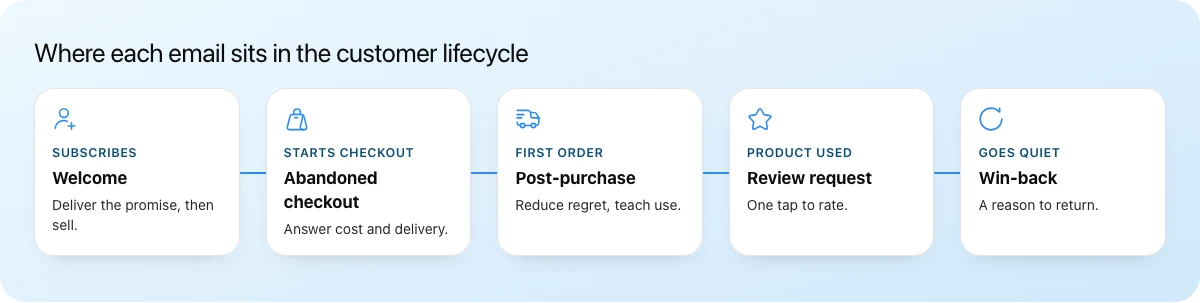
- Build automated flows before campaigns, in this order: abandoned checkout, welcome, post-purchase, review request, win-back.
- Send campaigns on a rhythm you can keep, and fill them with reviews, products and points balances, not only discounts.
- Protect deliverability (SPF, DKIM, DMARC, one-click unsubscribe, spam rate under 0.10%) and judge results by clicks and revenue, not opens.
Ecommerce email marketing is the email you send to shoppers and customers to turn a visit into a first order, and a first order into the next one. It is the one channel where you own the audience. No algorithm decides who sees your message, and a single send costs almost nothing.
Most guides stop at a list of email types. This one gives you a build order, a starting schedule for each flow, email outlines you can copy, the deliverability rules with their actual thresholds, and a way to compare platforms by how they bill you. It is written for Shopify stores, but the logic works on any platform.
Four numbers this guide leans on, each with its source:
What ecommerce email marketing covers: three kinds of email
Every email a store sends falls into one of three groups. They follow different rules and serve different goals, so it helps to keep them apart from day one.
| Type | Triggered by | Examples | Audience |
|---|---|---|---|
| Transactional | An order or account action | Order confirmation, shipping update, password reset | Any customer with an order or account |
| Automated flows | A customer event or a date | Welcome, abandoned checkout, post-purchase, win-back | Subscribed customers, as a rule |
| Campaigns | You, on a date you choose | Launches, sales, newsletters, restocks | Subscribed customers only |
Transactional emails are handled by Shopify's own notifications. Keep them transactional: the FTC notes that a message mixing in commercial content can be treated as commercial, depending on the subject line and where the promotion sits.
Automated flows are where email compounds. You build them once and they run for every new subscriber and every order. Campaigns are the work you repeat each week. A healthy program has both, but flows come first, because they keep working between campaigns.
How to grow your email list on Shopify, with consent
A list of people who asked to hear from you beats a bigger list of people who did not. Bought or scraped lists produce spam complaints, and spam complaints are what mailbox providers use to decide whether your next email reaches the inbox.
Start with the settings Shopify already gives you:
- Checkout opt-in: go to Settings > Checkout, find the Marketing opt-in section and select Email. Checkout is where intent is highest, so switch this on first.
- Preselection: under the Email option, choose "Regions recommended by Shopify", pick regions yourself, or select none so the box is never pre-ticked. In the EU, a pre-ticked box does not count as consent.
- Double opt-in: go to Settings > Notifications > Customer notifications and, in the Marketing double opt-in section, select Customer marketing confirmation. The Online Store sales channel must be installed.
- Signup form: add one in the footer and on a dedicated page, with one line saying what subscribers get and how often.
Shopify documents each of these settings in its guide to collecting customer contact information.
What you offer in exchange for an email matters as much as where you ask. A first-order discount works, but it teaches people to wait for codes. Alternatives that cost less margin:
- Early access to launches and restocks.
- A buying guide or size guide that answers the question shoppers ask support most often.
- Loyalty points for signing up, which pull people into a program instead of a one-off code.
- Back-in-stock alerts on sold-out products, where the shopper tells you exactly what they want.
In Trio, list growth runs through an email-capture section you place in your theme and a back-in-stock block on product pages. Trio has no pop-ups or spin-to-win wheels; if those are central to your plan, choose a tool that includes them. For the full setup of a newsletter signup and your first send, see our Shopify newsletter setup guide.
Ecommerce email automation: the 7 flows to build first, in order
The order below ranks flows by how close the shopper is to buying. Build from the top, and do not start the next flow until the previous one is live and tested. Three finished flows beat seven half-built ones.
| # | Flow | Trigger | Starting schedule | Emails |
|---|---|---|---|---|
| 1 | Abandoned checkout | Checkout started with an email, no order | About 1 h, 24 h and 72 h | 2-3 |
| 2 | Welcome | New subscriber | Right away, day 2, day 5 | 2-3 |
| 3 | Post-purchase | First order placed | After shipping, then once the product has arrived | 1-2 |
| 4 | Review request | Order placed, timed to when the product is in use | Shipping time plus a few days of use, one reminder | 1-2 |
| 5 | Win-back | No order for 1.5 to 2 times your usual reorder gap | Two sends, a few weeks apart | 2 |
| 6 | Back-in-stock | Product restocked | Same day | 1 |
| 7 | Birthday and loyalty | Birthday, expiring points, tier change | On the date, or 7 to 30 days before expiry | 1 each |
These schedules are starting points to test, not benchmarks. Your own data replaces them after a few weeks.
1. Abandoned checkout: the email closest to the sale
Baymard Institute puts the average documented cart abandonment rate at 70.22%. Its survey also lists why shoppers leave: once you set aside people who were just browsing, extra costs (shipping, tax, fees) lead at 40%, followed by slow delivery at 20%. That tells you what the first reminder should say. Answer cost, delivery time and returns before you think about a discount.
One Shopify detail trips people up. Most "abandoned cart" emails on Shopify are really abandoned checkout emails: they need an email address, which shoppers give when they start checkout. A cart left by an anonymous visitor cannot be emailed by anyone.
Reminder 1 (about 1 hour): "Your {product} is still in your bag"
  Two lines: shipping cost and time, return policy. Button: Return to checkout.
Reminder 2 (about 24 hours): "Still thinking about the {product}?"
  One real review of that product. Invite replies for questions.
Reminder 3 (about 72 hours, optional): "Your cart is saved until {date}"
  Only now, a small incentive if your margins allow it. Say when it ends.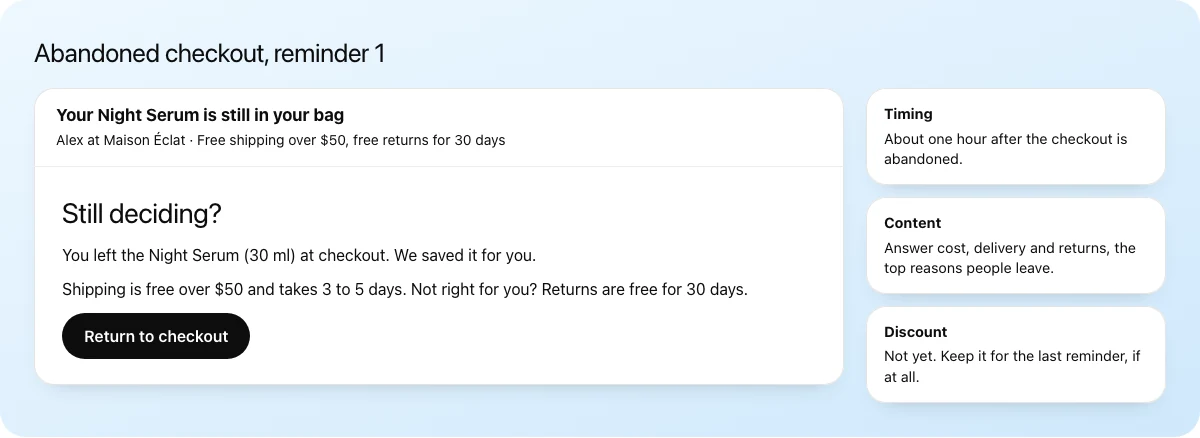
For the full sequence and its variations, read our abandoned cart email guide, and borrow wording from these abandoned cart subject lines. In Trio (Starter and up), the abandoned checkout automation sends up to three reminders on the schedule you set, with an optional coupon, and holds sends during quiet hours at night.
2. Welcome series: keep the promise, then sell
The welcome email is the one subscribers expect, so it is the easiest to get read. Deliver what the signup form promised in the first line. Do not bury the code under a brand story.
Email 1 (right away): "Welcome to {brand}, here is your {offer}"
  The promise in line one. One bestseller. Nothing else.
Email 2 (day 2): "The 3 products our customers rate highest"
  Three products, one short review quote under each.
Email 3 (day 5): "Why we started {brand}"
  A short story, how to choose, and an open invitation to reply.
3. Post-purchase: reduce regret, prepare the second order
The order confirmation is transactional. The post-purchase flow is separate and has two jobs: make the first experience good, and set up the next order. Send how-to-use and care tips around arrival, and save cross-sells until the customer has had time to use what they bought. Our post-purchase email guide has timings and examples by product type.
4. Review request: time it to the product, not the payment
A customer cannot review a product they have not used. If your tool counts the delay from the order date, as Trio does, set it to average shipping time plus days of use. If you ship in four days and your product needs a week to judge, ask after 11 to 14 days, then send one reminder.
On paid plans, Trio emails the review request 7 days after the order by default, with up to two reminders, and you can change the delay. A request that names the product and puts the rating inside the email asks far less of the customer than a generic survey; these review request email examples show the difference.
5. Win-back: define "lapsed" with your own reorder cycle
Fixed win-back windows ignore what you sell. If customers reorder coffee every 30 days, 90 days of silence probably means they have moved on. For a mattress, 90 days means nothing. Estimate the typical gap between first and second orders from your Shopify order history, then trigger the win-back at 1.5 to 2 times that gap.
Email 1 (1.5x your reorder gap): "It has been a while, {first_name}"
  What is new since their last order, with two reviews. No discount.
Email 2 (2x your reorder gap): "You still have {points} points"
  The balance and what it buys. No loyalty program? A time-limited offer.
Trio's win-back automation triggers after 30, 60 or 90 days of inactivity, so pick the option closest to your gap.
6 and 7. Back-in-stock, birthday and loyalty emails
These flows are small but precise: the shopper has told you what they want or when to write. A back-in-stock email goes out the day the product returns. A birthday email needs a date you collected with consent. Loyalty emails remind people of value they already earned: points about to expire, a new tier, a reward they can afford.
For the mechanics of setting up these automations on Shopify, with or without an app, see our Shopify email automation guide.
A weekly ecommerce email campaign plan you can keep
Campaign frequency is less about a magic number than about consistency. Start with one campaign a week. Add a second weekly send only if your unsubscribe and spam complaint rates stay flat after the change.
The harder problem is content. If every campaign is a discount, customers learn to wait for the next one. A four-week rotation keeps the calendar full without training that habit:
| Week | Campaign | Where the content comes from | Discount? |
|---|---|---|---|
| 1 | New arrival or bestseller | Product page plus two review quotes | No |
| 2 | How-to or buying guide | Support questions and 3-star reviews | No |
| 3 | Customer photos of the month | Photo reviews, with permission | No |
| 4 | Offer or event | Seasonal sale, double-points weekend | Yes |
A few rules make each send better:
- One goal per email, with one main button. Secondary links stay small.
- Subject lines that name the product or the benefit, short enough to read on a phone.
- Test one variable at a time, on part of the list, and pick the winner on clicks rather than opens.
- Send less to people who never click. If your tool can segment by engagement, give unengaged subscribers fewer campaigns.
Five segments that make a campaign relevant
Sending the same email to everyone is the fastest way to raise unsubscribes. Five segments cover most stores, and each one gets a different version of the weekly send:
| Segment | Rule to start with | What to send them |
|---|---|---|
| Engaged | Clicked an email in the last 90 days | Every campaign, first in line for launches |
| Subscribers who never bought | Subscribed, no order yet | Bestsellers with review quotes, the signup promise again |
| First-time customers | Exactly one order | How-to content, then a reason for order two |
| Repeat customers | Two or more orders, or active loyalty members | Early access, double-points events |
| Lapsed | No order past 1.5x your reorder gap | The win-back flow, fewer campaigns |
Check what your tool can filter on before you plan around these. Trio's segments use subscriber status, signup source and signup date, plus three ready-made loyalty segments (loyal, at-risk and lost members). It cannot segment by order count or purchase history, so the order-based rows need a tool that reads Shopify order data for segments.
Peak periods such as Black Friday need a plan, not just more sends. In the weeks before, mail your most engaged subscribers first so mailbox providers see clicks on your domain, then widen the audience. Announce the date early to people who signed up for early access. Keep your flows running too: more checkouts also means more abandoned ones.
Try the slider below: same weekly slot, two approaches.
"I have tried five serums. This is the one I reorder."
You have 340 points, enough for $10 off your next order.
See the serumOur biggest sale is here. Save 20% on all products. Hurry, limited time only!
Shop nowIn Trio, A/B tests start on the Growth plan: two versions go to a test share of your list (20% by default), and the winner, picked on open or click rate after a wait of 4 hours by default, goes to the rest. On paid plans, Mailo, Trio's email agent, can also draft a campaign from one sentence and propose a send time based on past opens. Nothing is sent until you approve it.

Reviews and loyalty: email content that is not another discount
Two content sources persuade without cutting your margin. Reviews bring proof into the inbox, in your customers' words. Loyalty points give a reason to come back that the customer has already earned. Used together, they let you send fewer discount codes.
Where they fit:
- Abandoned checkout: one review of the exact product left behind.
- Welcome: your highest-rated products, with a quote under each.
- Win-back: the points balance and what it buys, instead of a new code.
- After a review: a thank-you email that confirms the points earned.
- Before points expire: a reminder 7 or 30 days ahead, with a reward the customer can afford.
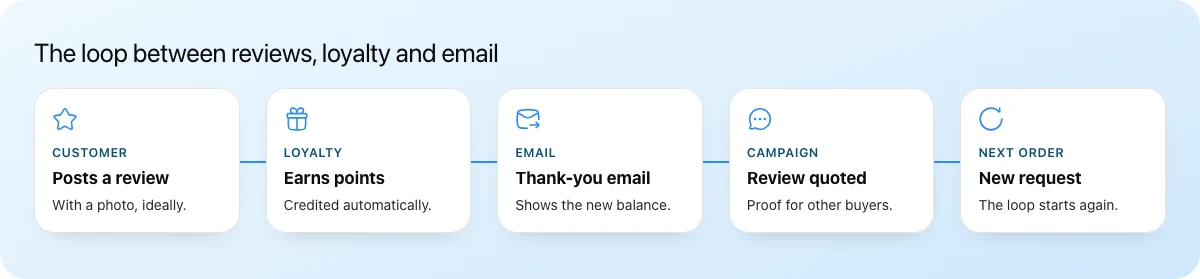
Trio is our product, and it is built around this loop. On paid plans, a review can earn loyalty points and trigger a thank-you email, and each order credits points and schedules the next review request. Every Trio email can show the customer's points balance and quotes from your reviews. You can see how the program side works on the Trio loyalty and rewards page, and how to design the program itself in our ecommerce loyalty program guide.
You can wire the same loop with separate reviews, loyalty and email apps through their integrations. The trade-off is more apps to keep in sync and more bills to track.
Email deliverability and compliance: the rules, with the numbers
An email that lands in spam earns nothing. Since February 2024, Gmail has enforced written sender rules, and US law sets its own floor. Both are short enough to check in one sitting.
Gmail's sender requirements
Google's email sender guidelines set rules for every sender and stricter ones for bulk senders:
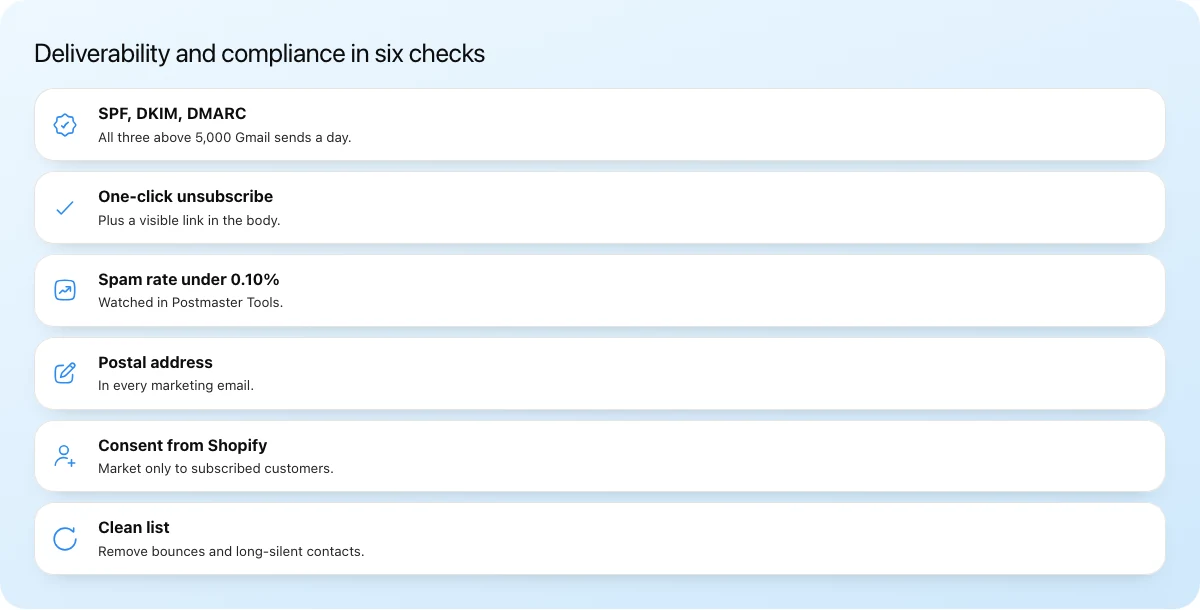
- Every sender to Gmail needs SPF or DKIM authentication on the sending domain.
- Senders of more than 5,000 messages a day to Gmail need SPF, DKIM and DMARC, one-click unsubscribe on marketing messages, and a visible unsubscribe link in the body.
- Spam rate: keep it below 0.10% in Google Postmaster Tools, and avoid ever reaching 0.30%.
In practice, set up Postmaster Tools for your domain, remove hard bounces, and stop mailing people who have not clicked anything in months. Sending from your own domain gives you control over authentication; in Trio that is a Scale feature, set up with a DNS wizard, so check where your own platform draws that line.
CAN-SPAM in plain words
For US recipients, the FTC's CAN-SPAM compliance guide boils down to a short list:
- Accurate sender details and a subject line that does not mislead.
- A clear statement that the message is an advertisement.
- A valid physical postal address.
- A clear way to opt out, honored within 10 business days, that keeps working for at least 30 days after the send.
- Responsibility stays with you even when an agency or app sends for you.
Each non-compliant email can cost up to $53,088. This is a summary, not legal advice. EU, UK and Canadian rules are stricter and generally require consent before you send.
If your spam rate climbs toward 0.30%, act the same day. Pause campaigns to people who have not clicked in months, check where your recent subscribers came from, and make the unsubscribe link easy to find. A hidden unsubscribe link turns people who only wanted to leave into spam reports.
Trio's marketing emails respect the Shopify marketing consent status, and every one carries an unsubscribe link and a preferences page.
Email marketing metrics that still work after Apple's privacy changes
Apple Mail Privacy Protection loads email content in the background, which can record an open the customer never made. Open rate is now a rough signal at best. These metrics hold up better:
| Metric | What it tells you | How to use it |
|---|---|---|
| Click rate | Whether the content earned an action | Compare emails of the same type |
| Revenue per recipient | Attributed revenue divided by emails delivered | The fairest way to compare a flow with a campaign |
| Unsubscribe rate | Whether frequency and content fit | Watch the trend after you add sends |
| Spam complaint rate | Your inbox placement risk | Keep it under 0.10% in Postmaster Tools |
| List growth | Net new subscribers | Signups minus unsubscribes and bounces |
Be careful with attributed revenue. Every tool defines it differently: the window length, whether an open counts or only a click, and which touch wins. Two tools can report very different numbers for the same month. Read the definition before you compare.
Trio's definition is strict: an order is credited when the same customer clicked a Trio email, or used a loyalty reward code, in the 5 days before ordering. Last touch wins and opens do not count. Trio does not track total store revenue or conversion rate, so read its numbers next to Shopify's own analytics.
How to choose an ecommerce email marketing platform
Start with the billing model, because it decides what you pay as you grow. Most tools charge by contacts or profiles: Klaviyo's Email plan was $30 a month at 1,000 profiles and $100 at 5,000 when we checked. Shopify Messaging charges by emails sent: the first 10,000 each month are free, then $1 per 1,000. A tool that is cheapest at 1,000 contacts may not be cheapest at 10,000.
Trio is our product, so read this table with that in mind. Prices come from each vendor's pricing page or Shopify App Store listing, checked on November 25, 2026, and change often.
| Trio | Shopify Messaging | Klaviyo | Omnisend | Mailchimp | |
|---|---|---|---|---|---|
| Billed by | Contacts (plan tiers) | Emails sent | Active profiles | Contacts | Contacts |
| Free tier | 250 contacts, 500 emails/mo | 10,000 emails/mo | 250 profiles, 500 emails/mo | 250 contacts, 500 emails/mo | 250 contacts, 500 sends/mo |
| Entry paid price | $29/mo for 1,000 contacts | $1 per 1,000 emails after 10,000 | $20/mo for 500 profiles | $16/mo for 500 contacts | From $13/mo |
| SMS | ✗ | ✓ | yes (add-on) | yes (Pro plan) | yes (add-on) |
| Pop-ups or signup forms | Inline section only | Via Shopify Forms | ✓ | ✓ | ✓ |
| Product reviews built in | ✓ | ✗ | Klaviyo Reviews, 50 orders/mo on Free and Email | ✗ | ✗ |
| Loyalty program built in | ✓ | ✗ | ✗ | ✗ | ✗ |
Worked example: the monthly bill at 5,000 subscribers
Entry prices hide how each model scales. Take a store with 5,000 subscribers that sends four campaigns a month (20,000 emails) plus about 3,000 flow emails, so 23,000 emails in total. With the prices we checked on November 25, 2026:
| Tool | What decides the price | Monthly cost for this store | Also in that price |
|---|---|---|---|
| Shopify Messaging | Emails sent beyond 10,000 | About $13 (13,000 paid emails at $1 per 1,000), less if some flow emails are abandoned checkouts | SMS billed per message; no reviews or loyalty |
| Trio | Contact tier | $79 (Growth: 5,000 contacts, 50,000 emails) | Reviews, loyalty, A/B tests |
| Klaviyo | Active profiles | $100 (Email plan at 5,000 profiles) | Reviews capped at 50 orders a month |
| Omnisend | Contacts | Not published at 5,000 in our check: Standard starts at $16 for 500, Pro at $59 for 2,500 | Pop-ups, web push |
| Mailchimp | Contacts | Not published for our locale: Essentials starts at $13 | Landing pages, forms |
The cheapest line is not automatically the best buy. If you also pay for a reviews app and a loyalty app, add those bills to the email-only rows before you compare.
Each tool has a real strength:
- Shopify Messaging is the cheapest start for small lists, billed on your Shopify invoice, and abandoned checkout emails never count toward the limit. It has no reviews or loyalty features.
- Klaviyo offers predictive analytics, AI segments and send-time optimization, and adds SMS, WhatsApp and push. Its price climbs with your profile count.
- Omnisend includes pop-ups, spin-to-win forms and web push, with 24/7 support on every plan, Free included.
- Mailchimp adds landing pages and signup forms, but its free plan has no automation flows.
- Trio puts reviews, email and loyalty in one app with shared customer data, from $0, with paid plans from $29 a month. It is email-only (no SMS), has no pop-ups, has no browse abandonment, and segments only by subscriber status, signup source and signup date plus three loyalty presets.
If SMS or advanced segments are central to your plan, Klaviyo or Omnisend will serve you better. If you want reviews, email and loyalty to share one customer record and one bill, look at Trio's email marketing module and the Free, Starter, Growth and Scale plans. For a wider field, we compare more tools in our best email marketing for Shopify stores roundup, and break down Klaviyo's tiers in our Klaviyo pricing guide.
Before you switch email platforms
A platform switch fails quietly: a flow you forget to rebuild simply stops sending. Run through this list first:
- Export contacts with their consent status, not just their addresses. A list without consent data cannot be mailed safely.
- List every live flow with its trigger, delays and discount codes, then rebuild and test each one before you turn off the old tool.
- Never run the same flow from two tools at once, or customers get two reminders for one checkout.
- Ramp up volume gradually on a new sending domain or provider, starting with your most engaged subscribers.
- Write down how each tool attributes revenue, so the month after the switch is not misread as a drop or a jump.
A 30-day ecommerce email marketing strategy for Shopify stores
You do not need everything above on day one. A realistic first month:
- Week 1: checkout opt-in and double opt-in settings, domain authentication through your platform, and the abandoned checkout flow.
- Week 2: a signup form with a clear promise, and the welcome series.
- Week 3: the post-purchase flow and the review request, timed to when the product is in use.
- Week 4: your first weekly campaign, Google Postmaster Tools, and a baseline of click rate, revenue per recipient and spam rate.
In month two, add win-back, back-in-stock and your first A/B test. After that, the work is one weekly campaign and one improvement to one flow at a time.
Frequently asked questions
- What is ecommerce email marketing?
- It is the email an online store sends to subscribers and customers. That covers automated flows triggered by behavior, such as abandoned checkout or welcome emails, and campaigns you schedule, such as launches and sales. Order confirmations and shipping updates are transactional emails and follow different rules.
- Is email marketing still worth it for ecommerce in 2026?
- Yes, for a structural reason: you own the list. No platform decides whether your subscribers see a message, and on most tools one email costs a fraction of a cent. Judge it on your own numbers, such as revenue per recipient and repeat orders, rather than on industry averages.
- How often should an online store send marketing emails?
- Start with one campaign a week on top of your automated flows. Add a second weekly send only if your unsubscribe and spam complaint rates stay flat. Big sale periods can justify more, as long as each email gives a new reason to open it.
- Which email flows should I set up first?
- Abandoned checkout, then welcome, post-purchase, review request and win-back. They are ordered by how close the shopper is to buying, so the first ones sit nearest to a sale. Back-in-stock, birthday and loyalty emails come after.
- How many emails should an abandoned cart sequence have?
- Two or three. A common starting schedule is about one hour, 24 hours and 72 hours after the checkout is abandoned. Use the first reminder to answer cost, delivery and returns, and keep any discount for the last one.
- Do I need double opt-in for my email list?
- Rules vary by country, and in some markets it is the expected standard. Even where it is optional, it confirms that the address is real and that the person asked to subscribe, which protects your spam complaint rate. On Shopify you turn it on under Settings, Notifications, Customer notifications, in the Marketing double opt-in section.
- Can I send marketing emails to customers who did not subscribe?
- Send order and shipping emails to every customer, but keep marketing emails for customers whose Shopify marketing status is subscribed. US law is opt-out based, while EU rules generally require consent first, so following Shopify's consent status keeps you on the safe side. Trio's marketing emails respect that status.
- What is a good open rate for ecommerce emails?
- There is no reliable universal number, because Apple Mail Privacy Protection can record opens nobody made. Compare each email with your own past emails of the same type, and give more weight to click rate, revenue per recipient and a spam complaint rate under 0.10%, the level Google asks senders to stay below.
- What is the best email marketing platform for a Shopify store?
- It depends on the job. Shopify Messaging is the cheapest start for small lists, Klaviyo and Omnisend are stronger if you need SMS and advanced segmentation, and Trio, our product, suits stores that want reviews, email and loyalty in one app with shared data. Compare how each tool bills before you choose.
- How much does ecommerce email marketing cost?
- Small lists can start free. Shopify Messaging includes 10,000 emails a month on eligible Shopify plans, and Trio, Klaviyo, Omnisend and Mailchimp have free plans for 250 contacts and 500 emails a month. Paid plans usually scale with contacts. Trio starts at $29 a month for 1,000 contacts, and Klaviyo's Email plan was $30 a month at 1,000 profiles when we checked in November 2026.
Related articles
Ecommerce marketing automation, step by step: the 8 flows to build first, timing and exit rules, collision rules, AI and honest measurement. Read the …
November 25, 2026GrowthEcommerce Retention by Industry: Complete Guide (2026)Ecommerce retention by industry: benchmarks for 7 verticals, playbooks for 12, with reorder timing, review requests and loyalty. Find your next move.
November 25, 2026GrowthShopify customer retention: the complete guide (2026)Measure Shopify customer retention with built-in reports, time every email to your repeat window and win the second order. Copy the segments and start…
November 25, 2026