


Post-purchase email: the complete guide for Shopify stores (2026)

- Shopify already sends the order and shipping emails. Your post-purchase flow is the marketing layer on top: thank-you, how-to, review request, next order and referral.
- Time each email on the customer's clock (delivery time plus time to first use), not on days since payment.
- Give each email one job, keep discounts out of the first one, and judge the flow by second orders and clicks, not opens.
A post-purchase email is any email a store sends after someone buys: the thank-you note, the how-to, the review request, the reorder reminder, the referral invitation. Shopify already sends the order and shipping notifications. This guide covers the layer on top, the post-purchase email flow that turns a first order into a second one. It expands one chapter of our ecommerce email marketing guide with timings, copy and setup steps.
Most guides list email types and stop. This one gives you a timing rule for any product, a schedule by product type, five post-purchase email examples to copy, the legal line between transactional and marketing email, and the Shopify setup.
Two of these numbers come from email platforms measuring their own customers, and Apple Mail Privacy Protection inflates every open rate. Treat them as a direction, not a target.
What a post-purchase email is, and what Shopify already sends
Post-purchase emails come in two kinds. Transactional emails complete the sale: confirmation, shipping, delivery. Marketing emails build the relationship: thank-you notes with products, how-to series, review requests, cross-sells, reorder reminders and referral invitations. Shopify handles the first kind out of the box. The second kind is your job.
Here is what Shopify sends, according to its customer notifications documentation, and what to do with each one:
| Shopify notification | Sent when | What to do with it |
|---|---|---|
| Order confirmation | The customer places an order | Brand it and keep it transactional |
| Shipping confirmation | The order is fulfilled | Keep tracking first, add a link to your care guide below |
| Shipping update | Tracking is added or changed | Leave it as is |
| Out for delivery | The carrier or fulfillment app sends that tracking event | Turn it on if your carriers support it |
| Delivered | The carrier or fulfillment app sends that tracking event | Your most reliable "it arrived" signal |
"Out for delivery" and "Delivered" depend on tracking events from the carrier, and they do not apply to local delivery orders. You edit these templates under Settings, Notifications, Customer notifications.
The legal line between transactional and marketing
The FTC's CAN-SPAM compliance guide treats an email as transactional only when its content confirms or completes a deal the customer already agreed to, or covers warranty, recall, safety or account details. If the subject line reads like an ad, or the transactional part is not mainly at the top, the email counts as commercial. In practice:
- Keep promotions out of the subject line of order and shipping emails.
- Put the order details first. Any product suggestion goes below them.
- Send your post-purchase marketing flow only to customers whose Shopify email marketing status is subscribed.
That last rule has a side effect most guides skip: unsubscribed buyers never see your flow. For them, Shopify's shipping and delivery notifications are the whole after-sale experience. Ten minutes spent on those templates reaches every customer, not just your list.
The post-purchase email flow: five emails on the customer's clock
Most flows run on the order clock: day 3, day 7, day 14 after payment. Customers live on a different clock. They care about when the parcel arrives and when the product starts doing its job. The rule we use is simple:
Send day = days to delivery + days to first use.
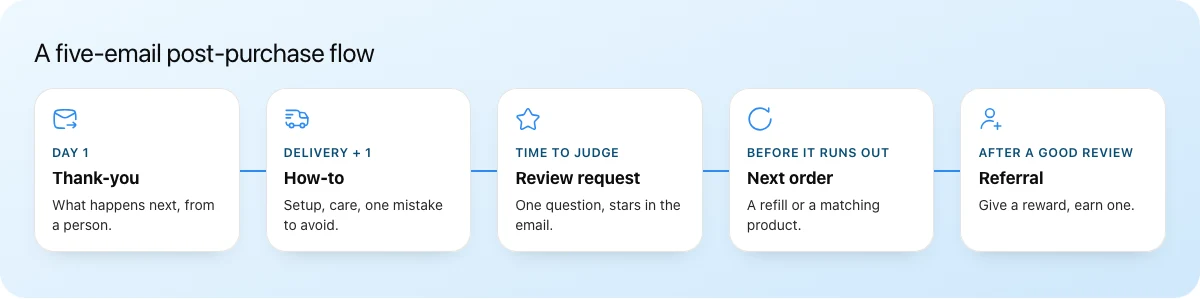
The five emails, each with one job:
- Thank-you and what happens next (day 1). From a person, plain, sets the delivery expectation. No discount, no product grid.
- How-to on arrival (delivery day + 1). Setup, care, one mistake to avoid. This is the email that heads off returns and "how do I use this?" tickets.
- Review request (once the customer can judge the product). One question, stars inside the email. Our review request email examples cover the wording and reminders.
- Next order (when it makes sense). A replenishment reminder for consumables, one complementary product for everything else.
- Referral or loyalty invitation (after a positive signal). A 4- or 5-star review or a second order, never day one.
Add three rules so the flow behaves:
- Exit on a new order: a customer who buys again starts a fresh flow instead of getting a cross-sell for something they just bought.
- Branch on a bad review: at 2 stars or less, stop the sales emails and send a personal apology with a fix.
- Skip refunds and cancellations: nobody wants a how-to for a product they sent back.
In Trio, the unhappy-customer rescue (Starter and up) covers the bad-review branch: a rating at or below 2 stars alerts you privately and prepares an apology email with a personal discount code, which you approve before it is sent.
Segment the flow: first-time buyers, repeat buyers and gifts
Once one flow runs, these splits matter most:
| Customer | What to change | Why |
|---|---|---|
| First-time buyer | Send all five emails, with a line on who you are in the thank-you | They do not know you yet |
| Repeat buyer, new product | Drop the introduction, keep the how-to and the review request | They know the store, not the product |
| Same product reordered | Skip the how-to, keep the refill reminder | They already know how to use it |
| Gift order (gift note or different shipping address) | Ask about the buying experience, not the product | The buyer is not the user |
| International order | Lengthen every delay by the extra shipping days | The parcel arrives later |
Shopify's thank-you template already treats first and repeat purchases differently, and Klaviyo's own guide suggests splitting flows by order count. Trio cannot make that split: its segments do not filter by purchase history, so write one flow that reads well for both.
After email five, the customer moves to your regular campaigns, and later to a win-back flow if they go quiet. Those steps belong to your wider customer retention strategy.
Post-purchase email timing by product type
These are starting points built from that rule, not industry benchmarks: replace them with your own shipping and reorder data.
| Product type | Time to judge it | How-to email | Review request | Next-order email |
|---|---|---|---|---|
| Skincare, supplements | 2-4 weeks of use | Delivery day | 3-4 weeks after delivery | Refill reminder at about 75% of the supply (day 22 of a 30-day pot) |
| Clothing, shoes | First wear, within days | Delivery + 1 day (fit and care) | 5-7 days after delivery | Complete the look, 2-3 weeks after delivery |
| Electronics, gadgets | Setup on day 1, judged over weeks | Delivery day (setup) | 2-3 weeks after delivery | Accessories, 3-4 weeks after delivery |
| Coffee, food, pet food | First use within days | Delivery day (storage, preparation) | 7-10 days after delivery | Reorder a few days before the bag runs out |
| Furniture, large home items | Assembly, then weeks of use | Before delivery (prep) and on delivery | 3-4 weeks after delivery | Care kit or matching pieces, 6-8 weeks after delivery |
| Gifts | The buyer is not the user | Delivery day (gift note, exchanges) | Ask about the buying experience, not the product | A reminder before the same occasion next year |
Add shipping time if your tool counts from the order. Many tools, Trio included, start the timer when the order is placed. With four days of domestic shipping, a clothing review request planned for "6 days after delivery" becomes 10 days after the order. Leave the delay at 7 days and some customers will be asked before they have worn the item. If your tool has a single delay, time it for your slowest common route.
Post-purchase email examples you can copy
Each example fits one step of the flow. Replace the braces with your details and keep the length: these emails work because they are short.
1. Thank-you note (day 1)
Subject: Your order is in good hands, {first_name}
Preheader: What happens next, and who to ask

Hi {first_name},

I'm {founder_name}, and I pack most orders myself. Your {product}
leaves {city} within {2} business days. You'll get tracking the
moment it does.

One tip while you wait: {tip that makes day one better}.

Any question, just reply. This inbox is mine.
{founder_name}
No button and no discount: a plain note from a person reads as service, not promotion.
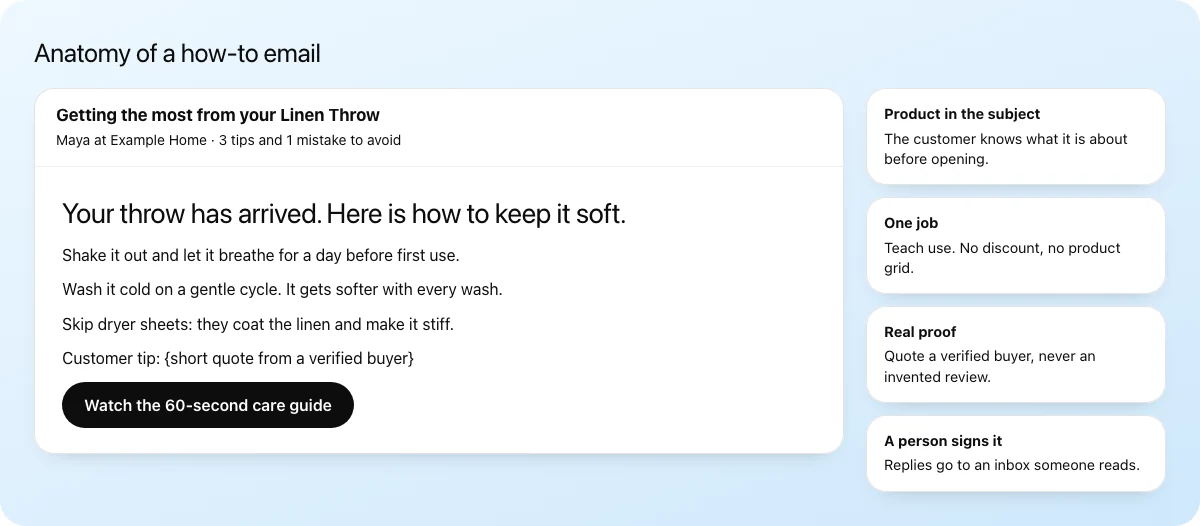
2. How-to on arrival (delivery + 1 day)
Subject: Getting the most from your {product}
Preheader: 3 tips and 1 mistake to avoid

Your {product} should be with you now. Three things our
customers wish they had known on day one:

1. {setup or first-use tip}
2. {care tip}
3. {tip that unlocks a second use}

The one mistake to avoid: {common mistake}.

[Watch the 60-second guide]
3. Review request (when the customer can judge it)
Subject: How is your {product}?
Preheader: One tap is enough

Hi {first_name}, you've had your {product} for {2 weeks}.
How is it working for you?

[1] [2] [3] [4] [5] stars

Your review helps the next customer choose. A photo helps even more.
4. Next order (refill or complement)
Subject: Your {product} is probably running low
Preheader: Reorder in one click, before you run out

Most customers finish a {product} in about {30} days.
Yours arrived {22} days ago.

You have {points} points, enough for {reward} on this order.

[Reorder now]
For durable goods, swap the opening for one complementary product chosen from the order, not your bestseller list.
5. Referral invitation (after a positive signal)
Subject: Know someone who'd like {product}?
Preheader: They get {friend_reward}, you get {points} points

Thanks for the kind words about your {product}, {first_name}.
If a friend would like one, here is your personal link.
They get {friend_reward} on their first order, and you earn
{points} points when they buy.

[Share my link]
Our referral program guide covers reward sizes and fraud rules. In Trio, the referral program starts on Growth.
- Thank you
Your order is in good hands, {first_name}
- Thank you
A quick thank-you from the person who packed your order
- Thank you
What happens next with your {product}
- How-to
Getting the most from your {product}
- How-to
3 tips for your first week with {product}
- How-to
The one mistake to avoid with your new {product}
- Review
How is your {product}?
- Review
Quick question about your {product}
- Next order
Your {product} is probably running low
- Next order
Goes well with your {product}
- Next order
Your {points} points are worth {reward} today
- Referral
Know someone who'd like {product}?
- Referral
Give {friend_reward}, get {points} points
- Rescue
I'm sorry your {product} let you down
Drag the slider to compare the thank-you most stores send with one built on these rules:
Your order leaves Portland within 2 business days. Tracking comes the moment it ships.
Wash the sheets once before first use: they soften with every wash.
Questions? Reply to this email. It comes to me, Maya.
Read the 2-minute care guideWe appreciate your business.
Here is 15% off your next order with code THANKS15.
Check out our bestsellers below.
Shop bestsellersWhat the best post-purchase emails have in common
Strong flows share seven habits:
- One job per email: thank, teach, ask or sell. An email that tries all four does none of them well.
- The product name in the subject: "How is your Linen Throw?" beats "We'd love your feedback".
- No discount in the first email: the customer just paid full price. A code the next day teaches them to wait for one.
- Proof from real customers: one short review about how someone uses the product does more than a product grid. Quote only real, verified reviews, which a reviews app can pull in for you.
- A reply-to that reaches a person: replies are free research, and a no-reply address says you do not want them.
- The points balance, if you run a loyalty program: "You have 240 points" gives a reason to come back that costs less than a new discount. See how points work in Trio's loyalty program.
- The same reward for every reviewer: the FTC's 2024 rule on fake reviews bans incentives conditioned on the sentiment of a review, so points or codes must never depend on the rating.
The usual mistakes are the mirror image: a cross-sell before the parcel arrives, a review request on day 3 for a product that takes a month to work, and a promotion stuffed into the order confirmation.
Where to build a post-purchase email flow on Shopify
You have three realistic options: Shopify's own Messaging app, a dedicated email platform, or an all-in-one app. Trio is our product, so read the table with that in mind. The other columns come from each vendor's public pages, checked in November 2026.
| Feature | Trio | Shopify Messaging | Klaviyo | Omnisend |
|---|---|---|---|---|
| Post-purchase starting point | Post-purchase and review request automations, timed from the order | "Thank customers after they purchase" and "Upsell customers after their first purchase" templates | Flows, with predictive analytics and product recommendations | Pre-built workflows; its review workflow can start on "Order fulfilled" |
| Free plan | 250 contacts, 500 emails a month, campaigns only | First 10,000 emails a month free on eligible Shopify plans | 250 active profiles, 500 emails a month | 250 contacts, 500 emails a month |
| Automations from | Starter, $29 a month for 1,000 contacts | Included; emails billed after 10,000 a month | Email plan, $30 a month at 1,000 profiles | Standard, $16 a month list price for 500 contacts |
| SMS | ✗ | Paid per message | Paid add-on | Pro plan |
| Product reviews in the same app | ✓ | ✗ | Separate Klaviyo reviews app | ✗ |
| Native loyalty points in emails | ✓ | ✗ | ✗ | ✗ |
Shopify Messaging is the cheapest start and lives in your admin. Klaviyo and Omnisend are stronger if you want SMS and deeper segmentation, and Omnisend can start a flow on fulfillment, which Trio cannot. Their costs grow with your list: see our breakdowns of Klaviyo pricing and Omnisend pricing. Trio fits when you want reviews and loyalty inside the same emails without connecting three apps, and it is email-only.
To start with Shopify Messaging, go to Apps, Messaging, Automations, Create automation, then pick "Thank customers after they purchase" and edit the email. Shopify asks you to use a desktop to edit automation workflows. Our guide to Shopify email automation covers the other flows worth building next.
In Trio's email marketing, post-purchase is one of the ready-made automations, next to welcome, abandoned checkout, win-back, birthday and the review request. Automations start on Starter at $29 a month, with a 14-day free trial (see Trio pricing).

How to measure a post-purchase email flow
Opens tell you little, because privacy features in Apple Mail record opens nobody made. Judge the flow on these instead:
| Metric | Why it matters | Where to read it |
|---|---|---|
| Second-order rate of first-time buyers within 90 days | It is the real job of the flow | Compare monthly cohorts of Shopify orders from before and after the flow went live |
| Click rate per email | Shows which step people act on | Your email tool |
| Revenue per recipient | Compares emails sent to lists of different sizes | Your email tool's attribution report |
| Reviews per 100 orders | Measures the review step | Your reviews app |
| Unsubscribe and spam complaint rate | Tells you when you send too much | Your email tool, plus Google Postmaster Tools for Gmail |
| "Where is my order?" tickets | Shows whether you set expectations well | Your help desk |
For spam, Google asks bulk senders to stay under a 0.10% complaint rate and never reach 0.30%, as its email sender guidelines explain. If your flow pushes complaints up, it sends too often or to the wrong people.
Attribution windows differ between tools, so do not compare revenue figures across platforms as if they were the same number. Trio credits an order to an email clicked in the 5 days before buying, last click wins, and opens do not count. Other tools use other windows and sometimes count opens.
Change one step at a time, such as the delay of the review request or the subject of the how-to, and wait for a full month of orders before you judge it.
A 30-minute post-purchase setup checklist
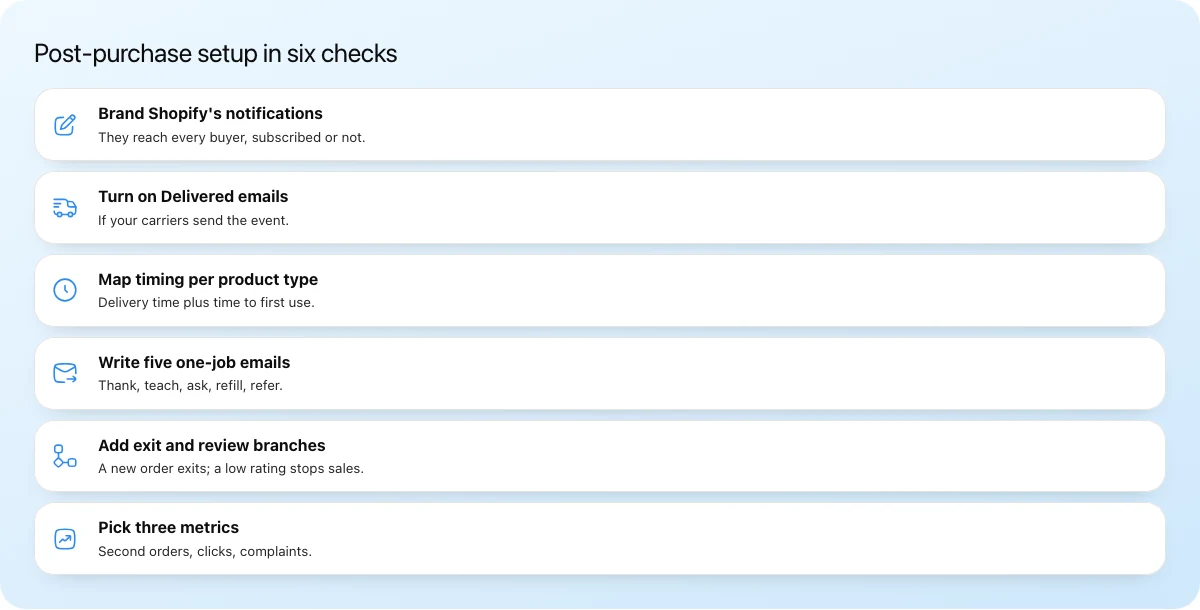
Start with two emails, the thank-you and the how-to, and the review request you probably already have. Add the next-order and referral emails once you have a month of data. If your store has no abandoned cart email yet, build that first: it sits closer to a sale than anything that happens after the order.
Frequently asked questions
- What is a post-purchase email?
- It is any email a store sends after a customer buys. Order and shipping confirmations are the transactional part. Thank-you notes, how-to tips, review requests, reorder reminders and referral invitations are the marketing part, usually sent as an automated flow.
- When should you send a post-purchase email?
- Time each email to the customer, not to the payment. Add the delivery time to the time it takes to use the product. A thank-you note works the day after the order, a how-to on delivery, a review request once the product can be judged, and a reorder reminder shortly before it runs out.
- How many emails should a post-purchase flow have?
- Four or five marketing emails over the first weeks is a solid start, covering the thank-you, how-to, review request, next order and referral. Add more only if your unsubscribe and spam complaint rates stay flat, and stop the flow as soon as the customer orders again.
- What should a post-purchase email include?
- One job, the product name and one clear next step. Add a reply-to address that reaches a person, a short quote from a real review where it helps, and the customer's points balance if you run a loyalty program. Leave discounts out of the first email.
- Can I add promotions to an order confirmation email?
- Carefully. Under the FTC's CAN-SPAM guidance, an email whose subject line reads like an ad, or whose order details are not mainly at the top, counts as commercial. Keep the subject and opening transactional and put any suggestion below the order details, or send it as a separate marketing email.
- Should a post-purchase email include a discount?
- Not the first one. The customer has just paid full price, and an instant code teaches them to wait for the next one. Keep incentives for the next-order email, and consider loyalty points or free shipping instead of a percentage off.
- Do I need consent to send post-purchase emails?
- Order, shipping and delivery emails go to every customer. Marketing emails, which include cross-sells, reorder reminders and referral invitations, should go only to customers who subscribed. On Shopify, that means following each customer's email marketing status.
- How do I set up post-purchase emails on Shopify?
- With Shopify Messaging, go to Apps, Messaging, Automations, Create automation, and start from "Thank customers after they purchase" or "Upsell customers after their first purchase". Email apps such as Trio, Klaviyo or Omnisend have their own post-purchase automations with more control over timing and content.
- What is the difference between a post-purchase email and a review request?
- A review request is one step of the post-purchase flow. The flow also includes the thank-you, how-to, next-order and referral emails. Send the review request after the how-to, once the customer has used the product long enough to judge it.
- How do I know if my post-purchase emails work?
- Track the second-order rate of first-time buyers within 60 to 90 days and compare it with cohorts from before the flow. Add click rate and revenue per recipient for each email, and watch unsubscribes and spam complaints. Open rates are unreliable because of Apple Mail Privacy Protection.
Related articles
Copy 20 abandoned cart email subject lines sorted by reminder, with preheaders, real send data and a simple way to test them on Shopify. Pick your thr…
November 25, 2026Email marketingAbandoned cart email: the complete guide for Shopify stores (2026)Write an abandoned cart email that recovers orders: timing, a 3-email sequence to copy, discount break-even math, compliance and Shopify setup. Start …
November 25, 2026Email marketingBest abandoned cart emails: 15 free templates to copy, and when to send eachThe best abandoned cart emails as 15 free templates: subject, preview, body and button for each reason shoppers leave, plus send timing. Copy them now…
November 25, 2026