


Best abandoned cart emails: 15 free templates to copy, and when to send each

- The best abandoned cart emails answer the reason the shopper left (cost, delivery, trust, returns, checkout friction), not just remind them.
- Send two or three emails with one job each: remind, reassure, then a last email with a question or an incentive. Keep discounts for the last one.
- Copy the 15 templates below, delete any sentence you cannot fill with true data, and judge each email by clicks and recovered revenue, not opens.
The best abandoned cart emails do not just remind people. They answer the reason the shopper left. Those reasons are predictable: Baymard Institute's checkout research puts extra costs, slow delivery, trust and forced account creation at the top of the list. This page gives you 15 free templates, each written for one of those reasons, with a subject line, preview text, body and button you can paste into Shopify, Trio or any email tool. You also get the send order, a placeholder guide, rewritten examples and a decision table that picks three emails for your type of cart.
For the wider strategy behind these emails, start with our ecommerce email marketing guide.
What makes a good abandoned cart email
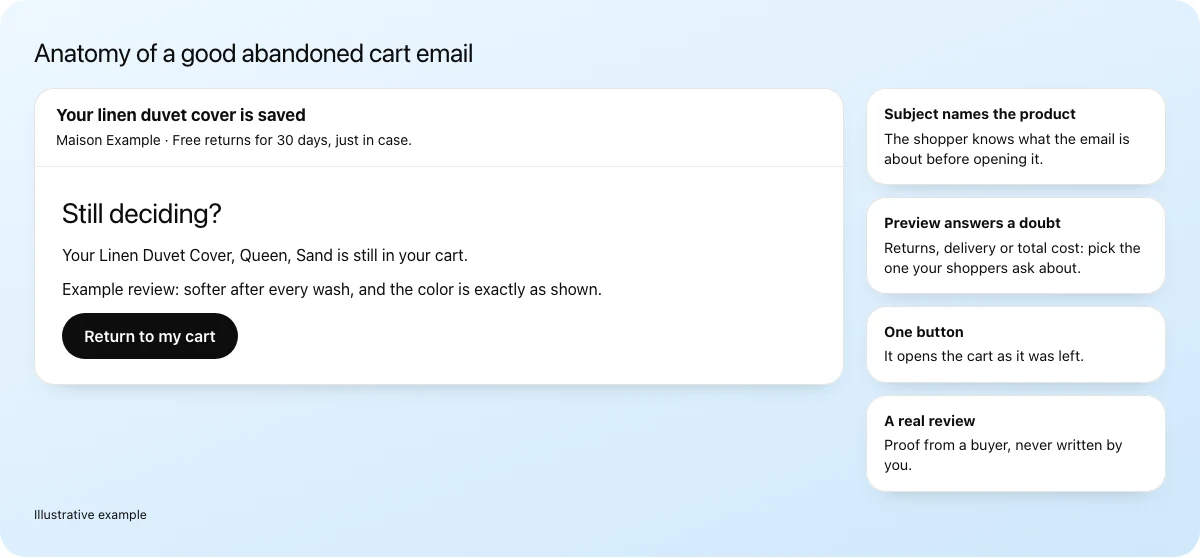
A good abandoned cart email has one job: bring the shopper back to a checkout they already started. It takes five parts:
- A subject line that names the product or the answer to a doubt, not "Did you forget something?". You will find 20 more in our abandoned cart subject lines.
- Preview text that handles one objection, such as delivery time or the return window.
- The cart itself: product image, name, variant and price, so nobody has to remember what they picked.
- One button that opens the restored cart. Not a homepage link, not three competing buttons.
- One piece of reassurance: a short review, the delivery date or the return policy.
Keep the body under about 100 words: most people read it on a phone.
Best abandoned cart emails in sequence: three emails, three jobs
A short sequence recovers more carts than a single email, as long as each email does something new. A common starting schedule is about one hour, 24 hours and 72 hours after the checkout is abandoned.
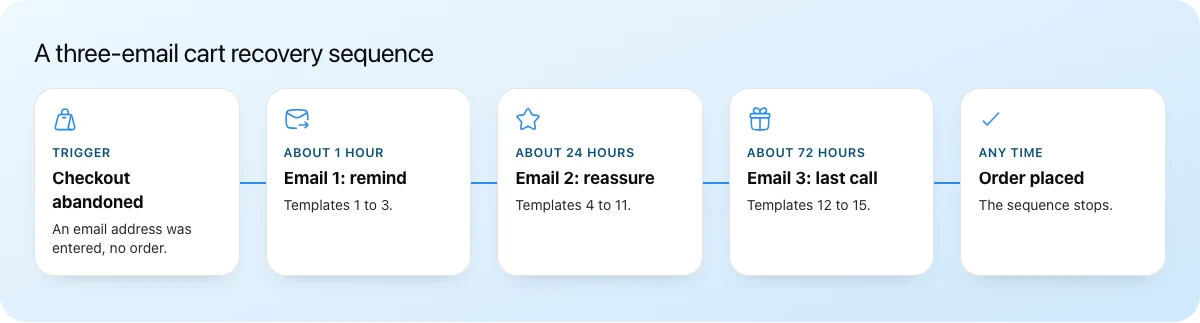
Email 1 is a reminder for the people who were interrupted. Email 2 answers the objection that stopped the others, or adds proof from other buyers. Email 3 is the last call: a question, a small incentive or alternative products. Stop there: more reminders add pressure, not new information.
Abandoned cart or abandoned checkout: who you can actually email
You can only email a shopper whose address you know. Shopify counts a checkout as abandoned when it stays incomplete for more than ten minutes after the customer entered an email address. That is why most Shopify "abandoned cart emails" are technically abandoned checkout emails. Reminders after a simple add-to-cart only reach visitors your tool already recognizes, such as a subscriber who arrived from one of your emails. Timing by product type, compliance and deliverability are covered in our complete abandoned cart email guide; this page sticks to the copy.
15 abandoned cart email templates to copy
Each abandoned cart email template below has a subject line, preview text, body and button. Filter by the email's place in the sequence, copy the one you need, and replace everything in curly braces.
- Email 1: remind
#1 | Subject: You left something in your cart | Preview: It is saved, whenever you are ready. | Body: Hi {first_name}, your {product_name} is still in your cart. We saved it so you can pick up exactly where you left off. | Button: Return to my cart
- Email 1: remind
#2 | Subject: Your cart is saved, {first_name} | Preview: Questions before you order? Just reply. | Body: Hi {first_name}, we kept your cart as you left it. If something stopped you, reply to this email. A real person at {store_name} reads every answer. | Button: Finish my order
- Email 1: remind
#3 | Subject: Still thinking about {product_name}? | Preview: Here is why customers pick it. | Body: {product_name} is the one our customers choose for {main_benefit}. It is still in your cart, in {variant}, at {price}. | Button: See my cart
- Email 2: reassure
#4 | Subject: Your order total, with no surprises | Preview: Shipping and taxes, spelled out. | Body: Hi {first_name}, here is your total before checkout: {cart_subtotal} for your items and {shipping_cost} shipping to {country}. Orders over {free_shipping_threshold} ship free. | Button: Complete my order
- Email 2: reassure
#5 | Subject: Order today, at your door by {delivery_date} | Preview: Here is how fast your cart ships. | Body: Your cart ships from {ship_from} within {handling_time}. Most orders to {country} arrive in {delivery_days} days, with a tracking link as soon as it leaves. | Button: Order now
- Email 2: reassure
#6 | Subject: A safe checkout, your way | Preview: Pay with {payment_methods}. | Body: Hi {first_name}, your cart is ready. Checkout runs on Shopify's secure checkout, and you can pay with {payment_methods}. Any question about your order? Reply and we will answer. | Button: Check out securely
- Email 2: reassure
#7 | Subject: Not sure it will fit? Returns are easy | Preview: {return_days} days to change your mind. | Body: If {product_name} is not right, send it back within {return_days} days. It works like this: {return_steps}. Your cart is still saved. | Button: Back to my cart
- Email 2: reassure
#8 | Subject: No account needed to finish your order | Preview: Check out as a guest. | Body: Hi {first_name}, you do not need an account to order. Your cart is saved, so checkout only takes a moment. If something went wrong, reply and tell us what happened. | Button: Finish my order
- Email 2: reassure
#9 | Subject: What customers say about {product_name} | Preview: {average_rating} stars from {review_count} reviews. | Body: "{short_review_quote}" {reviewer_name}, verified buyer. {product_name} is still in your cart if you want to join them. | Button: Return to my cart
- Email 2: reassure
#10 | Subject: You have {points_balance} points waiting | Preview: Use them on the order in your cart. | Body: Hi {first_name}, your cart is saved and you have {points_balance} points. That is enough for {reward_name} on this order, and the purchase earns you more. | Button: Use my points
- Email 2: reassure
#11 | Subject: Only {stock_left} left in your size | Preview: Carts do not reserve stock. | Body: Hi {first_name}, the {product_name} in your cart ({variant}) is down to {stock_left}. Items are not held in carts, so it goes to whoever checks out first. | Button: Check out now
- Email 3: last call
#12 | Subject: {discount_percent} off your cart, until {expiry_day} | Preview: A one-time code for the items you picked. | Body: Hi {first_name}, here is {discount_percent} off your cart with code {discount_code}. It ends on {expiry_day}. After that, your cart stays saved at the regular price. | Button: Apply my code
- Email 3: last call
#13 | Subject: Shipping is on us for your cart | Preview: Until {expiry_day} only. | Body: Shipping was the last step, so we removed it. Your cart ships free with code {shipping_code} until {expiry_day}. | Button: Claim free shipping
- Email 3: last call
#14 | Subject: Can I ask what stopped you? | Preview: One word is enough. | Body: Hi {first_name}, I am {sender_name} from {store_name}. You did not finish your order and I would love to know why. Reply with one word: price, shipping, size, timing or other. I read every reply. | Button: Return to my cart
- Email 3: last call
#15 | Subject: Last reminder about your cart | Preview: Plus a few picks if it was not quite right. | Body: This is our last email about your cart. If {product_name} was not quite right, customers who looked at it also chose {alt_product_1} and {alt_product_2}. Your cart stays saved either way. | Button: See my cart
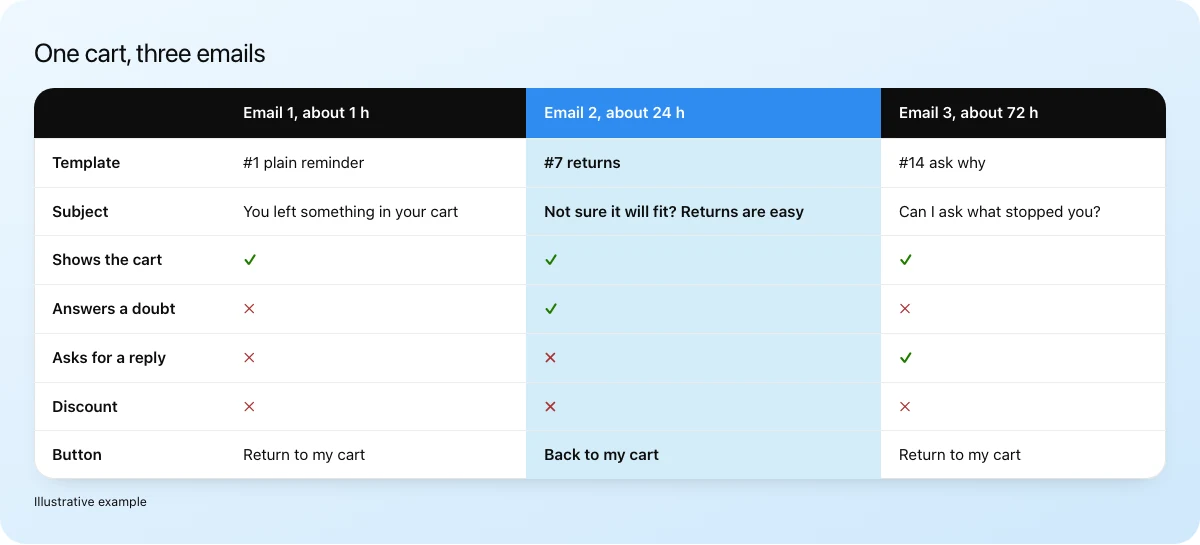
Templates 1 to 3 are the simple abandoned cart email: short, friendly, no pressure. Templates 4 to 11 each target one doubt. Templates 12 to 15 close the sequence, with or without a discount. Here is one sequence assembled from them, for a clothing store whose main doubt is fit:
Fill in the placeholders without inventing anything
Some placeholders fill themselves, others need a decision or data from another app. If you cannot fill a placeholder with true data, delete the sentence, or skip the template.
| Placeholder | Where the value comes from | Templates |
|---|---|---|
| {first_name}, {product_name}, {variant}, {price}, {cart_subtotal} | Your email tool, from the abandoned checkout | Most |
| {store_name}, {sender_name}, {payment_methods}, {return_days}, {return_steps} | You type them once, from your store policies | #2, #6, #7, #14 |
| {shipping_cost}, {free_shipping_threshold}, {ship_from}, {handling_time}, {delivery_days}, {delivery_date} | Your shipping settings; write a range ("3 to 5 days") if your tool cannot calculate a date | #4, #5 |
| {average_rating}, {review_count}, {short_review_quote}, {reviewer_name} | Your review app, for the exact product in the cart | #9 |
| {points_balance}, {reward_name} | Your loyalty program | #10 |
| {stock_left} | Live inventory. If your tool cannot read it, do not use #11 | #11 |
| {discount_percent}, {discount_code}, {shipping_code}, {expiry_day} | A single-use or expiring code you create | #12, #13 |
| {main_benefit}, {alt_product_1}, {alt_product_2} | You choose them per product or collection | #3, #15 |
Match the template to the reason shoppers leave
Baymard surveyed US shoppers who abandoned during checkout. Excluding the 42% who were just browsing, these are the main reasons (respondents could pick several), and the templates that answer each one:
| Why shoppers left (Baymard, US) | Share | Templates |
|---|---|---|
| Extra costs too high (shipping, tax, fees) | 40% | #4, #13 |
| Delivery was too slow | 20% | #5 |
| Did not trust the site with card details | 19% | #6, #9 |
| Site wanted them to create an account | 18% | #8 |
| Checkout too long or complicated | 17% | #8, #14 |
| Website errors or crashes | 17% | #2, #8, and fix the bug |
| Returns policy was not satisfactory | 13% | #7 |
| Could not see the total cost up front | 12% | #4 |
| Card declined, or not enough payment methods | 10%, 9% | #6 |
Notice that some reasons are store problems first. An email cannot fix a crash or a forced account: turn on guest checkout before you promise it in template 8. If you do not know which reason applies to your store, send template 14 for a month. The one-word replies tell you which reminder to write next.
Abandoned cart email examples: weak emails, rewritten
Most weak abandoned cart email examples share the same flaws: a guilt-trip subject, no product, a discount in the first email and a shouted button. Drag the slider to compare a typical first reminder with a rewrite built from templates 1 and 7.
Hi Sam, your Linen Duvet Cover (Queen, Sand) is still in your cart.
Not sure about the color? You have 30 days to return it, and the return label is on us.
Return to my cartWe noticed you left items in your cart.
Complete your purchase now before it's too late! Use code SAVE10 for 10% off.
BUY NOWWhat changed: the subject names the product, the body shows the exact variant, the returns line answers the likeliest doubt for a product bought on looks, and the discount moves to the last email.
The same fixes apply line by line. Five lines that show up in weak cart emails, and what to write instead:
| Weak line | Why it fails | Write this instead |
|---|---|---|
| "Did you forget something?" | Vague, and every store sends it | "Your {product_name} is saved" (#1, #3) |
| "We noticed you left items in your cart." | No product, no variant, no price | The product image, name, variant and price |
| "Complete your purchase before it's too late!" | Pressure without a reason | "Orders today arrive by {delivery_date}" (#5) |
| "Use code SAVE10" in email 1 | Paid to shoppers who were coming back anyway | Nothing in email 1; #12 or #13 in email 3 |
| "Shop now", "See bestsellers" and "Follow us" | Three buttons split the click | One button: "Return to my cart" |
Which template for which cart: a decision table
Not every cart deserves the same sequence. Use the cart value, the customer's history and your margin to pick the three emails:
| Cart situation | Email 1 (about 1 h) | Email 2 (about 24 h) | Email 3 (about 72 h) |
|---|---|---|---|
| First-time shopper, small cart | #1 plain reminder | #9 review quote | #13 free shipping |
| First-time shopper, large cart | #2 saved, reply for help | #6 secure checkout or #7 returns | #14 ask what stopped them |
| Returning customer or loyalty member | #3 product benefit | #10 points balance | #15 alternatives, no code |
| Shipping cost is your known weak spot | #1 plain reminder | #4 total cost upfront | #12 or #13 |
| Low stock on the item | #3 product benefit | #11 real stock count | #15 alternatives |
| Few reviews yet, made-to-order product | #2 saved, reply for help | #5 delivery date | #14 ask what stopped them |
Should the first email include a discount?
Usually not. On an $80 cart with a 50% gross margin, you keep $40. A 10% code costs $8, a fifth of that profit, and in email 1 you also pay it to every shopper who would have come back after a plain reminder. That is why the rule is discount in the last email only, with an end date. Returning customers rarely need one at all: a points balance or a review does the job without training them to wait for a code.
Sending these templates from Shopify, Trio or another tool
Every template works in any tool that sends abandoned checkout emails. Run one cart recovery flow, not two: if you move to an app, turn off Shopify's own abandoned checkout email so shoppers do not get duplicates.
In Shopify's built-in email
According to the Shopify Help Center, you turn it on under Apps, Messaging, Automations, in "Abandoned checkout emails by Shopify": set who receives it and the delay, save, then click Customize email to paste your template. It is one email per checkout, so pick the template that matches your main objection, usually #4 or #7. Shopify skips it when the order was completed in the meantime, when you do not ship to the customer's address or when the customer gave a phone number instead of an email. For the other flows Shopify can run, see our guide to Shopify email automation.
In Trio, our app
Trio is our product: one Shopify app for reviews, email marketing and loyalty. Its abandoned checkout automation, on the Starter plan and up, sends up to 3 reminders on a schedule you set, with an optional coupon. It works from Shopify's abandoned checkouts, checks for new ones every 30 minutes and holds sends during quiet hours at night. The free plan has no automations; Starter costs $29 a month with a 14-day free trial (see Trio's plans).
Two templates are easier here. The editor has a review quote block fed by your Trio product reviews, which gives you template 9 without copy-pasting quotes. Each customer's points balance from the loyalty program is a variable, which gives you template 10. The rest of the flows are on the Trio email marketing page.
Which tool fills which template
Most templates need nothing special. Templates 9 and 10 need review and loyalty data in the email, and an SMS follow-up needs a tool that sends SMS. Facts from each vendor's App Store listing and pricing page, checked November 2026; Trio is highlighted because it is ours, not because it wins every row.
| What you need | Trio | Shopify Messaging | Klaviyo | Omnisend |
|---|---|---|---|---|
| Cheapest way to start | Starter, $29 a month (1,000 contacts, 14-day trial) | Abandoned checkout emails are always free | Free plan: 250 profiles, 500 emails a month | Free plan: 250 contacts, 500 emails a month, cart automation included |
| Template 9: review quote from the same app | ✓ | ✗ | Klaviyo Reviews, capped at 50 orders a month on Free and Email plans | ✗ |
| Template 10: points balance without another app | ✓ | ✗ | ✗ | ✗ |
| SMS follow-up | ✗ | yes, paid per message | yes, paid add-on | Pro plan |
Shopify Messaging is the cheapest start, and Klaviyo or Omnisend are the better fit if you want SMS in the sequence. Prices change; our Klaviyo pricing and Omnisend pricing breakdowns have the details.
How to test abandoned cart email templates
Opens are a weak signal: Apple Mail Privacy Protection records opens nobody made. Judge each template by clicks, recovered orders and revenue per recipient. Klaviyo publishes reference numbers from its own customers:
These are Klaviyo-wide averages, not targets. Change one thing at a time, and start with the tests that teach you the most:
- Email 1, #1 against #3: A plain reminder against a product benefit tells you whether your shoppers were interrupted or unconvinced.
- Email 2, two objections: #4 (total cost) against #7 (returns). The winner is your real objection; build email 2 around it.
- Email 3, code against no code: #12 against #14 or #15. If the code barely wins, its cost probably wipes out the gain.
- The delay of email 1: one hour against three or four for considered purchases.
On Trio's Growth plan, A/B tests send two versions to part of the audience and the winner to the rest. Trio credits an order to an email when the customer clicked it in the 5 days before ordering, so you can compare automations by revenue. For the full metric list and a holdout test that shows the extra revenue, see the measurement section of our abandoned cart email guide.
Mistakes that sink a simple abandoned cart email
Most cart emails fail for the same handful of reasons:
- Guilt or panic in the subject line. "Don't miss out!!" sounds like every other promotion in the inbox.
- A discount in the first email, paid to people who were coming back anyway.
- Fake urgency: countdowns that reset, or stock counts that are not real.
- A cart link that opens an empty cart or the homepage. Abandon a real checkout yourself and click through, on a phone.
- Placeholders left unfilled, such as "Hi {first_name}" when the name is missing. Set a fallback like "Hi there".
- Emails that keep coming after the order is placed.
- No unsubscribe link or postal address. The FTC's CAN-SPAM guide requires both in commercial email, and EU rules generally require consent first.
Treat cart reminders as marketing emails and follow each customer's Shopify marketing status. Trio's marketing emails respect that status automatically.
Start with three emails: template 1, the reassurance template that matches your main objection, and template 14. Read the replies for a month, then rewrite email 2 around what customers actually say. Once a shopper does buy, the next email to get right is the post-purchase email.
Frequently asked questions
- What is the best abandoned cart email?
- The one that answers the reason the shopper left. A plain reminder works for people who were interrupted, but shoppers who left over shipping costs, delivery time, returns or trust need an email that gives them that answer. Name the product, show the cart and use a single button back to checkout.
- How many abandoned cart emails should I send?
- Two or three per abandoned checkout. The first reminds, the second reassures or adds proof, and the third is the last call with a question or an incentive. Stop the sequence as soon as the order is placed.
- When should I send the first abandoned cart email?
- Within the first few hours, while the shopper still remembers the cart. A common starting schedule is about one hour, 24 hours and 72 hours after abandonment. Test the first delay on your own store, since buying cycles differ by product.
- Should I offer a discount in an abandoned cart email?
- Not in the first one. A code in the first email goes to many shoppers who would have come back anyway, and it teaches regular customers to abandon carts on purpose. If you use a discount, put it in the last email and give it an end date.
- What is the difference between an abandoned cart email and an abandoned checkout email?
- An abandoned checkout email goes to someone who entered an email address at checkout and left. A true cart email can only reach a visitor your tool already recognizes. Most Shopify cart recovery emails, including Shopify's own and Trio's, are abandoned checkout emails.
- Does Shopify send abandoned cart emails automatically?
- Shopify can, once you turn it on. In the admin go to Apps, Messaging, Automations, edit the Abandoned checkout emails by Shopify automation, turn on automatic sending, then choose who receives it and the delay. Shopify Messaging does not charge for abandoned checkout emails.
- Can I use these templates in Shopify Messaging, Klaviyo or Trio?
- Yes. The templates are plain text with placeholders in curly braces. Paste the subject, preview and body into your tool's abandoned checkout email, then swap each placeholder for that tool's merge tag or for a fixed value such as your return window.
- What is a good click rate for abandoned cart emails?
- Klaviyo's 2026 benchmarks put the average abandoned cart email click rate at 6.0%, and 11.3% for the top 10% of senders. Use it as a rough reference only and compare each email with your own past results.
- Do I need consent to send abandoned cart emails?
- Treat them as marketing emails. In the US, CAN-SPAM requires a working unsubscribe link and your postal address in commercial email. EU rules generally require consent first. Following each customer's Shopify marketing status keeps you on the safe side.
- What should the subject line of an abandoned cart email say?
- Name the product or the answer to the shopper's doubt, such as the delivery date or the return window. Keep it short enough to read on a phone and avoid guilt or fake urgency.
Related articles
Copy 20 abandoned cart email subject lines sorted by reminder, with preheaders, real send data and a simple way to test them on Shopify. Pick your thr…
November 25, 2026Email marketingAbandoned cart email: the complete guide for Shopify stores (2026)Write an abandoned cart email that recovers orders: timing, a 3-email sequence to copy, discount break-even math, compliance and Shopify setup. Start …
November 25, 2026Email marketingEcommerce email marketing: the complete 2026 guide for Shopify storesEcommerce email marketing step by step: which flows to build first, starting schedules, copyable emails, deliverability rules and costs. Start free wi…
November 25, 2026