


Judge.me Reviews Connector: How to Sync, Export or Migrate Your Reviews

- "Connector" covers three jobs: reading Judge.me data through its API, Judge.me's own integrations, and a one-time export to move reviews to another app. Leaving Judge.me only needs the third.
- Judge.me's CSV export carries ratings, text, dates, names, photo links and replies, but not videos, a verified-status column or review tags. Audit the gap before you switch.
- Ask past customers first, export while Judge.me is still installed, then keep one widget live and one app sending review requests.
Search for a Judge.me reviews connector and you get two kinds of answers: data tools that pull your reviews into a warehouse, and review apps that offer to import them. They solve different problems. If Judge.me stays your review app, you need a live connection. If you are leaving it, you need no connector at all: you need one clean export and one careful import. This guide helps you pick the right path, shows exactly what Judge.me's export carries and what it leaves behind, then walks through the migration step by step. For the wider picture on collecting and showing reviews, start with our guide to Shopify product reviews.
What a Judge.me reviews connector actually does
People use "connector" for three different jobs. Name yours before you change a single setting:
- Analytics sync. Judge.me stays installed. A data tool reads its reviews through the Judge.me API on a schedule, for reports or a warehouse.
- Integrations. Judge.me stays installed and sends review data to another app you use, such as an email or help desk tool.
- Migration. You replace Judge.me. Reviews are exported once and imported into the new app. Nothing has to stay in sync, because the old app is going away.
| API data connector | Judge.me integration | Export + import | |
|---|---|---|---|
| Typical goal | Reports, dashboards, warehouse | Reviews inside your email or help desk tool | Switching review apps |
| Example tools | PostHog, Airbyte, Make, Nexla | Klaviyo, Omnisend, Gorgias, Shopify Flow | Judge.me export + the new app's importer |
| Judge.me stays installed | ✓ | ✓ | ✗ |
| Keeps syncing new reviews | ✓ | ✓ | ✗ |
| Puts reviews in a new widget | ✗ | ✗ | ✓ |
| What you need | A private API token | Judge.me's paid Awesome plan | Judge.me's CSV export |
| Ongoing upkeep | Watch for failed syncs | Little | None after the checks |
A quick way to decide:
- You want review numbers next to sales in a dashboard: API data connector.
- You want review stars or quotes inside emails, tickets or Flow workflows, and Judge.me stays: Judge.me integration.
- You want different widgets, or one app for reviews, email and loyalty: export + import.
Most of this guide covers the third path. If you only need the first two, the next section is enough.
Live connectors: the Judge.me API and integrations
Data connectors for analytics
Data platforms such as PostHog, Airbyte, Nexla and Make list Judge.me as a source. Most ask for your shop domain (the example.myshopify.com address) and an API token, which you find in the Judge.me admin under Settings, Integrations, Judge.me API. Three details save an afternoon of debugging:
- Use the private token. PostHog's Judge.me source documentation notes that the public token cannot read reviews.
- Check the sync mode. PostHog replaces its
reviewsandproductstables in full at each sync, while Airbyte's connector also supports incremental syncs from a start date you set. Your dashboards should know which one they get. - Check the direction. Nexla describes its Judge.me connector as bi-directional, so it can send data back to Judge.me, not only read it. For reporting you only need reads; set up nothing that writes unless you mean it.
Make works differently: its Judge.me "Watch Reviews" trigger fires when a new review arrives, which suits alerts (for example a message to your team for every 1-star review) more than reporting.
These tools copy data out. They do not put stars on your product pages, and a warehouse table of reviews will not replace a review widget.
Judge.me's own integrations
Judge.me's integrations are part of its paid Awesome plan, a flat $15 per month on its App Store listing. The listing counts more than 130 integrations, including Klaviyo, Omnisend, Gorgias, Smile, LoyaltyLion and Shopify Flow. The Forever Free plan does not include them. If your real goal is "show my Judge.me reviews in my Klaviyo emails", this is the connector you want, and you do not need to switch apps.
Should you leave Judge.me at all?
Be honest about this before you migrate, because Judge.me is a strong app. It holds a 5.0 rating from 50,788 reviews on the Shopify App Store (checked November 25, 2026). Trio, the app that publishes this blog, is one of the alternatives, so weigh what follows with that in mind.
Stay on Judge.me if:
- Reviews are all you need. Its Forever Free plan includes unlimited reviews with unlimited photo and video reviews, with no order cap.
- You depend on its integrations or syndication, for example to Google Shopping, Meta or TikTok Shop on the Awesome plan.
- You sell in many languages. Judge.me lists 38 languages for widgets and emails. Trio covers 10.
Judge.me has also launched a separate Judge.me Email Marketing app (July 14, 2026, with 15,000 free emails per month), so "reviews plus email" no longer forces a move. What it does not have is a loyalty points program: its rewards are coupons and referrals tied to reviews. If a free plan is your main criterion, our roundup of the best free review apps for Shopify is a better starting point than this guide.
Moving makes sense when you pay for separate review, email and loyalty apps and want them to share one customer record. That is Trio's whole design: a review can earn loyalty points and trigger a thank-you email, and every email can quote your reviews. For reviews alone, Judge.me's $15 Awesome plan costs less than Trio's $29 Starter plan, which is where review import starts (see Trio's plans). The math only changes if Trio replaces another app too. To weigh more options, read our comparison of the best review apps for Shopify.
What Judge.me's CSV export includes, and what it leaves out
This is the part most migration guides skip. Judge.me's help center lists exactly what goes into the export file (Exporting reviews). Read it as a packing list:
| Data | In the Judge.me export | What to do |
|---|---|---|
| Title, body, rating, submission date | Yes | The core of the import. Spot-check five reviews after it |
| Customer name and email | Yes | The name shows on your store. Treat the file as customer data |
| Product ID and product handle | Yes | How reviews find their product. Fix handles you renamed |
| Photos | Yes, as image links | Import while those links still work |
| Public reply and reply date | Yes | Check whether your new app imports replies |
| Status (published, hidden, pending, archived) | Yes, in "Export all reviews" | Decide row by row; keep honest low ratings |
| Source (for example email or SMS) | Yes | Your best clue to which reviews came from buyers |
| Answers to custom form questions | Yes | Map them to custom fields, or keep them in your archive |
| IP address and location | Yes, when available | Not needed on the page. Delete with the file |
| Videos | No (downloaded separately from the Reviews dashboard) | Count them now; plan to collect new ones |
| Verified-buyer status | No | Infer it from the Source column; check how your new app labels imported reviews |
| Reviews a customer asked to delete | No | Nothing to do: they should not move |
| Review tags | No | Re-tag after the import if you used tags |
| Order details, SKU, phone number | No | Matching relies on product ID and handle |
Three consequences follow. Videos stay behind: Judge.me lets you download them, but no review file carries them, so if video reviews matter to your products, plan a short campaign to collect new ones after the switch. The verified badge does not travel as a field, whatever app you move to; only the Source column hints at it. And the file holds names, emails and IP addresses, so keep it in one place, share it with no one who does not need it, and delete stray copies once the import is checked.
Send Judge.me review requests to past customers before you export
If some older orders never got a review request, ask now, while Judge.me is still installed. Reviews collected this way land in Judge.me and travel in the same export. The steps, from Judge.me's article on review requests for past Shopify orders:
- In the Judge.me admin, go to Settings, then Request reviews.
- Next to "Request reviews from previous Shopify orders", click Get started.
- Set "Send requests for orders created starting from" to a date before you installed Judge.me.
- Set the maximum number of emails per order. Judge.me recommends 1; higher values can send one request per product variant.
- Choose the review type (product, product then store, or store only) and the email template, send yourself a sample, then click Schedule request.
Know the limits before you count on it:
- 5,000 orders maximum, past and new combined. Once reached, no more orders are retrieved.
- Only fulfilled orders qualify. Canceled, refunded and returned orders are skipped.
- Domestic or international review requests must be switched on in Settings, or nothing is scheduled. Unsubscribed customers and excluded products are still filtered out.
- It is a one-time import: running the same dates again processes 0 orders.
- Judge.me says the tool is mainly for new users. On an account you have used for a while, recent orders are already in your regular flow.
- The help article lists it on the Free plan.
Past buyers need a memory cue, so name the product and roughly when they bought it. Here is a version you can adapt:
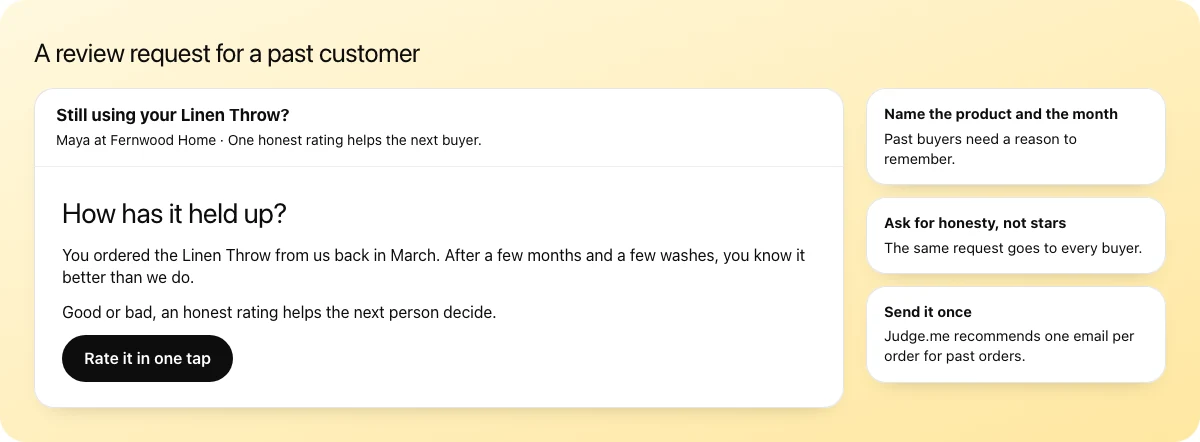
For more wording, see our review request email examples. Give the batch time to bring in reviews before you export. Anything that arrives later can come over in a second export filtered by date.
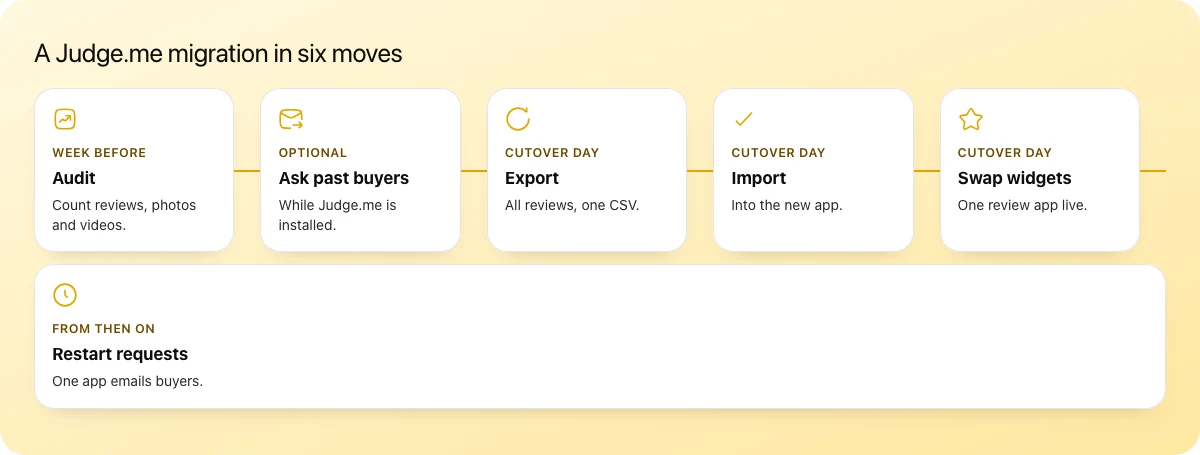
How to export and import Judge.me reviews in 7 steps
Step 1: Take an inventory
Write down four numbers: total published reviews, reviews with photos, reviews with videos, and the review count and average rating of your five best-selling products. You will compare against them after the import. Without a baseline, "it looks fine" is all you can say.
Step 2: Pick a cutover date and one owner for requests
Choose a quiet day. From that date, one app owns review requests: Judge.me for orders before it, the new app for orders after it. Never let both apps email the same buyer, because a second request reads like spam. Expect a small gap for orders placed just before the cutover. Accept it rather than risk double emails. In Trio (paid plans), the request is scheduled when an order is created and sent a number of days after the order date (7 by default, with up to two reminders). Orders placed before you install Trio never get a Trio request, which is why the past-customer batch belongs to Judge.me.
Step 3: Export everything
In Reviews, click Export, then "Export all reviews" so the file includes the status column. Check your admin notification email first: from 100 reviews, the file arrives by email and the link expires after 3 hours. Above 100,000 reviews, split the export: by date (the Created filter in Reviews) or by product (Settings, Product management, then Export reviews on the product). The date filter is also how you pick up reviews that arrive after cutover day.
Step 4: Clean the file, lightly
Open it in a spreadsheet, but never rewrite review text. Keep published rows and decide on pending ones. Look at reviews hidden as spam before you drop them: a real 1-star review hidden by mistake belongs on your page. Fix product handles you changed since the review was written, or the import cannot match them. Save as CSV with UTF-8 encoding so accents and emoji survive.
Step 5: Import into the new app
In Trio, review import starts on the Starter plan. Upload your cleaned Judge.me CSV: Trio recognizes the Judge.me format on its own, and the web admin also reads .xlsx. Ratings, text, dates, names and photos are kept. Those are the fields Trio commits to, so check replies and custom-question answers on a test product and keep the original file as your archive. Photos are downloaded and re-hosted, duplicates are detected, star-only reviews are accepted and large files run in the background. The import section of Trio's reviews page shows the supported sources: Judge.me, Loox, Yotpo, Trustoo and a generic CSV.
Step 6: Swap the widgets
Add the new review blocks from the Shopify theme editor, then turn off Judge.me's app embed and remove its blocks from every template, including collection cards and the home page carousel. One review app live per page. Trio's widgets are added from the theme editor with no code, and Trio also writes ratings to Shopify's standard product metafields (reviews.rating and reviews.rating_count), which some themes read to show stars on product cards.

Step 7: Restart requests and reconnect the rest
Turn on review requests in the new app on cutover day. Then list every tool that read Judge.me data and decide what replaces each one:
- Google Merchant Center. Switch off the old reviews feed first so each review is sent once. Trio can generate a Google product reviews feed on paid plans (approved reviews only, up to 5,000, matched to products by variant SKU or barcode, so fill those in first); our Google product ratings guide covers the setup.
- Shopify Flow. Rebuild workflows that used Judge.me. Trio offers one Flow trigger, "new approved review".
- Email. If you move email to Trio too, every Trio email can quote your reviews and show the customer's points balance.
Judge.me migration mistakes to avoid
- Two widgets live at once. Both apps may output review structured data on the same page, so Google sees two ratings. Google's review snippet guidelines ask that marked-up reviews be readily available to users on the page. Keep one app live, then run a product URL through the Rich Results Test.
- Uninstalling before the check. Your export is the only copy you control, and its photos are links. Keep Judge.me installed, with its widget off the theme, until the counts match.
- Both apps sending requests. Turn one off on cutover day, as planned in step 2.
- Editing reviews in the spreadsheet. Fix technical fields such as product handles or date formats. Never touch what customers wrote, and keep the low ratings.
- Forgetting the side connections, such as the Merchant Center feed, Flow workflows and email blocks that pulled Judge.me reviews.
Check the import: counts, averages and photos
Compare the new app with the inventory from step 1. To get per-product numbers from the Judge.me file, paste this in an empty cell of the export opened in Google Sheets, after replacing C with your rating column and I with your product handle column:
=QUERY(A1:Z, "select I, count(C), avg(C) where C is not null group by I label count(C) 'Reviews', avg(C) 'Average'", 1)Sort the result by review count and check your top products one by one in the new app. A difference of a few reviews usually points to rows you dropped on purpose or to duplicates the import skipped. A product with zero reviews almost always means a renamed handle.

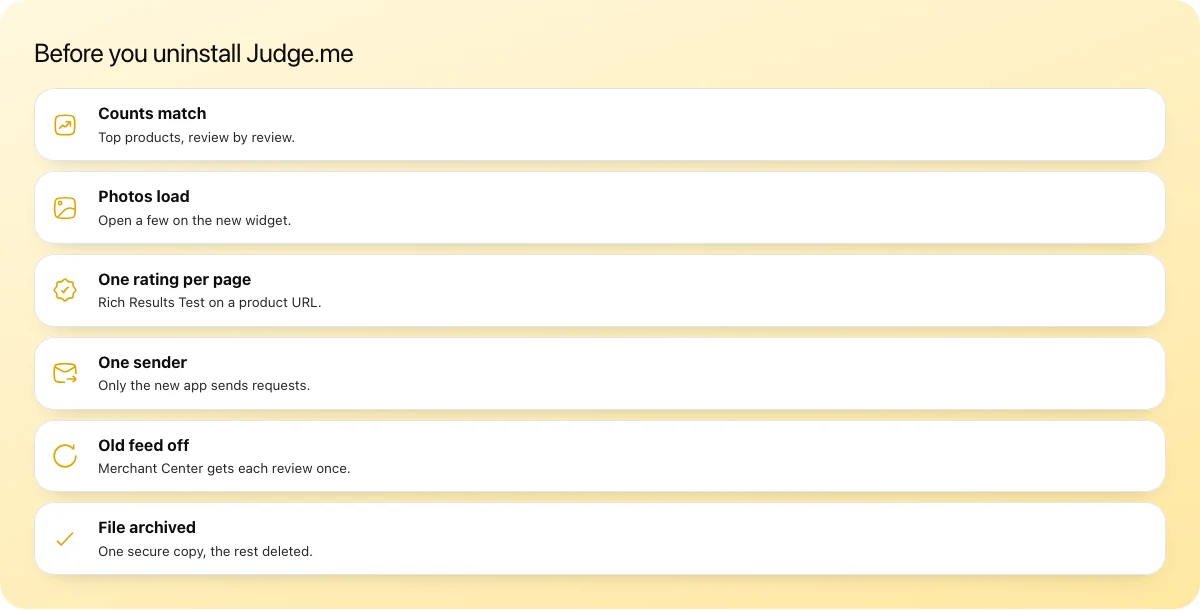
Once every box is ticked, uninstall Judge.me. Then reply to your most recent low-rated reviews if their replies did not come over: it is the first thing a new visitor reads. Our guide to automating review replies shows how to keep that habit without spending your evenings on it.
Moving from another app? The same method works with a different export: see the general guide on how to import reviews to Shopify and the Yotpo review migration walkthrough.
Frequently asked questions
- Is there a Judge.me reviews connector for Shopify?
- Judge.me already runs inside Shopify, so "connector" usually means one of three things. A data connector reads your reviews through Judge.me's API for dashboards or a warehouse. A Judge.me integration sends reviews to another app such as your email tool. An export and import moves your reviews to a different review app. Pick based on whether Judge.me stays installed.
- How do I export my reviews from Judge.me?
- In the Judge.me admin, open Reviews, click Export at the top right and choose all, published, hidden or archived reviews. Under 100 reviews, the file downloads right away. From 100 reviews, it is emailed to your admin notification addresses, and the link expires 3 hours after the email is sent. One CSV holds up to 100,000 reviews.
- Can I send Judge.me review request emails to past customers?
- Yes. Go to Settings, then Request reviews, and click Get started next to "Request reviews from previous Shopify orders". Pick a start date before you installed Judge.me. Only fulfilled orders count, the cap is 5,000 orders, and Judge.me designed it as a one-time import, so running the same dates again processes nothing.
- Will photos and videos move with my Judge.me reviews?
- Photos are in the export as image links, so the new app has to download them. Trio downloads them from those links and hosts them again. Videos are not part of Judge.me's CSV export; Judge.me lets you download them separately from the Reviews dashboard, but they will not come in with the file. Count your video reviews before you leave and plan to collect new ones (in Trio, video reviews start on the Growth plan).
- Do imported reviews keep the verified buyer badge?
- Not automatically. Judge.me's export has no verified-status column. Its help center suggests reading the Source column instead, since reviews that came from an email or SMS request were left by buyers. Keep that column in your archive and check how your new app labels imported reviews on a test product before you put the new widget live.
- Will moving my reviews to another app hurt my SEO?
- Not if you switch cleanly. The risk sits in the overlap, when two review widgets or two apps output review markup on the same product page. Keep one app live, then test a product URL in Google's Rich Results Test and make sure you see one rating, matching the reviews shoppers can see.
- Can Trio sync with Judge.me in real time?
- No. Trio imports a Judge.me export file once; it is not a live connector. If Judge.me stays your review app and you only need its data somewhere else, an API data connector or one of Judge.me's integrations fits better.
- How much does it cost to import Judge.me reviews into Trio?
- Review import is included from Trio's Starter plan, which costs $29 per month with a 14-day free trial. The Free plan does not include review import. Trio is our product, so compare it with other apps on the points that matter to you before you switch.
- How do I contact Judge.me support?
- Judge.me's help center says live chat is the fastest route, from the chat icon at the bottom right of the Judge.me admin or help center. An AI assistant answers first, and human agents are available around the clock. You can also email support@judge.me, which replies within 24 hours. Judge.me does not offer phone support.
- Can I import reviews into Judge.me instead?
- Yes. Judge.me has its own importer for files from other review apps and from its CSV template, and its App Store listing mentions imports from Etsy, Amazon and AliExpress. The same rule applies in both directions: every review must keep its product, rating and date, and you should test a small file first.
Related articles
How to import reviews to Shopify without losing stars, dates or photos: a copyable CSV template, product matching, legal rules and fixes. Start your i…
November 25, 2026ReviewsYotpo Import Reviews: Step-by-Step Migration Guide (2026)Yotpo import reviews, both ways: export the CSV, fix the columns that break imports and keep your Google stars. Follow our step-by-step migration guid…
November 25, 2026ReviewsGoogle Product Ratings: The Complete Guide for Shopify Stores (2026)Google product ratings explained: the 50-review rule, the reviews feed, GTIN matching in Shopify and policy traps. Use our checklist to get your stars…
November 25, 2026