


Shopify Product Reviews: The Complete Guide for 2026

- Shopify's native reviews live in the Shop app only. To show reviews on your own store, you need a review app, and the free plans differ a lot.
- Time the request from the order date as shipping time plus the time it takes to judge the product, reward every review the same way, and never hide genuine criticism.
- Stars on Google need structured data that matches the visible reviews, and replies to low ratings are written for the next hundred shoppers.
Shopify product reviews do three jobs at once. They convince the shopper who is about to buy, they add specific, customer-written text to your product pages, and they tell you what to fix. Yet it is easy to install a review app in ten minutes and never look at it again: the request goes out at the wrong time, the stars sit in the wrong place, and low ratings wait weeks for a reply.
This guide covers the whole system as it works in 2026: what Shopify gives you natively, how to choose an app, the exact setup steps in your theme, when to ask, what the FTC allows, how Google stars work, how to reply, and which numbers to watch. Each section links to a deeper article if you want the details.
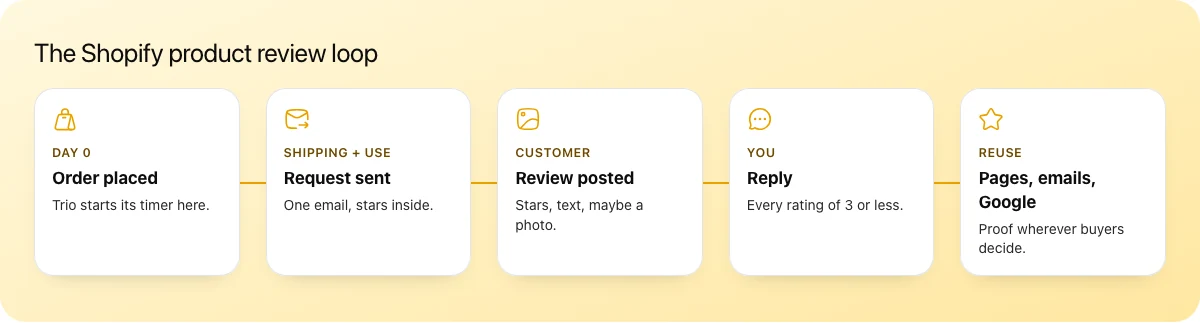
How product reviews on Shopify work in 2026
There are three places a review can come from on a Shopify store today, and they do not behave the same way.
1. Shop product reviews, the native option
Shopify collects reviews inside the Shop app. According to the Shopify Help Center, only Shop customers who bought the product can review it. They get a notification on their device after the order is delivered, give one to five stars and can add a comment of up to 1,000 characters. Those reviews appear on the product page in the Shop app, not on your online store.
Three details from Shopify's documentation are worth knowing. You choose when the Shop notification goes out, anywhere from 1 to 180 days after delivery, in Sales channels > Shop > Settings. You can reply to each review from the Reviews page of the Shop channel, up to 1,000 characters, and report reviews that break Shop's policies. And if your products are sold on Shop, you cannot opt out of receiving these reviews.
2. A review app on your online store
This is what most merchants mean by product reviews on Shopify: an app from the Shopify App Store that sends review requests, hosts the reviews and adds widgets to your theme. Shopify's own free Product Reviews app is gone. It can no longer be installed, and its reviews no longer display, so a third-party app is the only way to show reviews on your storefront.
3. Imported reviews
If you already have reviews in another app, you export them as a CSV and import them into the new one. Done well, ratings, dates and photos survive the move. One limit: Shopify states that reviews uploaded or migrated from a CSV are not eligible to appear in the Shop app, even through a sync partner.
How Shop reviews and review apps work together
Shop product reviews and a review app can coexist. The same help center section lists five partner apps that sync with Shop product reviews: Judge.me, Loox, Okendo, Stamped and Yotpo. With one of them installed, reviews collected in the Shop app are shared with the app, and you choose from the app's admin whether to publish them on your store, where they carry a "Verified by Shop" badge. Trio, our app, is not one of those partners today, so with Trio, Shop-collected reviews stay in the Shop app.
Why bother with all of this? Because the first handful of reviews on a product changes behavior more than anything you write about it.
Two practical lessons follow from that research. First, coverage beats volume: getting every product that sells to five reviews matters more than piling 300 reviews on your bestseller. Second, a perfect 5.0 is not the goal. A few honest three-star reviews with good replies make the rest believable.
How to choose a product review app for Shopify
Start from your constraints, not from feature lists. Most review apps can collect stars and show a widget. The differences are in what the free plan really includes, how the price grows with your store, and whether the app connects to the rest of your stack.
| Your situation | What to check first | Why it matters |
|---|---|---|
| Tight budget, few orders | Automatic review requests on the free plan | Without them, you collect almost nothing |
| Visual products (fashion, beauty, home) | The plan that unlocks photo reviews | "Supports photos" often means a paid plan |
| Many orders through the Shop app | Whether the app is one of the five Shop sync partners | Only partners can show Shop reviews on your store |
| Fast-growing order volume | The pricing model: per order, flat fee or per contact | Order-based plans can triple as you grow |
| Already paying for email and loyalty apps | Whether one combined app covers all three well enough | One customer record, one bill instead of three |
Here is how four popular options compare on their entry plans. Trio is our product, so read this table with that in mind; it shows where Trio is weaker too.
| Entry-plan feature | Judge.me | Loox | Yotpo Reviews | Trio |
|---|---|---|---|---|
| Free plan limit | No order cap | 500 orders in total | 50 orders a month | Unlimited text reviews |
| Automatic review requests on free | ✓ | ✓ | ✓ | ✗ |
| Photo reviews on free | ✓ | ✓ | ✗ | ✗ |
| Google rich snippets on free | ✓ | ✓ | ✗ | ✗ |
| First paid plan | $15/month, flat | $49.99/month, 300 orders included | From $15/month, scales with orders | $29/month (Starter) |
| Video reviews from | Free plan | Convert plan | Starter plan | Growth plan ($79/month) |
| Email marketing included | Separate app | ✗ | Not in this app | ✓ |
| Loyalty points included | ✗ | ✗ | Separate app | ✓ |
Competitor data comes from each app's Shopify App Store listing and pricing page, checked on November 25, 2026. Plans change often, so confirm before you buy. Judge.me's free plan is the most generous on reviews alone. Trio makes the most sense when you also want email marketing and a loyalty program in the same app, sharing the same customers. For a full ranking with more apps, see our list of the best review apps for Shopify, and if budget is the deciding factor, the best free product review apps.
Set up Shopify product reviews step by step
Once the app is installed, the setup happens in your theme. On an Online Store 2.0 theme, it takes about 20 minutes and no code.
- Import first. If you have reviews elsewhere, import them before you add widgets, so the product page never shows an empty block.
- Go to Online Store > Themes > Customize, then pick Products > Default product in the template selector at the top.
- In the product information section, click Add block, open the Apps tab and add the app's star rating block. Drag it right under the product title.
- Click Add section, open Apps again and add the review list below the product information.
- Open the App embeds panel in the theme editor sidebar and switch on the app's embed if it has one. Some widgets do not load without it.
- Turn on stars on collection cards. Some apps offer a block; many themes also read Shopify's standard review metafields. In Dawn, open the collection template, select the product grid section and tick Product rating (the featured collection section has the same option).
- Repeat steps 3 to 5 on every product template. Stores with alternate templates for bundles or pre-orders often forget them, and those products ship without stars.
- Check the page on a phone. The rating should be visible without scrolling, next to the price.
If you are setting this up in Trio, here is the short version.
Collect more reviews: timing, requests and incentives
A review app does not collect reviews. Your request does. Three settings decide how many you get: when it is sent, what it says and what you offer.
When to send the review request
Shop product reviews count from delivery, with a delay you set. Trio counts from the order date instead, so check which date your app uses, then set the delay with a simple formula: delay = usual shipping time + time needed to judge the product. The table gives starting points; adjust them to your own shipping times.
| Product type | Time to judge it | Delay after order (3 to 5 days shipping) |
|---|---|---|
| Apparel, shoes | First wear, 2 to 3 days | 7 to 10 days |
| Home decor, accessories | First use, 2 to 3 days | 7 to 10 days |
| Food, coffee, candles | First use, 1 to 3 days | 5 to 8 days |
| Gadgets, electronics | About a week of use | 10 to 14 days |
| Skincare, haircare | 2 to 3 weeks of routine | 21 to 28 days |
| Supplements | 3 to 4 weeks | 28 to 35 days |
| Made to order | Production time + first use | Production + shipping + 3 days |
Send one or two reminders, then stop. In Trio, reminders use the same spacing as the first delay, so a 28-day delay means reminders at 56 and 84 days. For long delays, one reminder is usually enough.
What the request should say
The best requests are short, name the product and put the stars in the email, so the first tap already counts. Here is a version you can copy:
Subject: How is your {product} working out? Hi {first name}, your {product} should have been with you for a few days now. How would you rate it? Tap a star below. If you have a minute, add a sentence or a photo: it helps the next shopper pick the right {size / shade / model}. [★ ★ ★ ★ ★] Thanks, {your name} at {store}
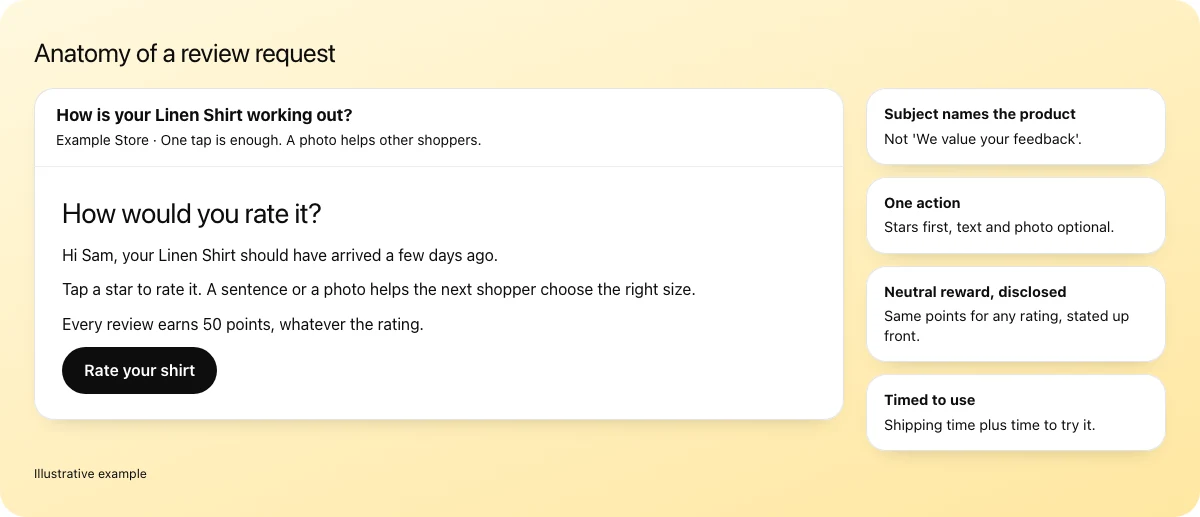
For 15 more versions, including reminders and photo requests, see our review request email examples.
Getting the first reviews on a new product
A new product has no buyers to ask yet, and a zero-review page converts worst. Four honest ways to break the silence:
- Ask recent buyers of a close product (same range, previous version) whether they would like to try the new one, and request a review afterwards.
- Ship to the first 20 to 50 buyers with a card that explains why their review matters so much right now.
- If you send free samples, ask reviewers to say they received the product for free: the FTC treats a free product as a connection that must be disclosed.
- Answer early questions in a product Q&A, so the page is not empty while reviews arrive.
Incentives, fake reviews and the FTC rule
In August 2024, the FTC announced a final rule banning fake reviews and testimonials, and it lets the agency seek civil penalties against knowing violators. For a Shopify store, it draws a clear line. This is a practical summary, not legal advice.
What you can do:
- Ask every buyer for a review, not only the ones you think are happy.
- Offer the same reward for every honest review, positive or negative, such as a discount code or loyalty points, and say so in the request.
- Give an extra reward for a photo, as long as it does not depend on the rating.
- Remove spam, abuse, personal data and off-topic posts under a moderation policy you apply to every rating.
What you cannot do:
- Write, buy or generate fake reviews, including AI-written ones, or post undisclosed reviews from staff and insiders.
- Make a reward conditional on sentiment, openly or by implication ("Get 15% off for a 5-star review").
- Use threats or groundless legal claims to get negative reviews removed.
- Hide negative reviews and still present the rest as all, or most, of your reviews.
One trap is easy to miss. Some apps, Trio included, can auto-publish reviews at or above a star threshold and hold the rest for manual approval. That is fine for catching spam, but if low ratings sit in the queue forever, your page shows a filtered picture. Review the queue every week and publish every genuine review. If you sell in the EU, consumer law also expects you to tell shoppers whether and how you check that reviews come from real buyers, so a verified-buyer badge and a short note under the widget help.
Where to show product reviews on your Shopify store
Reviews only work where the shopper is deciding. Place them in this order of priority:
- Under the product title: average rating and count, linked to the full reviews.
- Below the product information: the full list with photos first, filters by rating and "with photos", and sorting by most helpful.
- On collection cards: stars help shoppers compare products before they click.
- In your emails: one short, relevant review in a post-purchase or cart recovery email.
- On a store-wide reviews page: useful for brand searches and for shoppers who want to vet the store, not a product.
Keep the review block honest: real names or initials, a verified-buyer label, the rating breakdown visible, and your replies under the reviews that needed one.
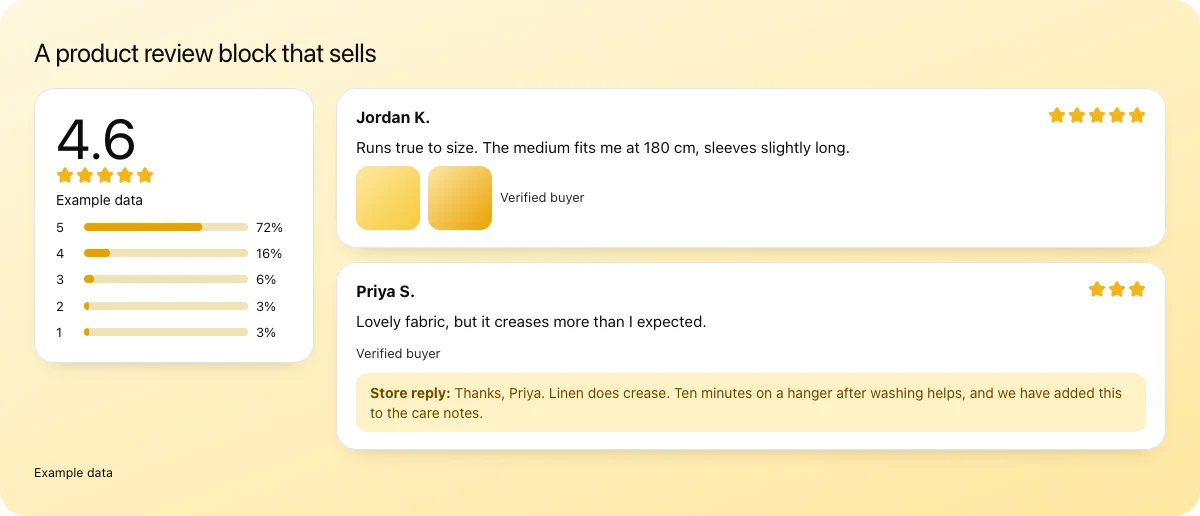
Trio adds a few display options on paid plans: an AI summary of what customers say with topic chips that filter the reviews, and an "ask the reviews" box where shoppers ask a question and get an answer based on the product's reviews. The full list of widgets is on the Trio reviews page.
Google stars: structured data, metafields and Merchant Center
Stars in Google results are the most visible payoff of Shopify product reviews, and the most misunderstood. There are two separate routes.
Organic results. Google reads Product structured data with an AggregateRating and individual reviews on the product page. Its review snippet guidelines set the rules: the reviews you mark up must be readily visible on the page, it must be immediately obvious that the page has review content, and you cannot aggregate ratings from other websites. Google also states that it does not guarantee rich results will show.
Google Shopping. Product ratings in Shopping usually come from a product reviews feed submitted to Merchant Center, by you or your review app, matched to your products by identifiers such as SKU or barcode.
Three checks prevent most problems:
- One Product, one rating. Many themes output their own Product JSON-LD and the review app adds another. Paste a product URL into Google's Rich Results Test: you want a single Product item with offers and a rating, not two competing ones.
- The markup lives in a block. In Trio, the structured data is output by the review list block (Starter and up). Remove the block from a template and the markup disappears with it.
- Metafields for the theme. Trio writes ratings to Shopify's standard
reviews.ratingandreviews.rating_countproduct metafields, which themes can read for collection stars.
On paid plans, Trio can also generate a Google product reviews feed for Merchant Center with approved reviews only. For the full walkthrough, eligibility questions and troubleshooting, read our guide to Google product ratings.
Reply to every Shopify product review that needs it
A reply is written for the next hundred visitors, not for the reviewer. They read it to learn what happens when something goes wrong. Reply to every review of three stars or less within two days, and to positive reviews when you can add something useful.
| Rating | Goal of the reply | Template you can adapt |
|---|---|---|
| 5 stars | Thank, echo a detail, add one tip | "Thanks, {name}. Glad the {detail they liked} works for you. Tip: {care or styling advice}." |
| 4 stars | Thank, address the one reservation | "Thanks, {name}. You're right about {issue}. {What it is or what you changed}." |
| 3 stars | Clarify and fix | "Thanks for the honest review, {name}. {Explain or fix}. We have {concrete change}." |
| 2 stars | Apologize for the specific problem, state the fix | "Sorry about {problem}, {name}. We have {sent a replacement / refunded}. Our team will follow up by email." |
| 1 star | Stay factual, never argue, move to private | "{name}, this is not the experience we want. We have emailed you to sort it out today." |
Three rules make replies work. Name the actual problem, so the reply could not be pasted under another review. Never offer a refund in exchange for editing or deleting the review. And fix the cause: if three people mention the same sizing issue, update the size guide, then say so in your replies.
Move the slider to see how the same review block reads at each rating, with the kind of reply each one needs.
Soft, cool and true to size.
On paid plans, Trio AI drafts replies in your brand's tone and in the reviewer's language (50 a month on Starter), and you approve them before they go live. You can switch on automatic publishing of AI replies for published reviews at or above a star rating you choose (four by default); it is off until you turn it on, so low ratings always get a human look. For low ratings, Trio's unhappy-customer rescue (Starter and up) alerts you privately and prepares an apology email with a single-use discount code for you to approve. More on balancing speed and quality in our guide to automating review replies.
Measure, reuse and migrate your Shopify product reviews
The six numbers to track
Most review dashboards show a total count and an average rating. Neither tells you what to do next. Track these instead, once a month:
| Metric | How to calculate it | What it tells you |
|---|---|---|
| Review rate | Reviews received ÷ review requests sent | Whether your timing and wording work |
| Photo share | Reviews with a photo ÷ all reviews | Whether your photo prompt works |
| Coverage | Products with 5+ reviews ÷ products that sold | Where social proof is missing |
| Low-rating reply rate | Replies to 1 to 3 stars ÷ reviews of 1 to 3 stars | Your public service record (aim for 100%) |
| Time to reply | Median hours from a 1 to 3 star review to your reply | How fast problems get handled |
| Complaint themes | Low ratings grouped by cause (size, shipping, quality) | What to fix in the product or the page |

Watch trends, not single months. A sudden rise in two-star reviews on one product is usually a batch, packaging or carrier problem, and it is cheaper to catch it in reviews than in returns.
Put reviews to work beyond the product page
Reviews are the most persuasive content you own, so reuse them:
- In emails: quote one real review of the product in your post-purchase email sequence, or a review of a related product as a cross-sell. Trio's email editor has a review quote block for this.
- In your loyalty program: reward reviews with points, the same amount for any rating. On Trio's paid plans, a review can earn points through the loyalty and rewards module and trigger a thank-you email automatically.
- In automations: Trio sends a "new approved review" trigger to Shopify Flow, which you can use to tag customers or alert your team.
- In your product copy: reuse the words customers use ("runs small", "no smell", "survived the dishwasher") in descriptions and FAQs.
Switching apps without losing reviews
Your reviews belong to you. Export them before you cancel anything, import them into the new app, check five products (rating, count, dates, photos), and only then swap the theme blocks and uninstall the old app. Our step-by-step guide on importing reviews to Shopify covers CSV formats and common errors, with dedicated walkthroughs for the Judge.me reviews connector and export and Yotpo review exports.
Trio imports export files from Judge.me, Loox, Yotpo and Trustoo, or a generic CSV, on Starter and up. It keeps ratings, text, dates and names, re-hosts photos from their URLs and detects duplicates. Plans start free, and paid plans begin at $29 a month with a 14-day trial; see Trio pricing for what each plan includes.
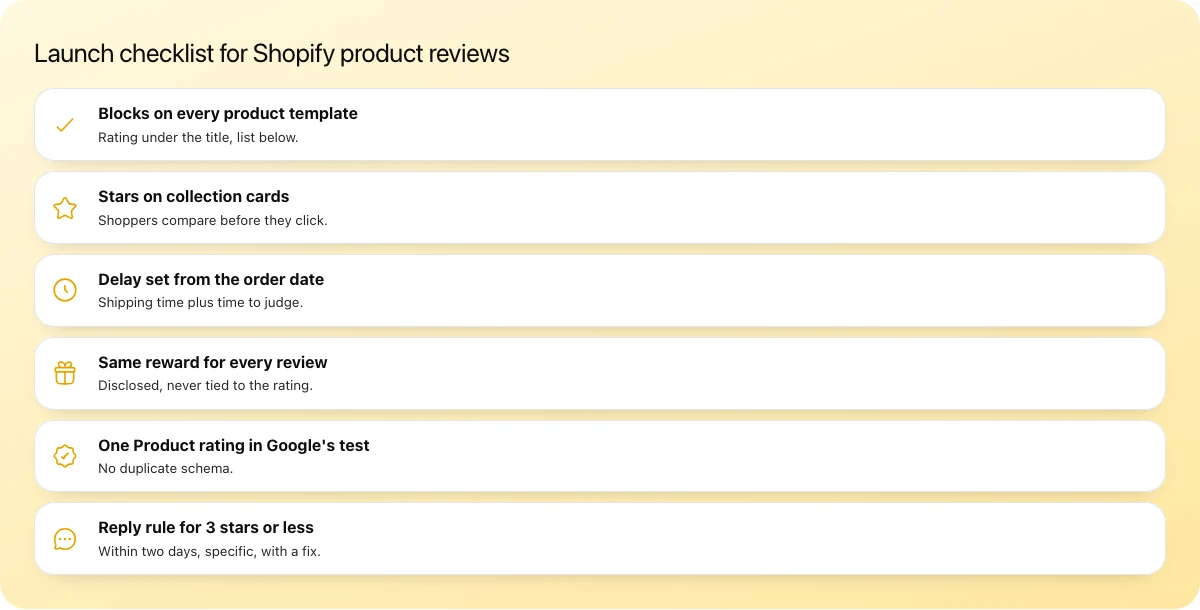
Start with the basics: one well-timed request, one reminder, photos switched on, and a reply habit for low ratings. Then add the Google feed, the email reuse and the loyalty rewards. Product reviews compound: every honest review you collect this month makes next month's shoppers more likely to buy and to leave one too.
Frequently asked questions
- Does Shopify have a built-in product review feature?
- Partly. Shop product reviews let customers who bought from you rate products in the Shop app, and those reviews show on the product page inside the Shop app. You can reply to them from the Shop channel in your admin. Shopify's old Product Reviews app is no longer available, so to show reviews on your own online store you need a third-party review app.
- How do I add product reviews to my Shopify store?
- Install a review app from the Shopify App Store, then open Online Store, Themes, Customize, and add the app's star rating block under the product title and its review list section below the product. Turn on the app embed if the app has one, repeat on every product template, and check the result on mobile.
- Are Shopify product review apps free?
- Many have a free plan, with very different limits. On November 25, 2026, Judge.me's free plan had no order cap, Loox's stopped at 500 orders and Yotpo's at 50 orders a month. Trio's free plan has unlimited text reviews, while review requests, photo reviews and Google markup start on Starter at $29 a month.
- How do I get star ratings to show on Google for my Shopify products?
- Your product pages need Product structured data with an aggregate rating and reviews that match what visitors can see. For Google Shopping, a product reviews feed in Merchant Center is the usual route. Google decides whether stars appear, so treat them as a possible result, not a promise.
- When should I send a review request email?
- When the customer has had the product long enough to judge it. If your app counts from the order date, set the delay to your usual shipping time plus a few days of use for apparel or gifts, and several weeks for skincare or supplements.
- Can I give customers a discount or points for leaving a review?
- Yes, if the reward does not depend on what the review says. The FTC's 2024 rule bans incentives conditioned on a positive or negative sentiment, explicit or implied. Offer the same reward for every honest review and say so in the request.
- Can I delete negative product reviews on Shopify?
- In your own review app, you can remove spam, abuse or reviews that break a published policy, but you should not hide genuine criticism; Shop app reviews can only be reported to Shopify. The FTC rule targets review suppression, and buyers trust a store more when they can see how it handles problems. Reply instead.
- How many reviews does a product need?
- The first few matter most. The Spiegel Research Center found that a product with five reviews was 270% more likely to be purchased than one with none. Aim to get every product that sells to five reviews before chasing big totals.
- Can I move my reviews from Judge.me or Yotpo to another app?
- Usually yes. Export a CSV from the old app, import it into the new one, check a few products, then switch the theme blocks. Trio imports Judge.me, Loox, Yotpo and Trustoo exports or a generic CSV on paid plans, keeping ratings, text, dates and photos.
- Should I reply to every product review?
- Reply to every review of three stars or less, ideally within two days, and to positive reviews when you can add something useful. A short, specific reply shows future buyers how you treat customers.
Related articles
Ecommerce marketing automation, step by step: the 8 flows to build first, timing and exit rules, collision rules, AI and honest measurement. Read the …
November 25, 2026Email marketingEcommerce email marketing: the complete 2026 guide for Shopify storesEcommerce email marketing step by step: which flows to build first, starting schedules, copyable emails, deliverability rules and costs. Start free wi…
November 25, 2026GrowthEcommerce Retention by Industry: Complete Guide (2026)Ecommerce retention by industry: benchmarks for 7 verticals, playbooks for 12, with reorder timing, review requests and loyalty. Find your next move.
November 25, 2026