


Yotpo Import Reviews: Step-by-Step Migration Guide (2026)

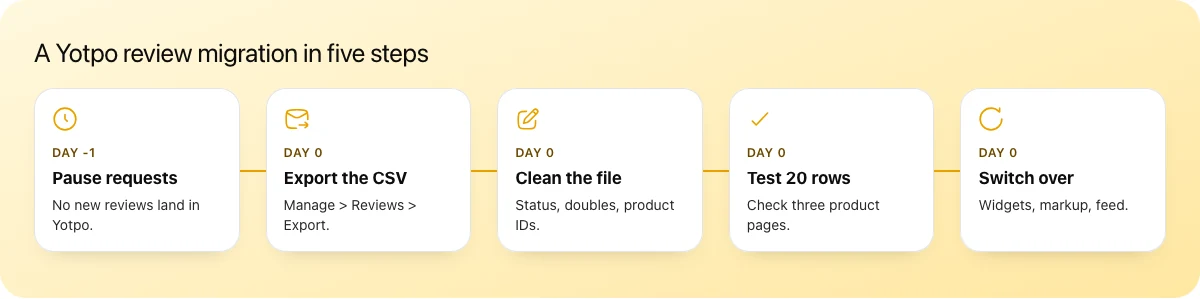
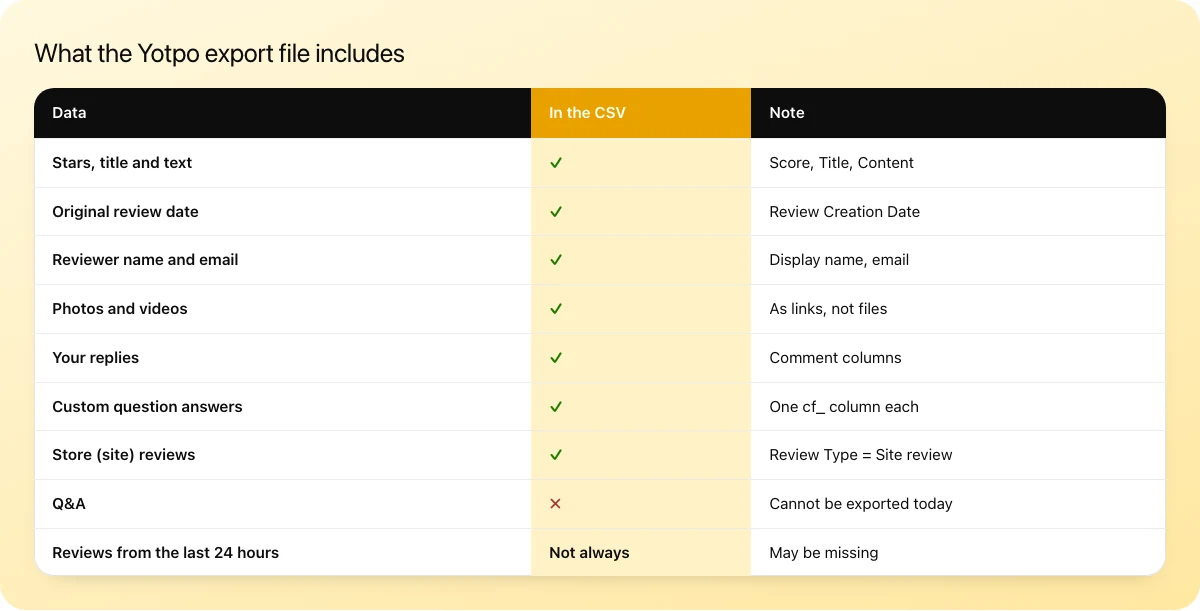
- Exporting from Yotpo takes three clicks on every plan (Manage > Reviews > Export), but the CSV arrives by email within an hour and leaves out Q&A and possibly the last 24 hours of reviews.
- The file holds photo links, not photo files, and can list the same review twice. Clean it and run a 20-row test before the full import.
- Switch widgets, review markup and your Merchant Center feed on the same day, and cancel Yotpo only after the review counts match.
People who search for "yotpo import reviews" want one of two things: bring reviews into Yotpo, or get them out of Yotpo and into another Shopify app. Both directions run on the same CSV file, and most failed migrations fail on that file, not in the app. This guide covers both, using Yotpo's current menus as documented in its help center in November 2026. You get a column-by-column reading of the export, the cleanup that prevents rejected rows, and a migration-day order that keeps your stars on Google. If you are still deciding how to run reviews on your store, start with our complete guide to Shopify product reviews.
Yotpo import reviews: which direction are you moving?
Start by naming the job, because the steps differ:
| Your situation | What you need | Where it starts |
|---|---|---|
| Moving to Yotpo from another app | Import reviews into Yotpo | Yotpo: Manage > Import Reviews |
| Leaving Yotpo for another Shopify app | Export from Yotpo, then import in the new app | Yotpo: Manage > Reviews > Export |
| Keeping Yotpo, want a backup or an audit | Export only | Yotpo: Manage > Reviews > Export |
| Moving from Judge.me, not Yotpo | A different export format | See our Judge.me migration guide |
Two facts frame everything below. The review export is available on every Yotpo plan, Free included. The self-service import into Yotpo is labeled Beta in Yotpo's help center and is open to all plans, with plan limits on media and badges that we cover in the import section.
How to export reviews from Yotpo, step by step
Here is how to export reviews from Yotpo with the current dashboard, based on Yotpo's help article Exporting Reviews from Yotpo:
- Pause new reviews first. Turn off Yotpo's review request emails a day before you export. Yotpo warns that reviews submitted in the last 24 hours might not appear in the file.
- In the Yotpo Reviews main menu, open Manage > Reviews.
- For a full export, leave the filters empty. Do not type in the search bar: Yotpo cannot export reviews filtered with the search bar. Use the filters (date range, content type, product) only when you want part of the catalog.
- Click Export in the upper-right corner.
- Open the email. Yotpo sends a download link to the address associated with the account. If someone else owns the account, the link lands in their inbox.
- Save two copies: the original, which you never edit, and a working copy for cleanup.
Older guides, including some other apps' help pages, still say "Reviews > Moderation > Export to CSV". That is the older menu. If your dashboard looks different from the steps above, look for Moderation.
What the Yotpo export CSV contains, column by column
The file is wide: more than 40 fixed columns, plus one column per custom question. Not every column applies to every review, so expect many blank cells. Yotpo documents each header. Here is what each group means for a migration:
| Yotpo columns | What they hold | What to do with them |
|---|---|---|
| Review Score, Review Title, Review Content | Stars from 1 to 5, title, text | Map all three. This is the review. |
| Review Creation Date | The original date | Map it so reviews keep their real age |
| Reviewer Display Name, Reviewer Email | Public name and email | Map both. Apps use the email to spot duplicates. |
| Product ID, Product Handle, Product SKU | Product identifiers from your store | Map Product ID; keep handle and SKU as fallbacks |
| Review Status | Published, Rejected or Escalated | Filter before importing (see below) |
| Review Type | Product review or Site review | Split product reviews from store reviews |
| Published Image URL, Published Video URL | Links to media, separated by semicolons | Map them, and check that the new app downloads the files |
| Unpublished Image URL, Unpublished Video URL | Media you chose not to show | Usually leave out |
| Comment Content, Comment Public, Comment Date | Your replies to reviews | Keep the public ones; not every app maps them |
| Reviewer Type | Anonymous, Verified Reviewer or Verified Buyer | Read the destination app's rules on badges |
| cf_[form name]_[question] | Answers to custom questions | Keep in the archive copy |
| Sentiment Score, Profanity Flag, Thumbs Up, Thumbs Down, Pushed to Social, Reviewer Device Type, app_key | Yotpo's internal data | Remove from the working copy |
The trap most guides skip: the file holds photo links, not photo files. If your new app only stores the links, your review photos keep depending on Yotpo's servers after you leave. Ask whether the app downloads and re-hosts them.
Clean the Yotpo file before you import it anywhere
Work on the copy, never the original. Every step below removes a reason for a row to be rejected or published by mistake.
Open it without breaking the product IDs
Shopify product IDs are long numbers. Excel can display them in scientific notation (7.12E+12) and save them that way, and then no product matches. It can also reformat dates. The safest route is Google Sheets: File, Import, and untick "Convert text to numbers, dates, and formulas". When you save, export as CSV UTF-8 so accents and emoji in reviews survive.
Keep the right rows
- Filter Review Status to Published. Rejected and escalated reviews were held back for a reason, such as spam or profanity, and some apps publish everything they import.
- Split store reviews from product reviews. Filter Review Type: rows marked Site review go in their own file. Yotpo says a review saved as both types appears twice, once per type, and Judge.me's help center notes that Yotpo fills Product ID with the placeholder yotpo_site_reviews on store reviews, which no product will ever match.
- Delete test reviews: your own email address, your team's, anything that says "test".
- Keep the low ratings. A migration is not a chance to drop genuine criticism, and a page that shows only the good reviews misleads shoppers.
Fix the columns that break imports
- Scores must be whole numbers from 1 to 5. Words like "Excellent" fail.
- Dates should read YYYY-MM-DD. Yotpo's own importer accepts YYYY-MM-DD and YYYY-DD-MM.
- The first row must contain the column names. A title row above the headers makes every column look wrong.
- Leave the semicolons between media URLs alone; they separate several photos on one review.
Find reviews whose product no longer exists
A product deleted and recreated since the review has a new ID, so its reviews match nothing. Export your products from Shopify (Products > Export), paste the file into a second tab called Shopify, and flag orphans next to each review. Shopify's product export puts the handle in column A; in an untouched Yotpo export, Product Handle is column AJ, so run this before you delete any column:
=IF(COUNTIF(Shopify!A:A, AJ2)=0, "MISSING", "ok")Rows marked MISSING either point to a product you renamed (fix the handle and ID by hand) or to one you no longer sell (keep them in the archive only).
Build your "before" count
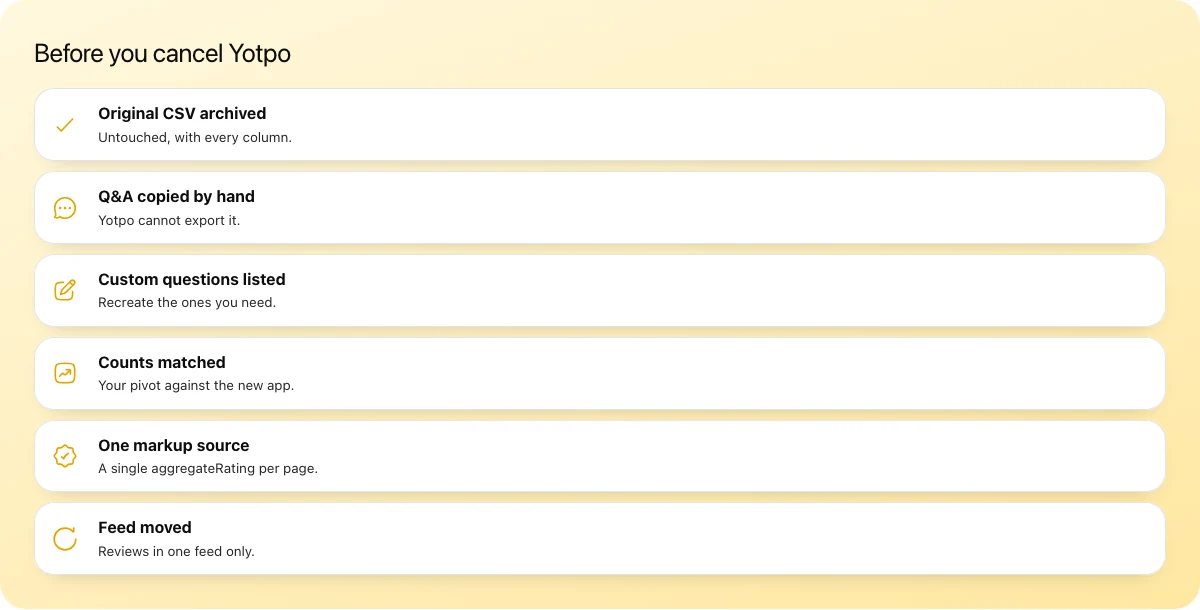
Make a pivot table with Product Title as rows and COUNTA of Review ID as values, filtered on Review Status = Published and Review Type = Product review. Write down the total and the five best-sellers. You will compare them with the new app after the import.
How to import reviews into Yotpo (self-service import)
If you are moving to Yotpo, this is the current process from Yotpo's article Importing Reviews to Yotpo (Beta). You need an Admin or Staff role in Yotpo.
- Import your product catalog first. Yotpo can only attach a review to a product that already exists in its catalog.
- Go to Manage > Import Reviews and click Request new import.
- Choose where the reviews were originally collected, then the specific source. Yotpo uses this to apply its authenticity policies.
- Upload the CSV, or download Yotpo's template and fill it in. Tick the box confirming the reviews are genuine and that you have permission to use them.
- Match your columns. Yotpo matches them automatically even when names differ, but check the result: a missing required column can be swapped for a similar one.
- Fix rows with errors directly in the cells, click Import, then Confirm import.
Processing runs in the background and can take several hours. Yotpo emails you when it is done, and an import can sit "In Review" while Yotpo checks it manually.
Import reviews into Yotpo: the limits to plan for
- Required columns: Product ID, Date, Review Content, Review Score, Email and Customer Country. An empty Product ID makes the row a site review.
- Up to 100,000 reviews per import.
- Media URLs are only imported on the Pro, Premium and Enterprise plans.
- The User Type column (Verified Buyer, Verified Reviewer) only applies to supported Premium and Enterprise accounts. Other plans import reviews as Anonymous.
- Custom question answers fail unless the questions already exist and are published in Yotpo.
- You cannot update a review by importing it again. Yotpo treats a row with the same email, title, content and product ID as a duplicate and skips it.
- Syndication to retailers is decided separately: an imported review can show on your store without being eligible for syndication.
How to move Yotpo reviews to another Shopify app
Many review apps on the Shopify App Store have a Yotpo option in their import screen. Our general guide to importing reviews into Shopify covers the common steps. Before you pick a destination, ask six questions:
- Does it read the Yotpo file as exported, or do you have to rename columns?
- Does it download and re-host photos and videos, or only keep the links?
- How does it label imported reviews? Judge.me, for example, only verifies an imported review when the reviewer's email matches a Shopify order.
- Does it import your replies and your store reviews?
- Which plan includes the import, and is the plan worth keeping after month one?
- What happens if you import the same file twice? Judge.me's help center warns that re-importing the same CSV creates duplicates.
If you are still comparing apps, our roundup of the best review apps for Shopify lines them up with sources.
Rejected rows: symptoms and fixes
Whatever the destination, the same handful of problems come back. Read the error report of your 20-row test against this table before you touch the full file:
| What you see | Likely cause | Fix |
|---|---|---|
| Almost every row says "product not found" | Excel saved Product ID as 7.12E+12 | Re-open the original in Google Sheets with number conversion off |
| Accents show as é or ? | File not saved as UTF-8 | Save again as CSV UTF-8 |
| Store reviews rejected or attached to nothing | Product ID holds a placeholder on site reviews | Import them as store reviews, from their own file |
| A few rows "product not found" | Product deleted or recreated | Use the MISSING formula above |
| Rows rejected for the rating | Blank score or a score outside 1 to 5 | Fix the score or drop the row |
| Reviews arrive without photos | Image column not mapped | Map Published Image URL, then re-run the test |
| Every review appears twice | File imported twice, or product and site rows mixed | Delete the batch and import the cleaned file once |
Example: Yotpo to Trio
Trio is our app, so read this as one example rather than a neutral review. Here is how Trio's import compares with Yotpo's own importer:
| Yotpo self-service import | Trio import | |
|---|---|---|
| Plans | All plans (Beta) | Starter and up, from $29/month with a 14-day free trial |
| Files accepted | CSV, with a column-matching step | Yotpo, Judge.me, Loox and Trustoo exports or a generic CSV; .xlsx in the web admin |
| Column matching | Automatic, with a step to check it | Preview where you check which column feeds each field |
| Photos | Image and video URLs on Pro, Premium and Enterprise | Downloaded from their URLs and re-hosted |
| Videos | Included in the media limit above | ✗ |
| Star-only reviews (no text) | Review Content is a required column | ✓ |
| Duplicates | Marked as duplicates and ignored | Detected |
| Large files | Up to 100,000 reviews per import, in the background | Processed in the background |
Yotpo's importer has two clear strengths: it runs on every plan, including Free, and it publishes a 100,000-review ceiling per file. Trio's import needs a paid plan and brings photos but not videos, so download the videos you want to keep before you cancel Yotpo. You can check the details on Trio's pricing page and in the import section of the reviews page. Whatever app you choose, run a test import of 20 rows first and open three product pages before you send the full file.
Your Yotpo replies may not travel with the reviews, depending on the app. For the products that matter most, re-post a short reply to the low ratings. Trio AI drafts replies in your brand's tone for you to approve; our guide to automating review replies shows how to keep them human.

Keep your Google stars during the switch
Stars in organic results come from review structured data on your product pages. Google's review snippet guidelines say the review content you mark up must be readily available to users on the marked-up page. In a migration, that means the reviews on the page and the reviews in the markup must change together.
- Switch on the same day. Remove Yotpo's widgets or app embed in the theme editor and add the new app's blocks in the same session.
- Keep one source of review markup. Two apps printing ratings for the same product send Google two sets of numbers. View the page source of one product and search for "aggregateRating": you should find one block, not two. Google's Rich Results Test gives the same answer.
- Clean old theme code. If Yotpo was installed with code in your theme files rather than app blocks, duplicate the theme first, then search the code for "yotpo" and remove the leftovers.
- Move the Merchant Center feed. If Yotpo sent your reviews to Google Shopping, set up the new feed and switch the old one off, so each review sits in one feed only. Trio's Google product reviews feed (Starter and up) matches products by variant SKU or barcode, so fill those in first. Our guide to Google product ratings covers the feed rules.
Trio also writes ratings to Shopify's standard product metafields (reviews.rating and reviews.rating_count), so themes that read those fields show the new numbers. Google still decides whether stars appear, before and after the move.
Migration-day checklist: cancel Yotpo last
The rule that protects you: cancel Yotpo last. Export while the account is active, prove the import worked, then uninstall. Here is the timeline we recommend:
- Day -7. Note your total review count and the counts on your five best-sellers. Check your Yotpo renewal date. Yotpo's App Store listing says some charges may be billed by Yotpo outside the Shopify invoice; our breakdown of Yotpo pricing explains the plans.
- Day -1. Pause Yotpo's review requests. Set up the new app's request email but keep it off. Copy the Q&A you want to keep, and download any review videos your new app will not import.
- Day 0. Export, clean, test 20 rows, import the full file, switch widgets, markup and feed.
- Day +1. Turn on the new app's review requests. On paid plans, Trio sends them a few days after each order (7 by default) with up to two reminders. Our review request email examples give wording you can copy.
- Day +7. Compare your "before" pivot with the new app's counts. If reviews arrived in Yotpo after your export, export again with a date filter for those days and import that small file. Then cancel Yotpo, and keep the original file forever.
If you also run Yotpo Loyalty, remember it is a separate app with a separate bill. Plan that move on its own; our comparison of Shopify loyalty programs is a good starting point.
Frequently asked questions
- How do I export reviews from Yotpo?
- In Yotpo Reviews, go to Manage > Reviews, leave the filters empty for a full export, and click Export in the upper-right corner. Yotpo emails a download link for the CSV to the address on your account, which can take up to an hour.
- Can I export reviews from Yotpo on the free plan?
- Yes. Yotpo's help center lists the review export on its Free, Starter, Pro, Premium and Enterprise plans, on Shopify and on the other platforms it supports.
- Does the Yotpo export include review photos and videos?
- It includes links to them, not the files. Published and unpublished image and video URLs sit in their own columns, with several links separated by semicolons. Your new app has to download those files if you want them to stay online after you leave Yotpo.
- Can I export Yotpo Q&A with my reviews?
- No. Yotpo's export page says Q&A cannot currently be exported. Copy the questions and answers that matter on your best-selling products by hand before you cancel.
- How do I import reviews into Yotpo?
- Import your product catalog into Yotpo first. Then go to Manage > Import Reviews, click Request new import, choose where the reviews came from, upload the CSV, match the columns, fix any rows with errors and confirm. Processing can take several hours and Yotpo emails you when it is done.
- Will imported reviews keep the Verified Buyer badge?
- It depends on the app receiving them. When you import into Yotpo, the User Type column only applies to supported Premium and Enterprise accounts, and other plans import reviews as Anonymous. Ask any destination app how it labels imported reviews before you move.
- Will I lose my Google star ratings if I leave Yotpo?
- Stars come from review markup that matches the reviews visible on the page. Remove Yotpo's widgets and add the new app's on the same day, check that only one app outputs review markup, and move your Merchant Center reviews feed too. Google decides whether stars show, before and after the move.
- Why does my Yotpo CSV fail to import?
- The usual causes are product IDs that Excel turned into scientific notation, a file not saved as CSV UTF-8, scores that are not whole numbers from 1 to 5, products deleted since the review was written, store reviews mixed in with product reviews, a title row above the headers, and duplicate rows.
- Can I import Yotpo reviews into Trio?
- Yes, on Starter ($29 a month, 14-day free trial) and above. Trio reads Yotpo, Judge.me, Loox and Trustoo export files or a generic CSV, shows a preview where you check which column feeds each field, keeps ratings, text, dates, names and photos (re-hosted) and detects duplicates. Videos are not part of the import, and it is a one-time import, not a live sync.
- Should I cancel Yotpo before or after importing my reviews?
- After. Export while your Yotpo account is active, import into the new app, compare review counts per product, and only then uninstall Yotpo. Keep the original CSV as an archive.
Related articles
How to import reviews to Shopify without losing stars, dates or photos: a copyable CSV template, product matching, legal rules and fixes. Start your i…
November 25, 2026ReviewsJudge.me Reviews Connector: How to Sync, Export or Migrate Your ReviewsNeed a Judge.me reviews connector? See when an API sync, an integration or a CSV export fits, what the export leaves behind, then migrate in 7 steps.
November 25, 2026ReviewsGoogle Product Ratings: The Complete Guide for Shopify Stores (2026)Google product ratings explained: the 50-review rule, the reviews feed, GTIN matching in Shopify and policy traps. Use our checklist to get your stars…
November 25, 2026