


How to Automate Review Replies with AI: Workflow and Risks

- Automate by lane, not by tool. Auto-publish only short 4 or 5 star praise that is already published, send mixed reviews and questions to draft-and-approve, and keep 1-2 stars and sensitive topics human.
- Give the AI a product facts sheet and a "never promise" list. Most failures are invented refunds, wrong product facts and the same reply pasted under every review.
- Approve every draft for the first two weeks, track how often you edit them, and widen automation one rating band at a time.
To automate review replies safely, stop asking whether AI can write them. It can. The real question is which reviews a machine may answer without you. This workflow sorts every new review into three lanes: automatic replies for short, published 5-star praise (4 stars once the drafts prove themselves), AI drafts you approve for mixed reviews and questions, and a person for low ratings and sensitive topics. You also get the ways AI replies go wrong, the FTC limits, and a 30-day rollout plan. It is one part of a wider ecommerce marketing automation playbook.
What it means to automate review replies
There are three ways to take replies off your plate. Most stores end up using all three, each for a different kind of review.
- Canned templates. A library of prewritten replies you pick from. Fast, but the same sentence under 40 reviews reads as nobody listening.
- AI drafts with approval. The AI writes a reply specific to each review. A person approves, edits or rejects it.
- Automatic publishing. The AI writes and posts with no one in between.
This guide covers product reviews on your own store. The routing works the same for Google Business Profile reviews, where no-code tools such as Zapier can draft replies, but the reply tool changes, not the rules.
| What you get | Canned templates | AI drafts + your approval | AI auto-publish |
|---|---|---|---|
| Specific to each review | ✗ | ✓ | ✓ |
| Facts checked before posting | ✓ | ✓ | ✗ |
| Safe for 1-2 star reviews | ✗ | ✓ | ✗ |
| Reads as written by a person | ✗ | ✓ | Mostly |
| Your time per reply | Picking a template | A read, sometimes an edit | None |
| Best used for | A fallback for the approver | Most reviews | Short 4-5 star praise |
The middle column is where most reviews belong. Automatic publishing earns its place on a narrow band of reviews, and templates work best as a fallback for whoever approves drafts. If you are still building the review engine itself, start with collecting and showing Shopify product reviews, then come back once reviews arrive faster than you can answer them.
Why responding to reviews is worth the effort
Replies are written for the next shopper as much as for the reviewer. A reply under a 2-star review shows how you handle problems. A reply under a 5-star review shows that someone is reading.
The best causal evidence comes from hotels, not online stores, so read it as a direction, not a forecast. Davide Proserpio and Georgios Zervas compared hotel ratings on TripAdvisor, where managers reply, with Expedia, where they almost never do. Once hotels started responding, ratings went up and review volume grew. They also found a trade-off: fewer negative reviews, but longer and more detailed ones (Marketing Science, 2017).
Automation matters because reply quality falls as volume rises. At five reviews a week, you answer each one by hand. At fifty, replies get shorter, later and more generic, and the low ratings wait longest. AI solves the speed problem; the routing below stops it from creating a trust problem.
One limit to keep in mind: a reply does not change your average rating or the stars that may show in search. Those come from the ratings themselves, as our guide to Google product ratings explains. Replies change how shoppers read those ratings.
Which reviews AI can answer alone: the routing matrix
Route each review on two signals: the star rating and what the text says. Rating alone is not enough. A 5-star review that says "love it, but the clasp broke after a week" needs a real answer, not a thank-you.
| Review | Lane | Why |
|---|---|---|
| 5 stars, short praise, already published | Automatic reply | Low risk: a warm, specific thank-you is all it needs |
| 4 stars, pure praise, already published | Draft + approve, then automatic once you open the 4-star band | Safe once two weeks of drafts needed almost no edits |
| 4 stars, praise plus a small complaint | Draft + approve | The complaint deserves a true answer |
| Any rating with a question | Draft + approve | The AI must not guess sizes, materials or policies |
| 3 stars | Draft + approve | Mixed reviews are where tone mistakes happen |
| 1-2 stars | A person edits and approves, then follows up privately | Future buyers judge you on these replies |
| Mentions injury, allergy, safety or legal action | Human only | What you write here can be quoted back to you |
| Contains an order number, address or phone number | Human only, never repeat the data | Personal details do not belong in a public reply |
| Spam or clearly fake | Moderate, do not reply | A reply gives junk more visibility |
| Stars only, no text | No reply, or one line at most | There is nothing specific to answer, so any reply is generic |
| The reviewer edits the text or changes the rating | Back through routing; update or remove your reply | A thank-you under a review that is now 2 stars looks careless |
| A language nobody on the team reads | Draft + approve with a translation | Approve only what you understand |
Two rules sit above the matrix:
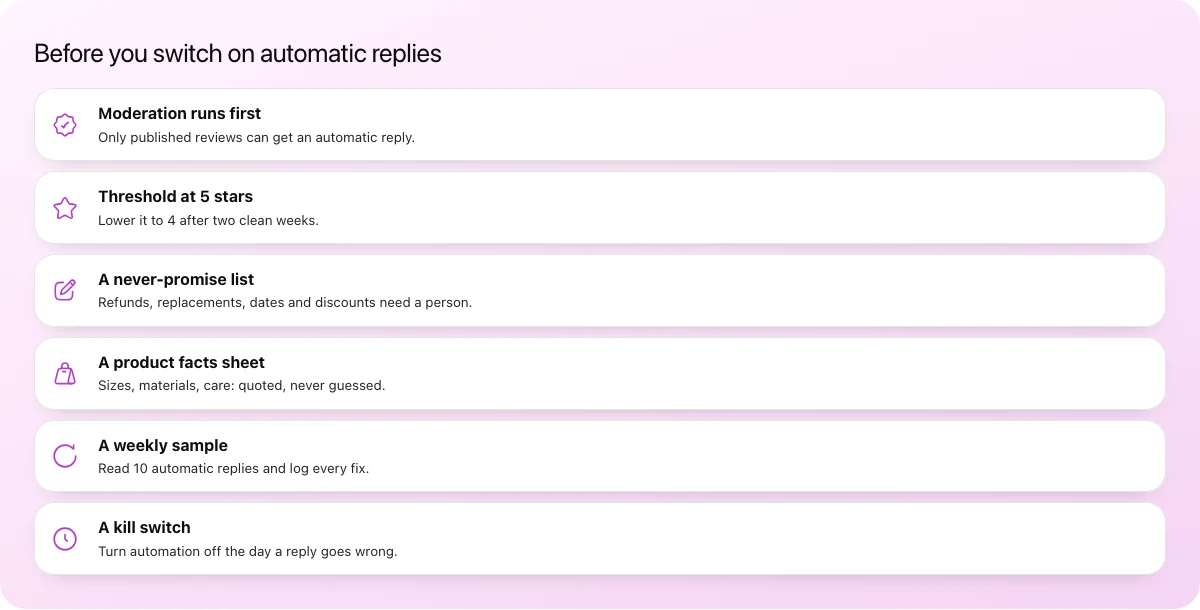
- Only reply automatically to published reviews. A review still in moderation may turn out to be spam, and an automatic reply would either highlight it or end up orphaned.
- Flags beat stars. When the text mentions a defect, a question, health, safety or personal data, the review leaves the automatic lane, whatever its rating.
Should the automatic threshold be 4 or 5 stars?
Start at 5. Four-star reviews often carry a small complaint, such as "great, but runs small", that a thank-you ignores. Move to 4 once two weeks of drafts show the AI handles those mixed sentences well. Keep 3 stars and below on approval for good: these are the replies future buyers read most closely.
A step-by-step workflow for AI review replies
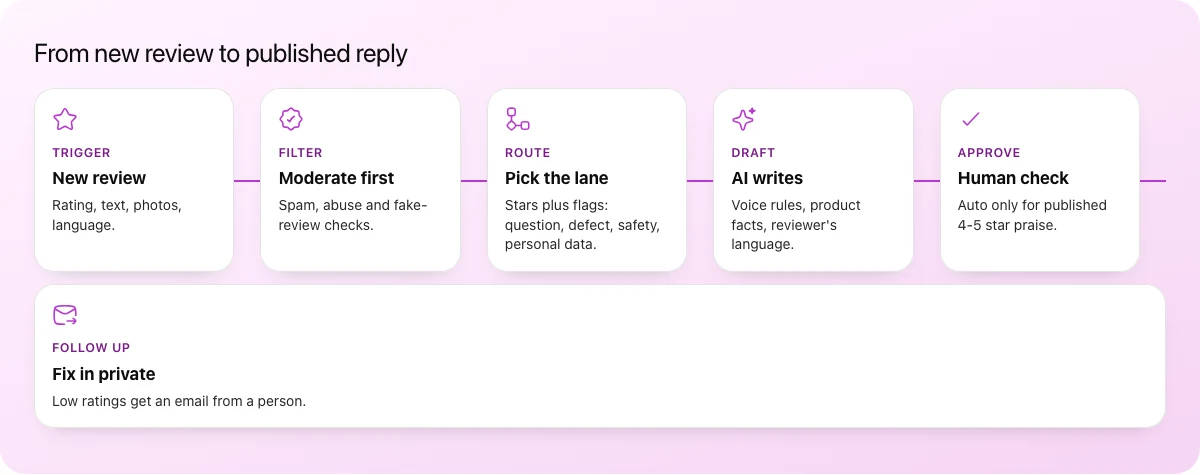
- Moderate first: Spam, abuse and fake-review checks run before any reply. Remove only what breaks your published review policy. Hiding genuine negative reviews is a different thing, and US regulators can treat it as deceptive.
- Classify: Tag the rating band and the flags: question, defect, delivery, size, health or safety, personal data, language.
- Draft with context: Give the AI the review, the product name, a short facts sheet (dimensions, materials, care, shipping and returns policy) and your voice rules. Without facts, it fills gaps with plausible guesses.
- Approve or publish by lane: automatic replies only for the band you have opened.
- Wait a little before posting: A reply a few seconds after the review reads as a bot. A few hours reads as a person.
- Follow up in private on low ratings: The public reply acknowledges the problem. A private email from a named person fixes it.
- Log and sample: Record which replies were automatic, edited or rewritten, and read a sample every week.
What goes in the product facts sheet
The facts sheet is the cheapest guardrail you have. One short block per product, pasted into the AI instructions or kept where approvers can see it, is enough:
- Exact name, size or dimensions, and materials, copied from the product page.
- Care and use instructions, word for word from the label.
- Your real shipping, returns and exchange terms, with the time limits.
- The three complaints you hear most, each with the true answer.
- What the AI must hand to a person: anything about refunds, health, safety or a missing order.
When a review asks something the sheet does not cover, the right draft says that a person will check, not a confident guess.
The queue grows with your request emails; these review request email examples show what gets customers to write. If support works from another inbox, Trio's "new approved review" trigger can start a Shopify Flow workflow that alerts it: see how to send an email from Shopify Flow.
The voice rules your AI follows
These rules answer the failures listed in the next section. Copy them into the instructions or brand-voice field of your review app, and give the same list to whoever approves drafts.
- Voice
Write like a person on our team: plain words, contractions, no exclamation marks below 4 stars.
- Voice
Keep replies to 2-4 sentences. Shorter for praise, longer only when you explain a fix.
- Voice
Sign with the first name of the person who approves the reply, never "The Team".
- Always
Mention one specific detail from the review, so the reply could not sit under any other review.
- Always
Use the product's real name and only facts from the product page or our facts sheet.
- Never
Never promise a refund, replacement, discount, delivery date or policy exception. A person adds those after deciding on them.
- Never
Never repeat an order number, address, phone number or email address from the review.
- Never
Never argue with the reviewer, question their honesty or suggest the review is fake.
- Never
Never ask the reviewer to change, update or remove their review.
- Escalate
If the review mentions an injury, an allergy, a safety issue or legal action, do not draft: flag it for a person.
Every edit you make during approval should become a new rule or a new line in the facts sheet. That is how the edit rate goes down over time.
The risks of auto-replying to reviews, and a guardrail for each
Most AI reply failures fall into a short list, and each one has a cheap guardrail.
| Risk | What it looks like | Guardrail |
|---|---|---|
| Invented promise | "We'll refund you right away" when your policy offers store credit | A "never promise" rule; refunds and replacements only in approved replies |
| Wrong product fact | Says the mug is dishwasher-safe when the label says hand wash only | A facts sheet per product; the AI quotes it or says a person will check |
| Copy-paste sameness | The same three sentences under 40 reviews | Require one detail from the review; reject drafts that fit any review |
| Defensive or accusing tone | "Our records show you never contacted us" | A no-arguing rule; never suggest in public that a review is fake |
| Personal data in public | Repeats the order number or street name from the review | Route reviews with personal data to a person; never quote it |
| Reply to spam | A warm thank-you under a spam link | Automatic replies only after moderation, on published reviews |
| Wrong language or register | An English reply to a German review, a joke under a complaint | Reply in the review's language; no humor below 4 stars |
| Quality drift | Replies get blander month after month | Learn from human-written replies, not from earlier AI replies |
| Incentive tied to the review | "Update your review and we'll send 20% off" | Offer fixes and codes with no condition on the review |
The legal side is narrower than many merchants fear. Under the FTC's Consumer Reviews and Testimonials Rule, in force since October 21, 2024, you may respond publicly to reviews. You may not make an accusation about a reviewer that you know is false, use groundless legal threats or intimidation to get a review removed, or tie an incentive to a review's sentiment. FTC staff add that paying for changes to truthful negative reviews may violate the FTC Act (FTC questions and answers on the rule). If you sell in the EU or the UK, check local consumer rules too.
Quality drift is invisible day to day: if an AI imitates its own earlier replies, small habits compound. Okendo's help center describes one fix, an AI that learns only from human-written replies (Okendo help center). Whatever app you use, keep your best human replies as the reference.
Responding to negative reviews: reply in public, fix in private
A low rating needs two messages, written for two audiences.
The public reply is for future shoppers. Keep it to two or three sentences: apologize, name the problem in the customer's words, say what happens next. Do not argue facts in public, and do not paste a policy. For example:
"Sorry, Sam. A pulled thread should never leave our warehouse. Maya from our team has emailed you to arrange a replacement or a refund, whichever you prefer."
The private message is for the customer, and it carries the fix: a replacement, a refund, an exchange or a real answer. Sign it with the name of someone who can act on it.
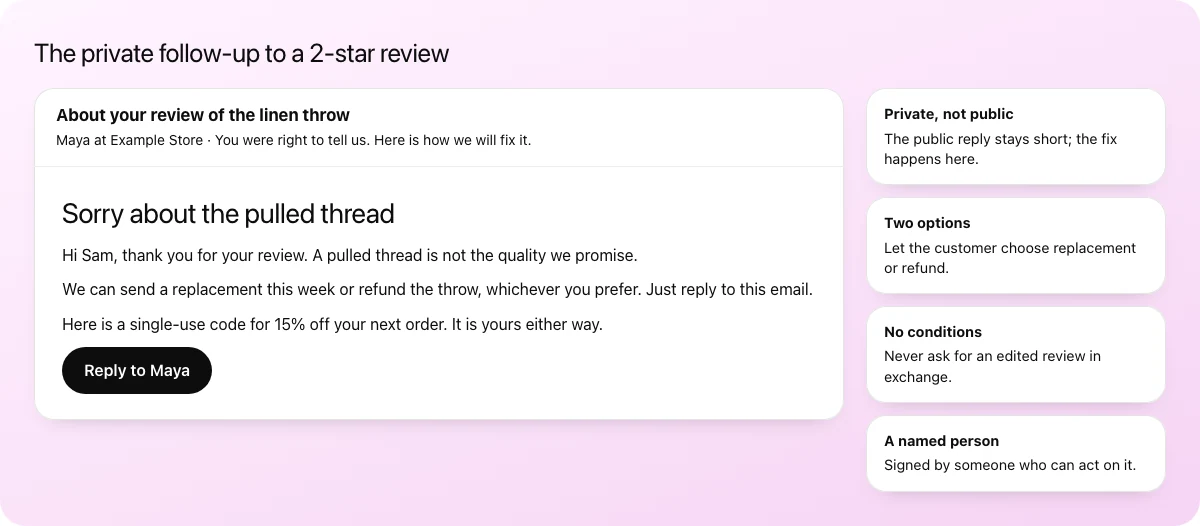
Two rules keep this clean. The fix and any code must never depend on the review being changed. And speed beats polish: aim to send the private message within one business day of the review.
If the same complaint keeps coming back, the reply is not the fix. Group low ratings by cause, such as size, packaging, delivery or expectations, and fix the product page or your post-purchase emails, which can set expectations on use, care and timing before a disappointed review gets written.
Move the slider to see how the reply should change as the rating drops, and where it stops being safe to automate.
Soft, heavy and the color matches the photos. Ordering a second one.
How to automate review replies in Trio (and in other Shopify apps)
Trio is our product, so here is exactly what it does, limits included.
- Drafts you approve. Trio AI drafts replies in your brand's tone and the reviewer's language; you approve each one before it is published. Paid plans include 50 AI replies a month on Starter ($29), 500 on Growth ($79) and 3,000 on Scale ($199); Free has no AI. Brand voice starts on Growth. See the plans and quotas.
- Opt-in automatic replies. Off by default. When on, Trio replies by itself only to published reviews at or above a threshold you set, 4 stars by default. Consider 5 for your first weeks.
- Unhappy-customer rescue. On Starter and up, a review at or below your threshold (2 stars by default) alerts you privately and prepares an apology email with a single-use personal discount code. It waits for your approval unless you switch on automatic sending. Trio never replies publicly in this flow and never changes the rating.
- Stella, the reviews agent. One of Trio's AI agents, Stella lists reviews waiting for an answer and drafts the replies for you to approve.
- Moderation before replies. Auto-publish above a rating or approve reviews by hand, with banned words, anti-spam and an AI fake-review guard.

Replies live in the same app as collection, so the Trio reviews module that sends your review requests also tracks how many reviews still need an answer.

Happy reviewers can get a second touchpoint too: a thank-you email after the review is one of Trio's email automations on Starter and up.
Other Shopify review apps offer AI replies too. Per their App Store listings, Judge.me includes them in its Awesome plan at a flat $15 a month, and Loox in Convert, from $49.99 a month. Okendo's help article above describes automatic replies on Growth and up, set separately for positive, neutral and negative reviews (all checked November 2026). Judge.me's flat price is hard to beat if replies are all you need; Trio makes more sense when you also want email and loyalty in one app. Compare controls, not labels: can you limit automation by rating and to published reviews, approve drafts, and see which replies were automatic? Our review app comparison covers the rest.
Measure it, then widen automation in 30 days
Track five numbers, split by rating band:
- Reply coverage: the share of published reviews with a reply. Aim for every review of 3 stars or less.
- Time to reply: hours from publication to the public reply, and to the private message for low ratings.
- Edit rate: the share of AI drafts you change before approving. This is the signal that tells you when a band is ready for automation.
- Reversal rate: automatic replies you later edit or delete. Anything above zero needs a new rule.
- Recovery: how many low-rating customers answered your private message and accepted a fix.
Then roll out in four steps:
- Week 1, drafts only: Approve everything, and note every edit and its reason.
- Week 2, turn edits into rules: Update the voice rules and the facts sheet. Re-read a few drafts to check the rules took.
- Week 3, open 5 stars: If almost no 5-star drafts needed an edit, switch on automatic replies for 5 stars. Our rule of thumb is fewer than 1 in 10; it is a judgment call, not a benchmark.
- Week 4, consider 4 stars: Extend only if the 5-star reversal rate stayed at zero. Keep 3 stars and below on approval permanently.
Automating review replies is about routing more than writing. Let AI take the volume, keep people on the replies that carry risk, and treat every edit as a rule waiting to be written.
Frequently asked questions
- Can you automate replies to customer reviews?
- Yes. Most review apps can draft replies with AI, and some can publish them automatically. The safe setup automates only short positive reviews that are already published, sends mixed and low ratings to a person for approval, and keeps sensitive topics such as injuries or legal threats fully human.
- Should I reply to every review?
- Reply to every review of 3 stars or less, and to as many positive reviews as you can answer with something specific. A generic "Thanks!" under every 5-star review adds little. If you cannot keep up, answer low ratings and reviews that ask a question first.
- Is it OK to use AI to respond to reviews?
- Yes, as long as the reply is accurate, posted on behalf of your business and checked where it matters. The FTC rule on consumer reviews targets fake reviews, false accusations against reviewers, intimidation and incentives tied to a review's sentiment, not AI-assisted replies. You stay responsible for everything a reply promises.
- How quickly should I respond to a negative review?
- Aim for one business day. The private follow-up matters more than the public reply, so send the fix first and keep the public answer short. A fast reply also limits how many shoppers read the complaint without your side of it.
- Can I offer a refund or discount to a customer who left a bad review?
- Yes, offering to fix a problem is fine. Do not make the refund or the code depend on the customer changing or removing the review. FTC staff guidance says paying for changes to truthful negative reviews may violate the FTC Act.
- What should you never say in a reply to a review?
- Never accuse the reviewer of lying, never repeat their order number or address, and never promise something your policy does not allow. Leave out medical or safety advice and never ask them to edit the review. Keep defensive explanations out of public view.
- Do replies to reviews help SEO?
- Replies shown on the product page add text to it, but they do not change your rating or the stars Google may show. Their main value is trust, because shoppers read how you respond. Identical replies across products read as automated and add nothing useful to the page.
- How do I make AI review replies sound human?
- Require one specific detail from each review, keep replies to two to four sentences, sign with a real first name and ban stock phrases such as "We value your feedback". Feed the AI your best human-written replies and edit the first weeks of drafts by hand.
- Should I automate replies to 1-star reviews?
- No. Future buyers read 1-star replies closely, and these reviews usually need an action, such as a replacement or refund, that only a person can authorize. Let AI write a first draft if it saves time, then have a person edit it, approve it and follow up privately.
- Can Trio reply to reviews automatically?
- Yes, as an opt-in. By default, Trio AI drafts replies and you approve them. You can switch on automatic replies for published reviews at or above a star threshold you choose, 4 stars by default. AI replies come with paid plans from Starter, with 50 to 3,000 a month depending on the plan.
Related articles
Ecommerce marketing automation, step by step: the 8 flows to build first, timing and exit rules, collision rules, AI and honest measurement. Read the …
November 25, 2026AI for storesShopify Email Automation: The Complete Setup Guide (2026)Shopify email automation, step by step: native Messaging vs apps, 7 flow blueprints with timing and exit rules, silent failures and a QA plan. Start h…
November 25, 2026AI for storesShopify Flow AI Prompt Examples: 20 Prompts for Email Chains20 Shopify Flow AI prompt examples for email chains: welcome, checkout, review and win-back, with the wait and exit checks Sidekick skips. Copy them n…
November 25, 2026