


Review request email example: 15 free templates to copy

- Send the first request when the customer can judge the product, which means shipping time plus a few days of use. Then send one reminder and stop.
- Name the product in the subject, put the stars inside the email, and ask for a photo only after the rating.
- Give every reviewer the same reward whatever the rating, and ask every buyer, not only the happy ones. The FTC warns against both mistakes.
Many review request email examples online are screenshots from big brands: nice to look at, hard to reuse. Here are 15 plain-text templates you can paste into any email tool, sorted by situation, each with a subject line, a preview line and when to send it. This page is part of our complete guide to Shopify product reviews, which covers the rest of the loop: showing reviews, replying and using them in search.
Why this small email deserves care, according to Northwestern's Spiegel Research Center:
The 4.0 to 4.7 range matters for everything below. You don't need a wall of five-star ratings. You need a steady flow of honest reviews from verified buyers, which is what a good request email produces.
What every review request email needs
A review request email has one job: get a rating in as few taps as possible. Every template below follows the same anatomy.
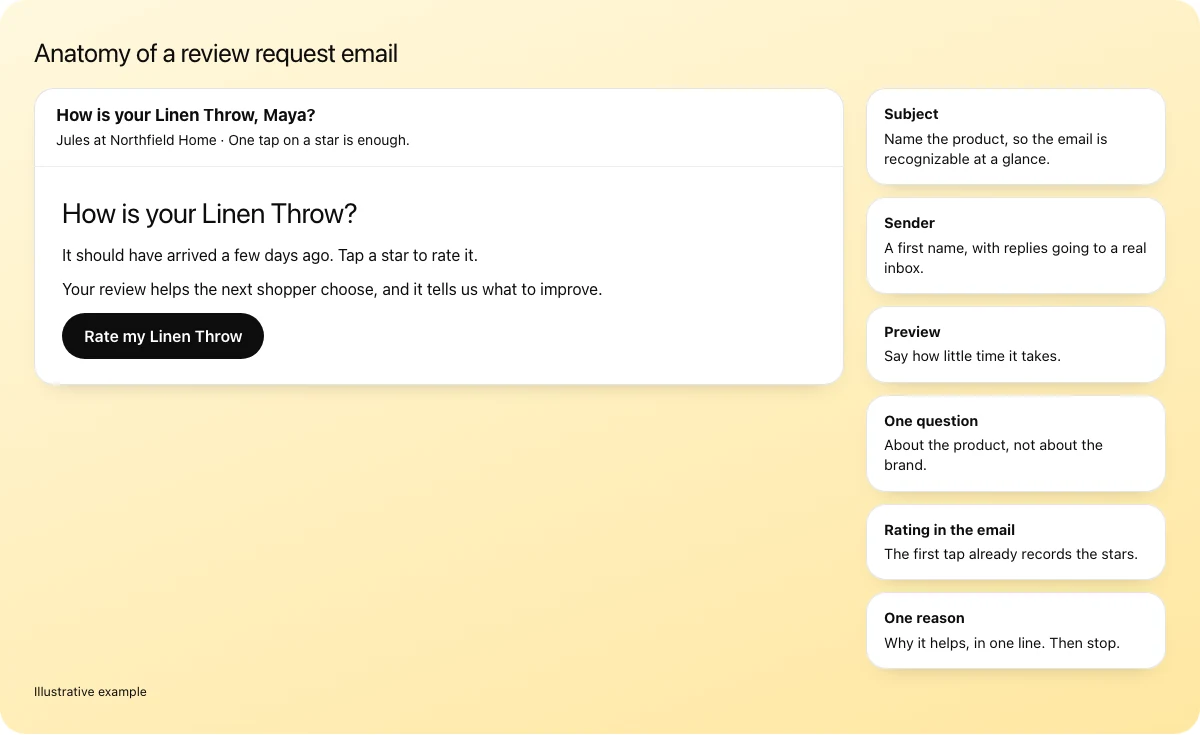
Five rules apply to every template:
- Name the product, not the order: "How is your Linen Throw?" beats "Review order #1042".
- One ask per email. Rating first; text and photo on the next screen.
- Keep it short. Three lines and a button read in full on a phone.
- Reply-to a real inbox. Some customers answer with a problem instead of a review. You want to see it.
- Same email for everyone. Never choose recipients by how happy you think they are.
Placeholders such as {first_name} stand for your app's merge tags.
Which template fits your situation
| Situation | Template | When it goes out |
|---|---|---|
| Most physical products, no special case | 1. One-tap request | First email |
| Small shop where a real person can sign | 2. Founder note | First email |
| Expensive or carefully compared purchase | 3. Help the next shopper | First email |
| Sizes, fit or dimensions matter | 4. Fit and detail question | First email |
| Results take weeks (skincare, supplements) | 5. Long-use check-in | First email, 3+ weeks after delivery |
| First email opened but not answered | 6, 7 or 8 | Reminder |
| Review arrived without a photo | 9. Photo follow-up | Right after the review |
| You run a loyalty program | 10. Loyalty points request | First email or reminder |
| You want a reward but have no loyalty program | 11. Discount code request | First email or reminder |
| Several products in one order | 12. Multi-item order | First email |
| Order shipped as a gift | 13. Gift order | First email |
| You want feedback on the shop, not the product | 14. Store review | After delivery |
| The order had a problem that is now fixed | 15. After a replacement or refund | Once the fix has arrived |
When to send an email for a review request
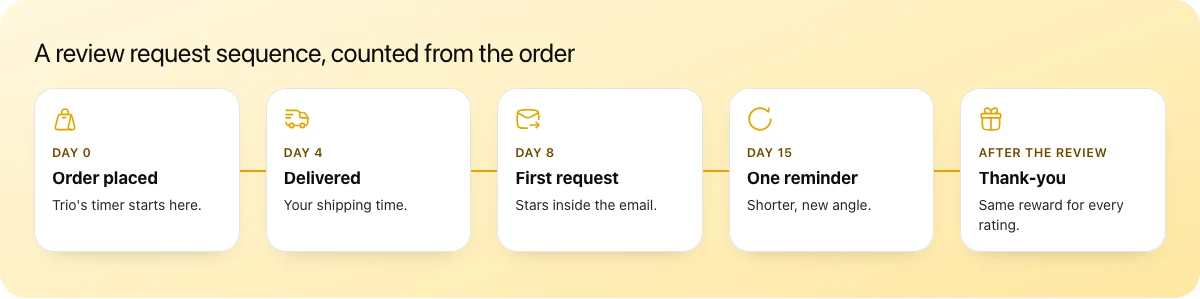
Send when the customer can judge the product, not when they pay. Two numbers decide it: shipping time, and how long the product takes to show what it does.
Check what your app counts from: the order, the fulfillment or the delivery. Trio counts from the order date (7 days by default, adjustable), so the delay must include shipping. The rule: send day = shipping days + judging days.
| Product type | Time to judge it after delivery | First request, with 3-5 days of shipping | Reminder |
|---|---|---|---|
| Food, coffee, consumables | 2-3 days | Day 6-8 after the order | 5-7 days later |
| Apparel and shoes | 3-5 days | Day 7-10 | 5-7 days later |
| Home, decor, textiles | 5-7 days | Day 9-12 | 7 days later |
| Electronics and gadgets | 7-10 days | Day 11-15 | 7 days later |
| Skincare and beauty | 2-3 weeks | Day 18-26 | 7-10 days later |
| Supplements | 3-4 weeks | Day 25-33 | 7-10 days later |
These are starting points from how long each category takes to use, not benchmarks. Trio spaces reminders by the same delay as the first email, so a long delay also means a late reminder.
First review request email examples (templates 1-5)
Pick one as your default. Templates 4 and 5 suit products where "how is it?" gets vague answers.

1. The one-tap request
The safest default for physical products.
Why it works: the product name makes the subject specific, and the stars turn the first tap into a rating.
2. The founder note
For shops where a real person can sign the email.
Why it works: a person is harder to ignore than a logo, and unhappy customers get a direct line to help. They can still review.
3. The "help the next shopper" request
For considered purchases where buyers compare a lot: mattresses, strollers, tech.
Why it works: it asks for help for another shopper, not a favor for the brand.
4. The fit and detail question
For apparel, shoes, furniture and anything with sizes or dimensions.
Why it works: a specific question gets a specific review, and fit details are what size-unsure shoppers look for.
5. The long-use check-in
For skincare, supplements and anything that takes weeks to show results.
Why it works: asking too early gets "too soon to tell". Naming the time frame and welcoming "no change yet" keeps reviews honest.
Review reminder email templates
One review reminder email recovers people who meant to answer and forgot. Make it shorter and change the angle. Trio allows up to two reminders; start with one.
6. The short nudge
Why it works: the same ask in half the words.
7. The stars-only ask
When the first email gets opened but rarely answered. Use it only if your app accepts a rating without text.
Why it works: it removes what usually stops people, the writing.
8. The last call
Why it works: a clear end is honest and keeps the sequence from feeling endless.
Email review request templates for photos, rewards and special cases
Three templates here offer a reward. Here is how the options compare.
| Reward option | No reward | Loyalty points | Discount code |
|---|---|---|---|
| Must be disclosed in the review (FTC guidance) | ✗ | ✓ | ✓ |
| Gives a reason to order again | ✗ | ✓ | ✓ |
| Adds to a balance the customer already has | ✗ | ✓ | ✗ |
| Can pay more for photo reviews | ✗ | ✓ | ✓ |
| Works without a loyalty program | ✓ | ✗ | ✓ |
Points keep working after the email: they land in a balance the customer watches grow.
9. The photo follow-up
Send it after a text review, for example as your post-review thank-you email.
Why it works: the rating is already in, so the photo is a small extra step. In Trio, photo reviews (up to 3 photos) start on Starter, video on Growth.
10. The loyalty points request
Why it works: points bring the customer back to spend them. In Trio, reviews can earn points from your loyalty and rewards program, and every email can show the customer's balance.
11. The discount code request
Why it works: no loyalty program needed, and "whatever the rating" shows the reward doesn't depend on sentiment, as the FTC rule requires.
12. The multi-item order
Check first that your app can list several products in one request.
Why it works: one email for the whole order instead of one per product.
13. The gift order
When the order has a gift note or ships to another address.
Why it works: the buyer never used the product, so ask about what they did experience.
14. The store review
Why it works: store reviews build trust where product reviews don't fit, such as your homepage. Trio collects store reviews alongside product reviews.
15. After a replacement or refund
Why it works: you ask whatever the outcome, the opposite of review gating. If a low rating comes in, Trio (Starter and up) can alert you privately and prepare an apology email with a personal discount code for you to approve; it never replies publicly in that flow or changes the rating. For the public reply, see how to automate review replies safely.
20 subject lines for review request emails
Swap any template's subject for one of these, and keep it short so phones show the whole line. As with abandoned cart email subject lines, specific beats clever.
- Question
How is your {product_name} so far?
- Question
Did {product_name} live up to the photos?
- Question
Would you buy {product_name} again?
- Question
What would you tell a friend about {product_name}?
- Question
One week with {product_name}: what do you think?
- Short
Quick question about your order
- Short
Rate {product_name} in one tap
- Short
20 seconds for {product_name}?
- Short
Your take on {product_name}?
- Personal
{first_name}, a quick favor from {sender_first_name}
- Personal
I'd love your honest opinion, {first_name}
- Personal
A note from the {shop_name} team
- Reminder
Still have a moment for {product_name}?
- Reminder
Ratings only? That works too
- Reminder
Last ask about your {product_name}
- Photo
Show us {product_name} in real life
- Photo
Got a photo of your {product_name}?
- Reward
{points} points for your honest review
- Reward
Your review earns {points} points, whatever you think
- Reward
A thank-you code for any honest review
Avoid subjects that fake a reply ("Re: your order") or promise what the email doesn't deliver. US law requires subject lines that don't mislead.
Keep every email request for review FTC-compliant
In August 2024 the FTC announced a final rule banning fake reviews and testimonials, in force since October 2024. With its guide for marketers on soliciting and paying for online reviews, it gives five rules for any email request for review:
- Rewards can't depend on the rating. The rule bans incentives conditioned, expressly or implicitly, on a particular sentiment. "Leave 5 stars, get 15% off" is the textbook case.
- Ask every buyer. The guide says not to ask only customers you think will be positive. That rules out review gating: a "Happy with us?" screen that sends unhappy customers to support and happy ones to the review form.
- Disclose the reward. Even when it's the same for everyone, the guide says the review should disclose the incentive. Hence the last line of templates 10 and 11.
- No staff or family reviews unless the connection is disclosed.
- Moderate spam, not opinions. The rule bans removing negative reviews through threats or intimidation, and presenting displayed reviews as most of your feedback when negative ones were hidden.
If a request also promotes products, CAN-SPAM may treat it as commercial email: include an unsubscribe link and your postal address. Outside the US, check local rules. This is general information, not legal advice.
Tell us what you really think, good or bad.
Every review gets the same 15% code, whatever the rating. Please mention it in your review.
Something wrong? Reply anytime. We'll help, and you can still review.
Write my reviewHappy with your order? Leave us a 5-star review and we'll send you 15% off.
Not happy? Reply to this email instead and we'll sort it out privately.
Leave 5 starsHow to automate review request emails on Shopify
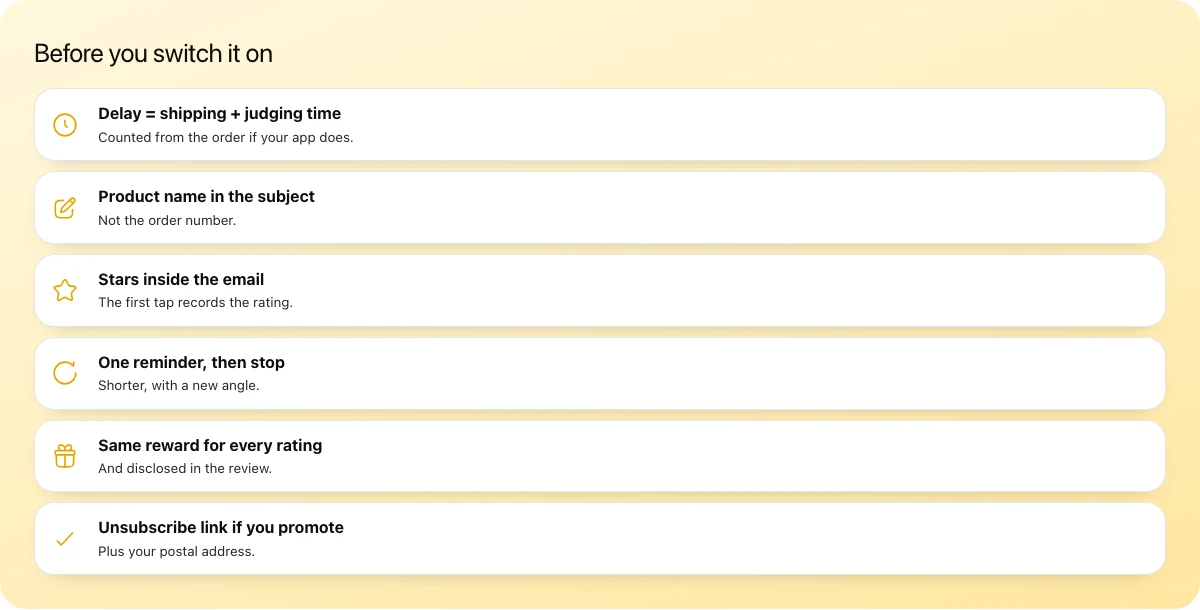
On Shopify, review requests come from a reviews app or an email tool connected to your orders. Set it up once, in this order:
- Set the delay from shipping time plus judging time (table above).
- Exclude test orders, cancelled orders and tagged orders you never want to ask about.
- Add one reminder, written as a new angle.
- Turn on photo uploads and choose one reward for every rating.
- Place a test order and read the email on your phone.
Then close the loop: show stars on product pages and in Google product ratings, and reuse your best reviews in post-purchase emails.
Set it up in Trio
Trio is our product, so read this as a description, not a neutral review. In Trio's reviews module, the review request is an automation sent a set number of days after each order (7 by default), with up to two reminders, skipping test orders, cancelled orders and excluded tags. It runs on paid plans, from Starter at $29 per month with a 14-day free trial (see pricing). The Free plan includes unlimited text reviews, but not automatic requests. A review can earn loyalty points and trigger a thank-you email. Still choosing a tool? Our roundup of the best review apps for Shopify covers the alternatives and their strengths.
Measure what works
- Reviews per 100 requests sent: your main number. Compare months, not days.
- Share of reviews with a photo: if low, move the photo ask to the thank-you email (template 9).
- Days from request to review: if most reviews follow the reminder, your first email is probably early.
- Rating distribution: a sudden dip usually points to a product or shipping problem, not the email.
Change one thing at a time, the delay first, then the subject line.
The review request is one automation among several. Our guide to Shopify email automation covers welcome, cart recovery and win-back flows, and Trio's email marketing runs them next to your reviews and loyalty program.
Frequently asked questions
- How do you write an email asking for a review?
- Name the product in the subject, ask one question about it, and put the star rating inside the email so the first tap counts. Keep it to three short lines and one button, sign it with a real name, and let replies reach a real inbox.
- What is a good subject line for a review request email?
- A short, specific question that names the product, such as "How is your Linen Throw?". Avoid vague lines like "Feedback", order numbers and fake replies starting with "Re:". Test two versions over a month and keep the one that brings more reviews per request.
- How long after a purchase should I send a review request email?
- Wait until the customer can judge the product, which is shipping time plus the time it takes to use it. As a starting point, that is about a week after the order for clothing and two to four weeks for skincare or supplements. If your app counts from the order date, as Trio does, include shipping in the delay.
- How many review reminder emails should I send?
- Start with one reminder, shorter than the first email and with a different angle, such as asking for stars only. A second reminder can work if few people unsubscribe, but stop there. More emails about the same order mostly add noise.
- Is it legal to offer a discount or points for a review?
- In the US, yes, as long as the reward does not depend on the review being positive and it is disclosed. The FTC's 2024 rule bans incentives conditioned on sentiment, and its guidance for marketers says the review should disclose the incentive. Other countries and review platforms have their own rules, so check the ones that apply to you.
- Can I send review requests only to happy customers?
- No. The FTC's guidance for marketers says not to ask for reviews only from customers you expect to leave positive ones. Send the same request to every buyer, and handle unhappy customers through support and your public replies.
- What is a good response rate for review request emails?
- There is no reliable independent benchmark, because most published figures come from review apps measuring their own customers. Track reviews per 100 requests sent on your own store, then improve it by testing timing first and subject lines second.
- Should a review request email include the star rating?
- Yes, if your app supports it. Stars inside the email let the customer start the review with one tap, and the text and photo come on the next screen. If your app cannot embed stars, use one clear button that opens the review form.
- How do I send review request emails automatically on Shopify?
- Use a reviews app or an email tool connected to your orders, set a delay after each order and add one reminder. In Trio, the review request runs on paid plans from Starter. It goes out 7 days after the order by default, with up to two reminders, and skips test and cancelled orders.
- Should I ask for a review of every item in a multi-item order?
- Ask in one email, not one email per product. List the items with a rating for each and let the customer rate one or all of them. Several separate requests for the same order are easy to ignore.
Related articles
Google product ratings explained: the 50-review rule, the reviews feed, GTIN matching in Shopify and policy traps. Use our checklist to get your stars…
November 25, 2026ReviewsHow to Import Reviews to Shopify: Step-by-Step GuideHow to import reviews to Shopify without losing stars, dates or photos: a copyable CSV template, product matching, legal rules and fixes. Start your i…
November 25, 2026ReviewsJudge.me Reviews Connector: How to Sync, Export or Migrate Your ReviewsNeed a Judge.me reviews connector? See when an API sync, an integration or a CSV export fits, what the export leaves behind, then migrate in 7 steps.
November 25, 2026