


Klaviyo: How to Resend an Email to Non-Openers (Step by Step)

- Campaign not sent yet: turn on Add a follow-up email on the Review step. Already sent: build a received-but-not-opened segment, clone the campaign and send the clone to it.
- Apple Mail Privacy Protection records opens nobody made, so Klaviyo's non-opener list quietly skips many Apple readers. Adjust the segment when the send matters.
- Resend once, only to people engaged in the last 30 to 60 days, and judge the resend against a holdout group, not its revenue column.
In Klaviyo, there are two ways to resend an email to non-openers: switch on Add a follow-up email before a campaign goes out, or build a non-opener segment and send a clone of a campaign that already went out. Each takes about five minutes. The hard part is everything around the clicks: Apple Mail Privacy Protection hides many real non-openers, a careless resend dents your sender reputation, and the resend's revenue column overstates what it actually earned. This guide covers the steps, the traps and the math, as part of our wider ecommerce email marketing guide.
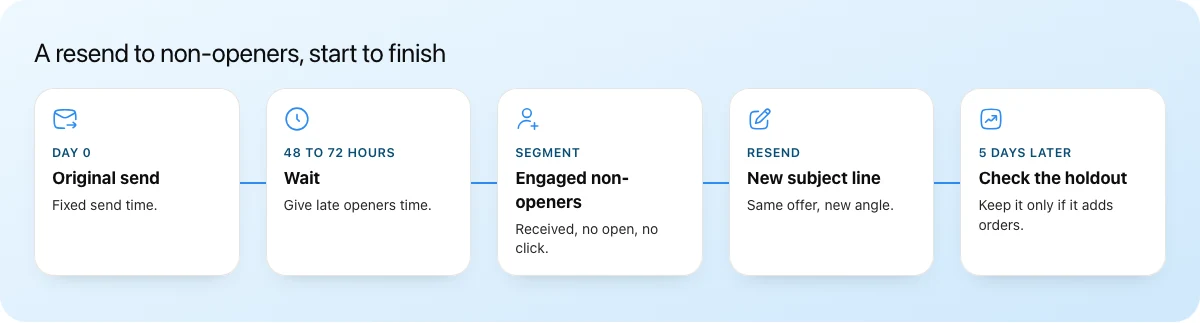
Two ways to resend a Klaviyo email to non-openers
The right method depends on one question: has the campaign already been sent?
- Not sent yet: use the automatic follow-up built into the campaign wizard.
- Already sent: build a non-opener segment, clone the campaign and send the clone.
- One customer says they never got it: use the single-profile Resend button on their profile.
Here is how the three options compare, based on Klaviyo's help article on follow-ups to non-openers:
| Automatic follow-up | Clone + non-opener segment | Single-profile resend | |
|---|---|---|---|
| Works on a campaign already sent | ✗ | ✓ | ✓ |
| Sends to many people at once | ✓ | ✓ | ✗ |
| Lets you edit the email body | ✗ | ✓ | ✗ |
| Engagement filter built in | ✓ | ✗ | ✗ |
| Works with A/B tests and Smart send time | ✗ | ✓ | ✗ |
| Needs a deliverability score of 50+ | ✓ | ✗ | ✗ |
| Best for | Planned launches and sales | Sent campaigns, custom audiences | A customer who missed one email |
If you are still deciding whether Klaviyo is the right tool at all, our overview of what Klaviyo does covers its strengths and limits.
Method 1: add an automatic follow-up to a new campaign
This is the method Klaviyo recommends. The follow-up is scheduled together with the original and sends itself to the people who did not open.
- Create the campaign as usual, or open one that has not been sent.
- On the Review step, turn on Add a follow-up email in the sidebar.
- Write a new subject line. The body of the follow-up stays identical to the original.
- Choose the engagement window: profiles who opened or clicked any of your emails in the last 30, 60 or 90 days.
- Set the delay, in hours or days.
- Click Schedule or send, pick Fixed send time if you are scheduling, then Schedule message or Send now.
Klaviyo enforces a few rules on timing and settings:
| Setting | Rule in Klaviyo |
|---|---|
| Minimum delay, fixed time zone | 24 hours |
| Minimum delay, recipient's local time zone | 48 hours (a shorter delay removes local time zone sending) |
| Maximum delay | 30 days |
| Send type | Fixed send time only |
| Not compatible with | A/B tests, Smart send time, Gradual send, SMS |
| Editable until | The original sends: subject line, segment and delay |
To cancel or edit the follow-up, open the Campaigns tab, click the scheduled campaign and use the three-dot menu on the follow-up card. Cancelling the follow-up leaves the original campaign scheduled.
Why the follow-up toggle is missing
If you cannot find the toggle, one of these is almost always the cause:
- The campaign has already been sent. The option only exists for new or unsent campaigns. Use Method 2.
- Your deliverability score is under 50. Klaviyo shows "Follow-up emails disabled due to poor deliverability score". Check it under Analytics, Deliverability, Email, Score.
- The campaign is an A/B test, or it uses Smart send time or Gradual send.
- It is an SMS campaign. Klaviyo cannot detect SMS opens.
Method 2: resend a campaign you already sent, with a non-opener segment
This is the fallback when the campaign is gone, and the better choice when you want to change more than the subject line.
Build the non-opener segment
Go to Audience, Lists & segments, create a segment and join these conditions with AND:
- Received Email at least once over all time, with the filter Campaign Name equals your campaign.
- Opened Email zero times over all time, same filter.
- Clicked Email zero times over all time, same filter.
- Opened Email at least once in the last 60 days, with the filter Apple Privacy Open is false, OR Clicked Email at least once in the last 60 days. This is the engagement guard.
- Can receive email marketing, because the person is Subscribed.
Condition 1 is the one people forget. Without it, the segment holds every profile in your account that did not open the campaign, including people who never received it. Condition 4 mirrors what the automatic follow-up does: an open or a click counts as recent engagement, but Apple privacy opens do not. Condition 5 matters because activity conditions do not check consent on their own.
Clone the campaign and send it
- In Campaigns, open the three-dot menu on the original and click Clone. Keep Single channel and, if asked, choose Clone to the current account.
- Check the campaign name and send date, then click Clone campaign. Add "resend" to the name so your reports stay readable.
- Under Send to, replace the original lists with your non-opener segment. Keep your usual exclusions.
- If you are resending inside your Smart Sending window, turn off Skip recently emailed profiles, or Klaviyo will skip almost everyone.
- Change the subject line, the preheader and, if you like, the opening block.
- On Review, click Schedule or send. When scheduling, select Determine recipients at send time so people who open the original in the meantime drop out. With send time optimization, the label reads Determine recipients at start of sending.
Apple Mail Privacy Protection: who your non-openers really are
Apple Mail Privacy Protection loads the images in an email, including the tracking pixel, before the reader does anything. Klaviyo records that as an open and tags it with the property Apple Privacy Open set to true. In Klaviyo's own words, a true value "doesn't necessarily reflect a true email open", and a false value does not prove someone read the message either. Klaviyo explains the property in its guide to identifying Mail Privacy Protection opens.
Here is the consequence most guides skip. Any recorded open of the original, including an Apple privacy open, keeps that profile out of the automatic follow-up. On a list with a typical Apple share, your "non-openers" are mostly Gmail, Outlook and other readers, while Apple Mail users who never looked at the email are never resent anything.
If the send matters, change how you define a non-opener. The manual method lets you choose between three definitions:
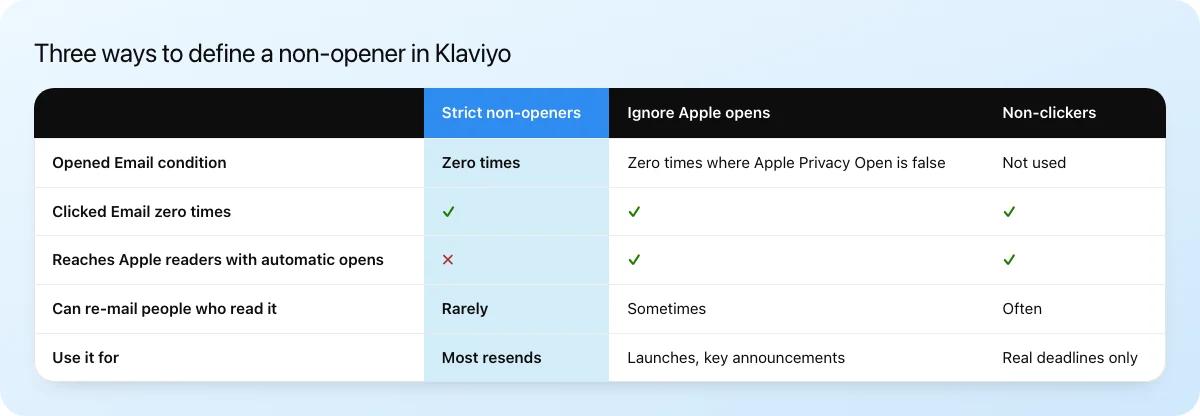
To build the second definition, add the filter Apple Privacy Open is false to the Opened Email zero times condition. The segment then ignores automatic Apple opens but still drops anyone who clicked. Some of those Apple users did read the email, which is why we keep this version for launches and announcements rather than every newsletter.
When to resend and what to change in the follow-up email
A resend earns its place when missing the email costs the customer something. Good candidates:
- Product launches and restocks people asked for.
- Sales with a real end date.
- Practical announcements: a holiday shipping cutoff, a policy change, a price increase.
Use this table to decide before you build anything:
| Situation | Resend to non-openers? | Why |
|---|---|---|
| Launch or restock, original performed normally | Yes, once, after 48 to 72 hours | Missing it costs the customer something |
| Sale that ends in two or three days | Yes, with a 24-hour delay | The deadline is the new angle |
| Weekly newsletter | No | The next issue arrives anyway |
| Openers opened but barely clicked | No, fix the email | A resend shows weak content to more people |
| Follow-ups disabled for a score under 50 | No | Clean the list first |
| Original drew more unsubscribes or complaints than usual | No | The audience already said no |
For regular newsletters, our Shopify newsletter guide covers better ways to lift opens than a resend.
Timing
Klaviyo's floor is 24 hours, but we suggest 48 to 72 hours for most campaigns. The point of a resend is to reach people at a different moment, so change the day and the time: a Tuesday morning original pairs well with a Thursday evening or Saturday morning resend. Go shorter only when the deadline is real and close.
What to change
The automatic follow-up only lets you change the subject line. With the manual method you can also change the preheader and the first lines. Keep the offer exactly the same: a better deal for non-openers teaches your list to ignore the first email. Never fake a reply with "RE:" or "FWD:". US law (CAN-SPAM) bans misleading subject lines, and readers notice.
Subject lines you can adapt:
| Angle | Original subject | Resend subject |
|---|---|---|
| Benefit instead of news | New arrival: the Linen Weekender | Pack 3 days in one carry-on |
| A question | Our fall sale starts today | Have you seen the fall sale yet? |
| Real deadline | 20% off sitewide | Ends Sunday at midnight: 20% off sitewide |
| Specific detail | The restock is live | Sizes 8 to 11 are back in the Trail Runner |
| Personal note | October newsletter | A quick note from Maya at Fern & Fold |
| Customer words | Meet our new serum | What the first buyers say about the serum |
The last line only works with real reviews of that product. For more formulas, see our list of subject lines for cart reminders, which use the same mechanics.
Move the slider to compare an original launch email with a resend that keeps the offer and changes the angle:
In case Tuesday's email got buried: the Linen Weekender is here.
It fits three days of clothes and slides under a plane seat.
See the bagIntroducing our newest bag, designed for weekends away.
Available now in sand and olive.
Shop now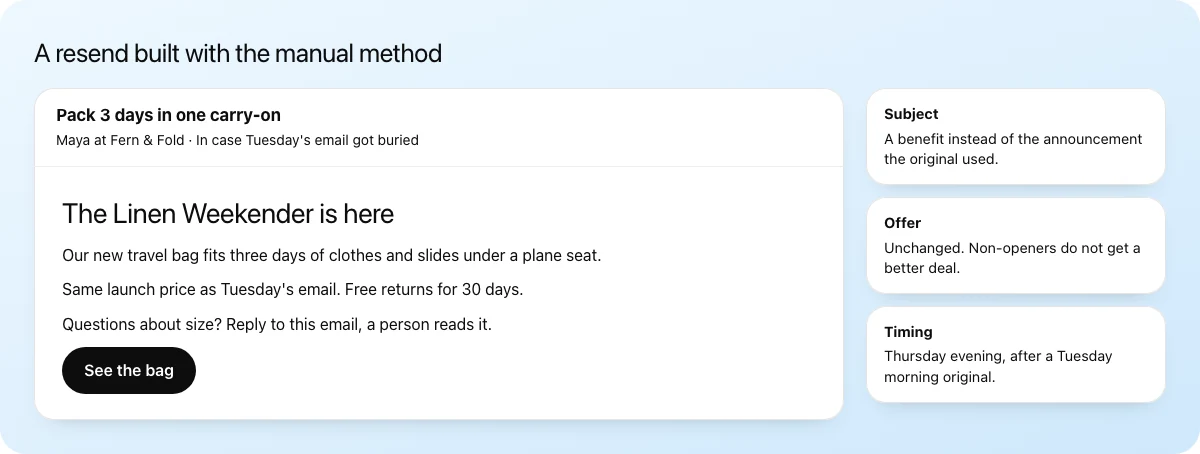
Deliverability guardrails for resending to non-openers
A resend goes to the least engaged slice of the audience you just mailed. Mailbox providers watch engagement and complaints, so this is where a sloppy resend costs you. Google's email sender guidelines require senders to keep the spam rate reported in Postmaster Tools below 0.3%, and recommend staying below 0.1%.
Our rules of thumb:
- One resend per campaign, never a second one.
- Engagement window of 30 to 60 days. Klaviyo warns that mailing people who have not engaged in over 90 days can push your emails to spam.
- At most one resend a week across all campaigns, so your engaged readers do not feel chased.
- Compare the resend's unsubscribe and spam complaint rates with the original's. If they are clearly higher, shrink the window to 30 days or stop.
- If Klaviyo has disabled follow-ups for a low deliverability score, fix list hygiene before resending anything. Suppress profiles that have ignored months of sends.
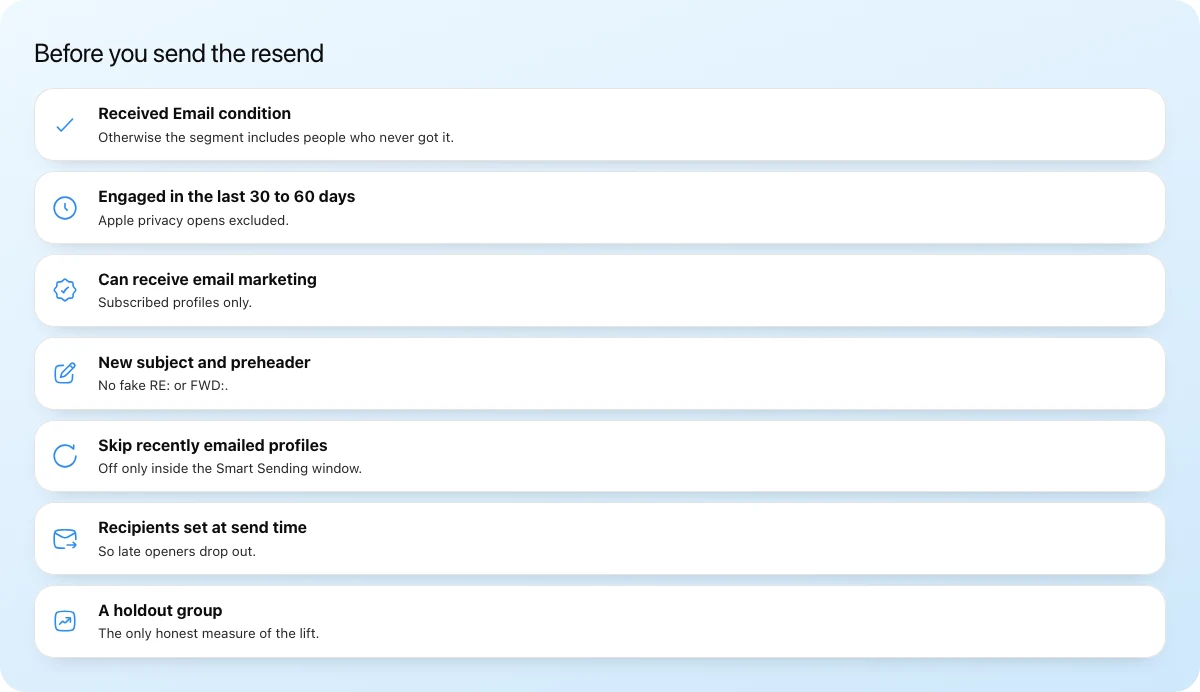
Resending a flow email or a single email in Klaviyo
One email to one person
When a customer writes "I never got my email", open their profile, go to the Messages inbox, find the email in the Sent or Skipped tab and click Resend. You can also do it from a flow message: View details, then Recipient activity, Recipients, hover over the profile and click Resend. The limits:
- Email only, one message and one person at a time.
- Only messages marked sent or skipped. Scheduled or cancelled messages cannot be resent.
- Flow filters and Smart Sending are not applied, and the person does not re-enter the flow.
Non-openers inside a flow
Flows have no follow-up toggle, so build the resend into the flow itself. After the email, add a time delay of two or three days, then a conditional split on Opened Email zero times since starting this flow. Send a second version, with a new subject line, down the branch for people who did not open. The time delay is required: without it, Klaviyo checks for opens the moment the email leaves.
Two warnings. Apple privacy opens count as opens in that split too. And in purchase-driven flows such as an abandoned cart email sequence, the condition that matters is whether the person ordered, not whether they opened. Our guide to Shopify email automation covers how to structure the main flows.
Did the resend earn money? Measure it, then fix the first send
The resend's revenue in your campaign report is not the revenue it caused. Some non-openers would have bought anyway, from an ad, a search or a visit to your homepage. Depending on your attribution settings, an automatic Apple open can also count toward the credit. The only clean answer is a holdout:
- Build the non-opener segment as usual.
- Export it to CSV and split the rows at random into two halves (sort by a random-number column in a spreadsheet).
- Upload one half as a list called "Resend – send" and the other as "Resend – holdout".
- Send the cloned campaign to the send list only.
- Five days later, compare the share of each list that placed an order, and the revenue per profile.
The difference between the two lists, multiplied by the size of the send list, is what the resend actually added. A hypothetical example: your segment holds 4,000 profiles. The send half (2,000) places 30 orders, or 1.5%. The holdout half (2,000) places 18, or 0.9%. The resend added about 12 orders (0.6 points of 2,000), not the 30 your campaign report credits to it. With a few hundred profiles per half, a handful of orders swings the result, so repeat the test on several campaigns before you decide. If the send list does not clearly beat the holdout, stop resending that type of campaign.
A resend makes up for a subject line or a send time that missed. Often the better fix is to get the first send right: test subject lines on part of your list, send when your readers usually open and keep the list engaged. You can compare how other tools handle that in our roundup of the best email marketing software.
That is the route we took with Trio, our own Shopify app for reviews, email and loyalty. To be clear, Trio has no resend-to-non-openers button and no engagement-based segment today. Its email marketing module focuses on the first send instead: A/B tests on Growth and up (see plans) send two subject lines to a test share of your list and send the winner to the rest. Pick the winner on click rate rather than open rate, for the Apple reasons above. Mailo, one of Trio's AI agents available on paid plans, proposes a send time based on your past opens when you ask it. And Trio's attributed revenue counts clicks only, never opens, so automatic Apple opens cannot inflate it.
Frequently asked questions
- How do I resend an email to non-openers in Klaviyo?
- For a campaign that has not gone out yet, turn on Add a follow-up email on the Review step, write a new subject line, pick a 30, 60 or 90-day engagement window and set a delay. For a campaign you already sent, build a segment of people who received it but did not open or click, clone the campaign and send the clone to that segment.
- Why is the Add a follow-up email option missing in Klaviyo?
- It only appears on new or unsent email campaigns. It is not available for A/B tests, Smart send time or Gradual send, and Klaviyo disables it when your deliverability score is below 50 (Analytics, Deliverability, Email, Score). In those cases, use the manual segment method.
- How long should I wait before resending to non-openers?
- Klaviyo requires at least 24 hours with a fixed time zone and 48 hours with local time zone sending, and allows up to 30 days. For most campaigns, 48 to 72 hours works well and lets the resend land on a different day and time. Go shorter only for a real deadline.
- Can I change the content of a Klaviyo follow-up email?
- Not with the automatic follow-up. Only the subject line changes and the body stays identical. If you want a new preheader, opening line or hero image, clone the campaign and send the clone to a non-opener segment instead.
- Does resending to non-openers hurt deliverability?
- It can, because a resend goes to your least engaged readers. Limit it to profiles that opened or clicked in the last 30 to 60 days, resend each campaign once at most and watch spam complaints. Google asks senders to keep their Postmaster Tools spam rate below 0.3%, ideally below 0.1%.
- How does Apple Mail Privacy Protection affect resends to non-openers?
- Apple Mail can load an email automatically, which records an open even if nobody read it. Any recorded open, including an Apple privacy open, keeps that profile out of Klaviyo's automatic follow-up. To reach those profiles, build a manual segment that only counts opens where Apple Privacy Open is false and requires zero clicks.
- Can I resend a Klaviyo flow email to people who did not open it?
- Flows have no follow-up toggle. Add a time delay after the email, then a conditional split on Opened Email zero times since starting this flow, and send a second version down the matching branch. To resend one flow email to one person, use Resend in that profile's Messages inbox.
- Can I resend a Klaviyo campaign that was already sent?
- Yes. Clone it, replace the audience with a non-opener segment, turn off Skip recently emailed profiles if you are inside your Smart Sending window, and choose Determine recipients at send time when you schedule it.
- Should I resend to non-openers or to non-clickers?
- Start with non-openers, the people least likely to have seen the email. A resend to non-clickers also reaches people who read it and passed, which raises the unsubscribe and complaint risk, so keep it for sales with a real deadline.
- Can I resend an SMS to non-openers in Klaviyo?
- No. Klaviyo cannot detect SMS opens, so automatic follow-ups work for email campaigns only. The single-profile Resend button is email-only as well.
Related articles
Copy 20 abandoned cart email subject lines sorted by reminder, with preheaders, real send data and a simple way to test them on Shopify. Pick your thr…
November 25, 2026Email marketingAbandoned cart email: the complete guide for Shopify stores (2026)Write an abandoned cart email that recovers orders: timing, a 3-email sequence to copy, discount break-even math, compliance and Shopify setup. Start …
November 25, 2026Email marketingBest abandoned cart emails: 15 free templates to copy, and when to send eachThe best abandoned cart emails as 15 free templates: subject, preview, body and button for each reason shoppers leave, plus send timing. Copy them now…
November 25, 2026