


Shopify customer retention: the complete guide (2026)

- Retention on Shopify is mostly a second-order problem. Measure your repeat window (median days between a first and second order) and time every email to it.
- Shopify already sorts customers into 11 RFM groups. Turn each group into a segment and give it its own play instead of one newsletter for everyone.
- Email, reviews and loyalty work best as one loop. Start with four flows, add a loyalty reward customers can reach in two or three orders, then compare cohorts every month.
Shopify customer retention is the share of your buyers who come back and order again. It is also one of the cheapest ways to grow: a repeat order needs no new ad spend to find the customer. This guide covers the full system on Shopify, from the reports that measure retention to the emails, reviews and loyalty rewards that move it, with copyable segments, timing formulas and a 30-day launch plan. If you only want the list of tactics, start with our customer retention strategies that work, then come back here for the measurement and the setup.
What Shopify customer retention means, and why the second order matters most
Customer retention is a ratio: of the customers you had, how many bought again within a given period. Retention marketing is everything you do to raise that ratio, aimed at people who already know you: post-purchase emails, review requests, loyalty points, referral rewards, service.
The economics are the reason to care. The most quoted figures come from a 2014 Harvard Business Review article, which also cites Bain & Company research:
These numbers are more than a decade old and come from many industries, so read them as a direction. You can check the logic on the original HBR article and then against your own ad costs.
On Shopify, retention breaks down into three levers. Every tactic in this guide pulls at least one of them:
- Frequency: more customers place a second, third and fourth order.
- Timing: the next order comes sooner, because you reach people at the moment they need you.
- Value: each returning customer spends a little more, through cross-sells, bundles or a higher tier.
Of the three, the first gap matters most. A customer who has ordered twice has formed the start of a habit; a one-time buyer is still a stranger. That is why we call retention a second-order problem. A quick illustration, with made-up numbers: a store that gets 1,000 first-time buyers a month at a $50 average order and lifts its second-order rate from 20% to 23% earns 30 more repeat orders a month, or $1,500, without spending a dollar more on ads. And those 30 customers keep buying.
How to measure customer retention in Shopify, step by step
You do not need an app to measure retention. Shopify's reports already hold the numbers, and the Shopify Help Center page on customer reports documents each one. Here is how to use them.
Open the Customer cohort analysis report
- In your Shopify admin, go to Analytics, then Reports.
- Click the category filter and choose Customers.
- Open Customer cohort analysis.
- In the Metric menu, pick Customer retention rate. Other options include number of customers, gross and net sales, average order value and amount spent per customer.
- Set the interval: weeks for fast consumables, months for most stores, quarters for durable goods.
Each row is a cohort: everyone whose first order fell in that week, month or quarter. Each column is the time since that first order. Shopify notes that the period 0 column "captures returning orders by the cohort's customers in the same period as their first order," so the first real retention signal is in period 1. The report shows a heatmap by default and can switch to a retention curve.
Two settings make the report far more useful. The cohort definition filter lets you group customers by the sales channel, marketing channel or product of their first order, so you can see whether people who came from a sale, an ad or a bestseller retain differently. And with 24 months of data, the amount-spent-per-customer metric can show projections, which Shopify is careful to say are not a guarantee.
Calculate retention by hand
The formula is simple. Pick a group and a window:
Retention rate = customers from the group who ordered again in the window ÷ customers in the group × 100
Example with illustrative numbers: 600 customers placed their first order in March. By the end of June, 132 of them had ordered again. Your 90-day retention for the March cohort is 132 ÷ 600 = 22%. Run the same calculation for April and May. If the rate climbs, your retention work is paying off.
Find your repeat window: the number that sets your timing
This is the step most retention guides skip, and it is the one that makes everything else work. Your repeat window (we will call it W) is the median number of days between a customer's first and second order. It tells you when to send a reorder nudge and when a customer is late.
You can get it from the Returning customers report, which lists every customer with two or more orders, their order count, and their first and last order dates. For customers with exactly two orders, the last order date minus the first order date is the gap you want.
- Open the Returning customers report and export it.
- In a spreadsheet, add a column for the gap in days. If the first order date is in column B and the last order date in column C, use
=C2-B2and format the result as a number. Adjust the letters to your export. - Take the median for customers with exactly two orders. In Google Sheets, with the order count in column D and the gap in column E:
=MEDIAN(FILTER(E2:E, D2:D=2)) - Take the 75th percentile as your "late" signal:
=PERCENTILE(FILTER(E2:E, D2:D=2), 0.75)
The median is when a typical returning customer comes back. By the 75th percentile, three in four of the customers who came back had already done so, which makes it a good "late" line for reminders and win-backs.
One trap: customers who first ordered last month have not had time to come back slowly, so recent data pulls W down. If your store is old enough, set the report's date range so it only includes customers whose first order is at least 12 months old, and recalculate W every quarter.
The retention metrics worth tracking
| Metric | How it is calculated | Where to find it in Shopify | What it tells you |
|---|---|---|---|
| Customer retention rate | Customers from a cohort who ordered again ÷ cohort size | Customer cohort analysis, metric "Customer retention rate" | Whether newer cohorts stay better than older ones |
| New vs returning customers | Count of first-time and returning customers per period | New vs returning customers report | How much of each month depends on repeat buyers |
| Repeat window (W) | Median days between first and second order | Returning customers report, exported | When to send reorder nudges and win-backs |
| Amount spent per customer | Cohort sales ÷ customers in the cohort | Customer cohort analysis | The value of a cohort over time, with projections after 24 months |
| RFM group mix | Share of customers in each of the 11 groups | RFM customer analysis report | How many customers are at risk right now |
| Attributed revenue | Orders credited to a click on an email or a reward code | Your email or loyalty app | Which retention messages bring orders |
Map every retention touchpoint to the customer lifecycle
Once you know W, you can schedule every message relative to it instead of guessing. The pattern looks like this:
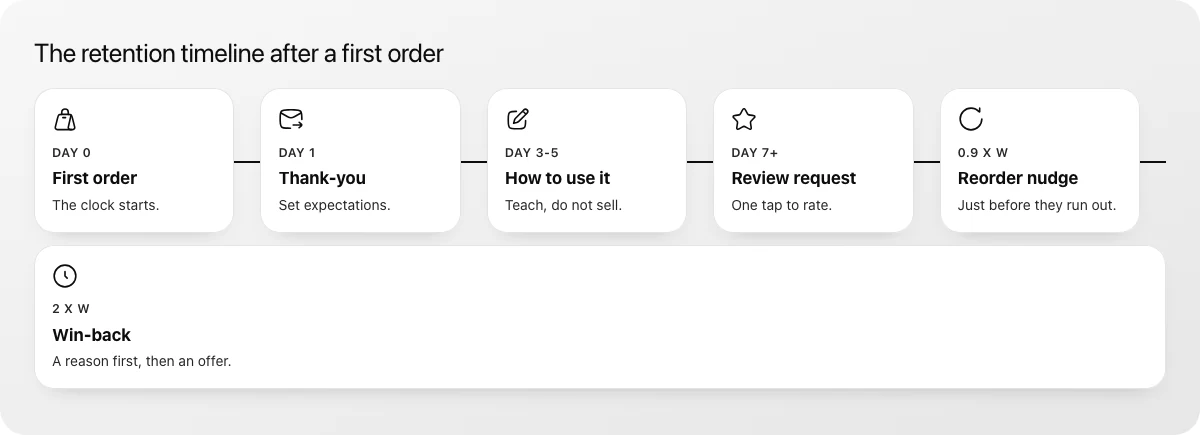
Here is the same schedule as a template. Replace W with your own number; the third column shows the result for a store whose customers usually reorder after 40 days.
| Touchpoint | When to send it | Example with W = 40 days | Goal |
|---|---|---|---|
| Thank-you or welcome | Day 1 | Day 1 | Set expectations, introduce the people behind the brand |
| How-to or education | Day 3 to 5 | Day 4 | A good first experience with the product |
| Review request | About a week after the order, later for slow-result products | Day 7 | Proof for the next buyer, and a reason to engage |
| Reorder or next-step nudge | 0.9 × W | Day 36 | Reach people at their natural reorder moment |
| Reminder with a reason | 1.5 × W | Day 60 | A new arrival, a restock or the points balance |
| Win-back | 2 × W | Day 80 | Bring back late customers |
| Sunset | 3 × W with no opens or clicks | Day 120 | Stop emailing, protect your sender reputation |
The first three touchpoints are the post-purchase sequence, and they decide whether a second order is even possible. Our guide to the post-purchase email has the wording for each one. Two rules hold across the whole schedule. First, every message needs a reason to exist beyond "we miss you." Second, stop a sequence the moment the customer orders again, then restart the clock from that order.
Match your retention plan to what you sell
A coffee brand and a furniture store should not run the same retention plan. What brings customers back depends on the product, and so does the right timing anchor. Use this table to pick your main lever before you build anything.
| What you sell | What brings people back | Main lever | Timing anchor | Watch out for |
|---|---|---|---|---|
| Consumables (skincare, coffee, supplements, pet food) | Running out | Reorder reminders, subscriptions, one-click reorder | Usage: pack size ÷ daily use, checked against W | Discounting orders people would have placed anyway |
| Fashion and accessories | New styles, confidence in fit | New-arrival emails, photo reviews with size details, early access for repeat buyers | Collection drops and seasons | Returns: a customer who returned the first order needs reassurance, not a promo |
| Home, furniture and other durables | Accessories, care, gifting, referrals | Care guides, complementary products, a referral program | Product life: care tips at 30 days, accessories later | Emailing weekly about a product people buy once every few years |
| Gifts and seasonal products | Occasions | Birthday and occasion reminders, "same time last year" emails | Calendar dates | Treating the gift buyer as the user of the product |
Most stores sit between two rows. A candle brand is partly consumable, partly gift. Pick the row that drives most repeat orders and borrow tactics from the second. For a deeper breakdown by vertical, see our guide to retention by industry.
Turn Shopify's RFM groups into retention plays
RFM stands for recency, frequency and monetary value: how recently a customer ordered, how often, and how much they spent. Shopify scores every customer on these axes and sorts them into 11 groups in the RFM customer analysis report, from Champions to Dormant. Most merchants open it once and close it. It is more useful as a to-do list.
Every group can become a customer segment. In your admin, go to Customers, then Segments, then Create segment, and use the rfm_group filter. Here is a play for each of the 11 groups, ordered from your best customers to the ones you are about to lose:
| RFM group | Who they are | Retention play | Segment filter |
|---|---|---|---|
| Champions | Ordered recently and often, among your highest spenders | Early access, a personal thank-you, an invitation to review or refer. No discount needed. | rfm_group = 'CHAMPIONS' |
| Loyal | Regular buyers, slightly less recent | Points reminders, new products related to past orders | rfm_group = 'LOYAL' |
| Active | Recent buyers with a few orders and moderate spend | Cross-sell the product most often bought second, show the points balance | rfm_group = 'ACTIVE' |
| Promising | Recent, but few orders and low spend | A how-to email and a review request, then a reorder nudge at W | rfm_group = 'PROMISING' |
| New | A very recent first order | The first-order sequence: how-to, review request, reorder nudge at W | rfm_group = 'NEW' |
| Needs attention | Middle of the road on every axis | A concrete reason to return: a restock, a new product, their points balance | rfm_group = 'NEEDS_ATTENTION' |
| At risk | Used to order often, not lately | A personal check-in that asks what changed, then a modest offer | rfm_group = 'AT_RISK' |
| Almost lost | Lapsing, with few orders and low spend | One reminder with a reason (a restock or a new product), then a modest offer at 2 × W | rfm_group = 'ALMOST_LOST' |
| Previously loyal | High value in the past, quiet now | Your highest-priority win-back: a short, plain email from the founder | rfm_group = 'PREVIOUSLY_LOYAL' |
| Dormant | Low value and long gone | One last win-back, then stop emailing them | rfm_group = 'DORMANT' |
| Prospects | Subscribed, never ordered | A welcome series that answers the questions that block a first order | rfm_group = 'PROSPECTS' |
Before you email any segment, add AND email_subscription_status = 'SUBSCRIBED' so you only reach people who agreed to marketing emails. Two more segments built from your repeat window are worth saving:
number_of_orders = 1 AND last_order_date < -60d AND email_subscription_status = 'SUBSCRIBED'One-time buyers who are past the window. Replace 60 with your own 2 × W. This is the segment where the second order is won or lost.
number_of_orders >= 3 AND last_order_date >= -90dCustomers with three or more orders who are still active: your VIP candidates and your best source of referrals and reviews.
You can email these segments from Shopify Messaging or any email tool that reads Shopify segments. One honest note about our own app: Trio's segments (Starter and up) use subscriber status, signup source and signup date, plus three ready-made loyalty segments (loyal, at-risk and lost members). Trio cannot filter by order count, last order date or RFM group, so for the queries above, Shopify's segment editor is the right tool.
Boost customer retention on Shopify without discounts
A discount is the easiest retention tool and the most expensive. It trains customers to wait for the next code, and it rewards people who would have ordered anyway. These levers cost little or no margin.
Teach before you sell
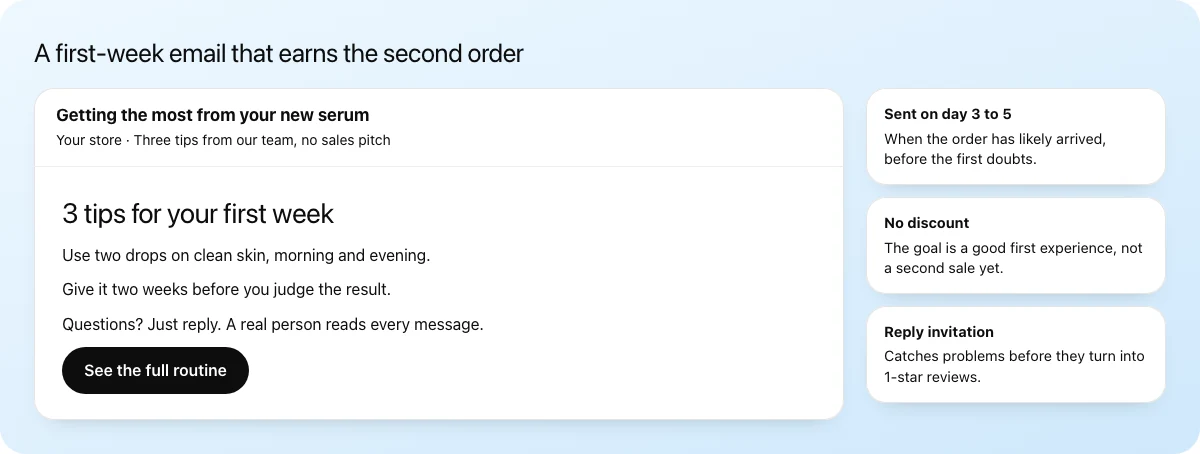
The first week decides whether the product meets expectations. An email a few days after the order that explains how to get the best result does more for the second order than any promo. Keep it short, useful and free of sales pressure.
Reply to every low rating with a fix
A customer with a problem who gets a fast, specific answer often trusts you more than one who never had a problem. Reply publicly in two or three sentences, name the issue, say what you did, then move the details to email. Read your three-star reviews too: they are the most specific, and the complaints that repeat (sizing, packaging, delivery) are your churn causes.
Reward with access, not just money
Loyal customers value being first and being recognized. Early access to a drop, a free sample with the next order, free shipping above a lower threshold or a handwritten note all feel generous without cutting your price. Keep cash discounts for the moments that need them, such as a late win-back.
Make the reorder one click
Shopify cart permalinks let you link straight to a cart that already holds a product: https://your-store.com/cart/VARIANT_ID:1. Put that link in your reorder nudge so a returning customer goes from the email to checkout without searching for the product again.
Send fewer, better emails
Every email should pass one test: would this customer be glad to get it today? A specific reorder reminder at the right time passes. A fourth "last chance" in a week does not. Here is the difference on a win-back email:
Most customers reorder about 40 days after their first bottle. Yours arrived 42 days ago.
You have 250 points, enough for free shipping on this order.
Not working for you? Reply and tell us why. We read everything.
Reorder in one clickIt's been a while. Come back and save 15% on your next order.
Use code COMEBACK15 at checkout.
Shop nowHow email, reviews and loyalty work as one retention loop
Each channel can work alone, but retention compounds when they feed each other. An order triggers a review request. A review earns points. Points give the next email a reason to exist. The next email shows a review that convinces the customer to try a second product. Here is what each piece contributes.
Email: the backbone of retention marketing
Email is the only channel where you choose the timing, the audience and the message, and the list belongs to you. The four flows that matter most for retention are post-purchase, review request, win-back and abandoned checkout, in that order for a store with existing customers. Our pillar guide to ecommerce email marketing covers the full program. In Trio, the email marketing module includes these automations on Starter and up, and every email can show the customer's points balance and quotes from your reviews.
Reviews: proof for the next order
Reviews do two retention jobs. They reassure a first-time buyer considering a second product, and the review request itself is a touchpoint that brings the customer back to your store. Ask a few days after the order, in one tap, and reply to what comes in. Our guide to Shopify product reviews covers collection and display in detail.
If you reward reviews, reward every review the same way. The FTC's 2024 rule on fake reviews bans incentives conditioned on a review expressing a particular sentiment; you can read the FTC announcement for the details. In Trio, the reviews module sends the review request a set number of days after the order (7 by default, with up to two reminders) on paid plans, and on those plans customers can earn loyalty points for leaving a review.

Loyalty and referrals: a reason to come back
A loyalty program works when the first reward feels close. Design it so a typical customer unlocks something within two or three orders; a reward ten orders away is invisible. Points for reviews and birthdays add touchpoints between orders. VIP tiers then reward your Champions, and a referral program turns them into an acquisition channel. Our ecommerce loyalty program guide covers program types and reward math, and the referral program guide explains how to reward both sides of a referral.
In Trio's loyalty and rewards module, the points program is on every plan, rewards create real Shopify discount codes, and VIP tiers and referrals start on Growth. On Growth and up, advanced insights compare the average spend of groups, such as photo reviewers versus other customers, once each group has at least 15 members. Trio labels these comparisons as correlation, not cause, and you should read your own cohort data the same way.
Choose your retention stack: native Shopify, separate apps or one app
There are three ways to equip a Shopify store for retention. None is right for everyone. The table compares them on the jobs that matter. Trio is our product, so read the last column with that in mind; competitor details come from their App Store listings, checked on November 25, 2026.
| Retention job | Shopify native | Specialist apps (examples) | Trio (our app) |
|---|---|---|---|
| Email campaigns and automations | ✓ | ✓ | Campaigns on every plan, automations from Starter |
| Free email allowance | 10,000 emails a month with Shopify Messaging | Klaviyo: 500 emails a month for 250 profiles | 500 emails a month for 250 contacts |
| SMS | ✓ | ✓ | ✗ |
| Product reviews | ✗ | ✓ | ✓ |
| Loyalty points | ✗ | ✓ | ✓ |
| Segments by order history or RFM group | ✓ | Varies by app | ✗ |
| Reviews, email and loyalty share one customer record | No native reviews or points | Through integrations between apps | ✓ |
| Entry paid price | $1 per 1,000 emails after the free 10,000 | Judge.me Awesome $15/month, Smile.io Essential $15/month, Klaviyo Email from $20/month | Starter $29/month, all three modules |
Shopify native is the cheapest start. Shopify Messaging gives you 10,000 free emails a month, abandoned checkout emails are always free, and the segment editor handles RFM and order-history targeting. You will still need apps for reviews and a points program.
Specialist apps win on depth. Judge.me's free plan includes unlimited photo and video reviews. Klaviyo covers email, SMS, WhatsApp and push in one platform. Smile.io supports Shopify POS on every plan, including its free plan. If you need SMS or in-store loyalty, this is the route, and Trio does not cover either today. The trade-off is three bills and three sets of customer data to keep in sync.
One app wins on simplicity for small teams. Trio combines reviews, email and loyalty, so a review can earn points and trigger a thank-you email without any integration, and you pay by contact list size rather than per module. It has a free plan, and paid plans start at $29 a month with a 14-day free trial. For a side-by-side of every option, read our ranking of the best Shopify apps for customer retention.
Your 30-day plan to improve customer retention on Shopify
You do not need every tactic at once. One lever per week, measured against your cohorts, beats a big launch you cannot evaluate.
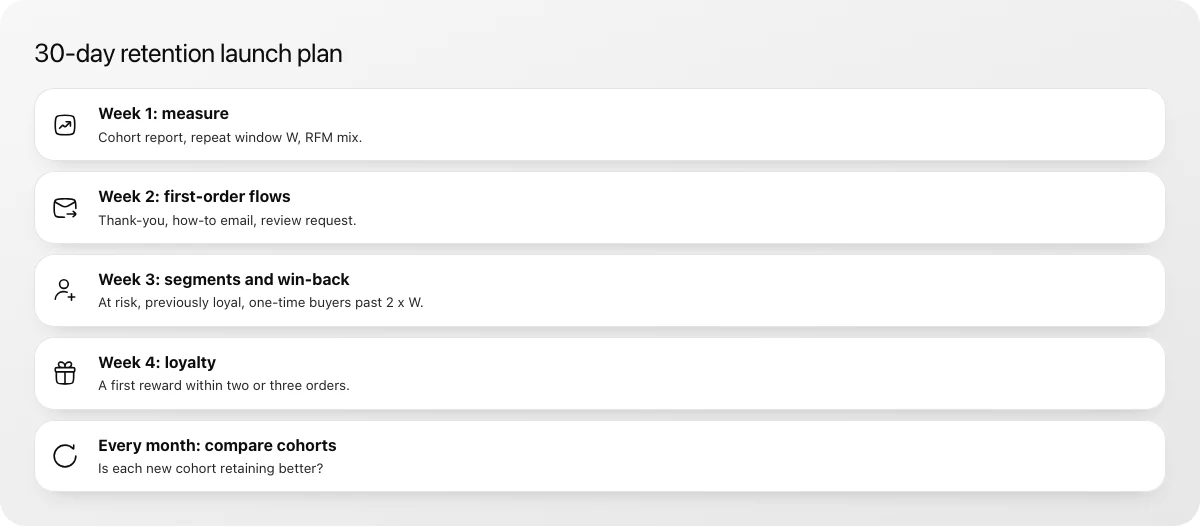
- Week 1, measure. Record the 90-day retention of your last six monthly cohorts, calculate W and its 75th percentile, and note how many customers sit in At risk and Previously loyal.
- Week 2, the first-order sequence. Launch the thank-you, how-to and review request emails. These shape every cohort from now on.
- Week 3, segments and win-back. Save the RFM and one-time-buyer segments, write one win-back with a reason, and set a sunset rule for people who never open.
- Week 4, loyalty. Launch points with a first reward reachable in two or three orders, and add points for reviews.
- Every month after that. Compare the newest cohort's retention curve with the older ones. Keep what moves the curve, cut what does not.
Retention is slow to show up in revenue and fast to show up in cohorts. If the March cohort retains better than January's, you are on the right track, whatever this month's sales say.
Frequently asked questions
- What is a good customer retention rate for a Shopify store?
- There is no universal benchmark. Retention depends on what you sell, how often people need it and your price point, and published averages vary a lot between sources. Use your own cohorts as the benchmark and aim for each new cohort to retain better than the one before it.
- How do I measure customer retention on Shopify?
- In your Shopify admin, open Analytics, then Reports, filter the category to Customers and open Customer cohort analysis. Set the metric to Customer retention rate. Customers are grouped by the date of their first order, and each column shows how many came back in the following weeks, months or quarters.
- What is the difference between retention rate and returning customer rate?
- Retention rate follows a fixed group of customers over time, for example everyone who first bought in March. Returning customer rate looks at one period and asks what share of the customers who ordered had ordered before. The first tells you if customers stay; the second tells you how much of your current revenue comes from repeat buyers.
- How can I improve customer retention on Shopify without discounts?
- Teach customers how to use the product in the first week, reply to every low review with a fix, time reminders to the moment people usually reorder, make reordering one click, and reward loyal customers with access or free shipping rather than bigger discounts.
- Is customer retention cheaper than acquisition?
- Usually. Harvard Business Review reported in 2014 that acquiring a new customer can cost five to 25 times more than retaining one, and cited Bain & Company research linking a 5% rise in retention to 25% to 95% more profit. Treat it as a direction, not a rule, and check it against your own ad costs and margins.
- How long should I wait before sending a win-back email?
- Base it on your repeat window rather than a fixed number. A customer who is at about twice the usual gap between orders is late. For a product reordered every 30 days, that means around day 60; for a product reordered twice a year, much later.
- Does a loyalty program actually improve retention?
- It gives customers a concrete reason to come back, but only if the first reward is reachable within two or three orders. Measure it by comparing cohorts of members and non-members over time, and remember that the comparison shows correlation, not proof of cause.
- What is retention marketing?
- Retention marketing is every message, offer and experience aimed at people who have already bought from you, with the goal of a next order. On Shopify that usually means post-purchase and win-back emails, review requests, a loyalty or referral program and good customer service.
- Can I run customer retention with Shopify's free tools only?
- You can start. Shopify Messaging includes 10,000 free emails a month on Basic, Grow, Advanced and Plus, and the segment editor lets you target customers by order count, last order date or RFM group. Product reviews and a points program need an app.
Related articles
Ecommerce marketing automation, step by step: the 8 flows to build first, timing and exit rules, collision rules, AI and honest measurement. Read the …
November 25, 2026Email marketingEcommerce email marketing: the complete 2026 guide for Shopify storesEcommerce email marketing step by step: which flows to build first, starting schedules, copyable emails, deliverability rules and costs. Start free wi…
November 25, 2026GrowthEcommerce Retention by Industry: Complete Guide (2026)Ecommerce retention by industry: benchmarks for 7 verticals, playbooks for 12, with reorder timing, review requests and loyalty. Find your next move.
November 25, 2026