


Ecommerce Marketing Automation: Complete Guide (2026)

- Build the flows closest to a purchase first (welcome, abandoned checkout, post-purchase, review request), then add win-back and loyalty triggers.
- Write five lines before you build any flow (trigger, wait, exit, suppression, metric) and set a priority order so flows never pile up on one customer.
- Let AI draft and prepare, keep a human approval on anything that emails customers or changes discounts, and judge each flow with click attribution plus a holdout group.
Ecommerce marketing automation is the set of rules that sends the right message, discount or reward when a shopper does something in your store, without anyone pressing send. Done well, it is a short list of flows that run every day and pay for themselves. Done badly, it is a pile of overlapping emails that teaches customers to ignore you.
This guide is the map. It covers the eight automations worth building, the order to build them in, the rules that stop them from colliding, where Shopify Flow fits, how far to trust AI and how to measure what each flow really adds. Email is the main channel in every section, so if you are starting from zero, keep our ecommerce email marketing guide open next to this one.
Two of those numbers come from a vendor measuring its own customers, the third from an independent research firm. Read them as direction, not as a forecast for your store. The direction is clear, though: a few automated flows do a disproportionate share of the work, and the two closest to a purchase do most of it.
What ecommerce marketing automation is (and what it is not)
Every automation, in every tool, has the same three parts:
- Trigger: an event in your store data. A signup, a checkout started, an order placed, a review approved, points about to expire, 60 days without an order.
- Rules: who qualifies, how long to wait, when to stop and who to leave out.
- Action: what happens next. An email, a discount code, loyalty points, an internal alert or a tag on the customer record.
That definition rules out two things people often call automation. A newsletter scheduled for Tuesday at 10 a.m. is a campaign: everyone gets it at the same moment, whatever they did. And a flow you switched on two years ago and never opened again is not automation either. It is a liability, because your products, prices and discount policy have changed since.
Three different jobs also hide under the same word:
- Customer messages: the flows shoppers see, such as the welcome series, cart recovery and the review request. This is where the revenue comes from.
- Store operations: tagging, inventory alerts, order checks and team notifications. Shopify Flow is built for this.
- Prepared work: AI that drafts a campaign, a reply or a segment and waits for you to approve it.
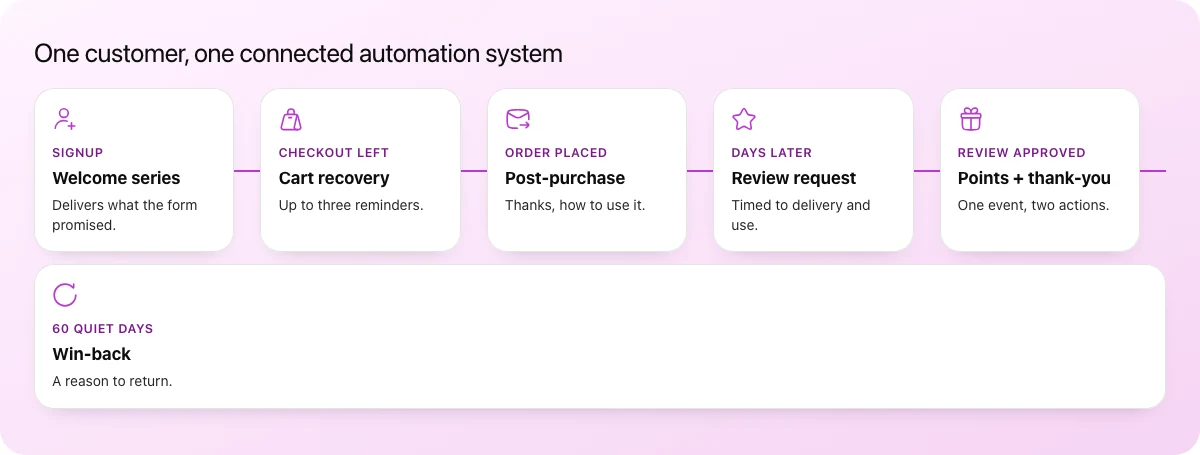
The figure shows the part most guides skip: the triggers are connected. An order should stop the cart reminder, schedule a review request and credit loyalty points. When those three jobs live in three apps that do not share data, you rebuild the connections by hand, or you go without them.
The 8 ecommerce automations to build, ranked by revenue proximity
Revenue proximity is how close a trigger sits to a purchase. A shopper who left checkout ten minutes ago is close to buying. A customer who has not ordered in 90 days is not. Build from the closest trigger outward, and do not start the next tier until the previous one runs cleanly.
| Automation | Trigger | Starting timing to test | Exit when | Judge it by |
|---|---|---|---|---|
| Welcome series | Newsletter or email-capture signup | Email 1 at once, 2 or 3 more over 7 to 10 days | First order | First-order rate of new subscribers |
| Abandoned checkout | Checkout started with an email, no order | About 1 hour, 24 hours, then 48 to 72 hours | Order placed | Recovered orders per abandoned checkout |
| Post-purchase | Order placed | Thank-you within a day, how-to email a few days later | Refund or cancellation | Support tickets and second-order rate |
| Review request | Order placed, plus a delay sized to delivery and use | 7 to 14 days after the order, 1 or 2 reminders | Review submitted | Reviews per order, share with photos |
| Loyalty triggers | Points earned, tier change, points about to expire | On the event, expiry 7 or 30 days before | Points redeemed | Reward redemption rate |
| Win-back | No order for a set number of days | About 1.5 times your usual repeat cycle | Order placed | Customers reactivated |
| Birthday | Birthday date on file | On the day or a few days before | Reward used | Birthday reward redemptions |
| Back-in-stock | Alert requested on a sold-out product | When the product is back | Purchase | Orders from alerts |
The timings are starting points to test, not benchmarks. A skincare routine needs longer before a review request than a phone case. A coffee brand needs a shorter win-back window than a furniture store.
Not sure where your store leaks? Match the symptom to the flow before you copy anyone's list:
| If your numbers show… | Fix this flow first | Check after 30 days |
|---|---|---|
| Plenty of subscribers, few first orders | Welcome series | First-order rate of new subscribers |
| Many checkouts started, few completed | Abandoned checkout | Recovered orders per abandoned checkout |
| Few reviews on your best sellers | Review request | Reviews per 100 orders |
| One-time buyers who never return | Post-purchase, then win-back | Second-order rate within your repeat gap |
| Points piling up unredeemed | Loyalty triggers (points earned, expiry) | Reward redemption rate |
Tier 1, this week: welcome series and abandoned checkout
These two drove three quarters of automation-generated orders in the Omnisend data above, and they share a trait: the shopper has just shown intent.
The welcome series starts with the promise your signup form made. If the form offered a code or a guide, email 1 delivers it immediately and does nothing else. Email 2 brings proof, such as your best-rated products and a short customer quote. Email 3 explains how to choose, or why the brand exists. The series ends the moment the subscriber places a first order.
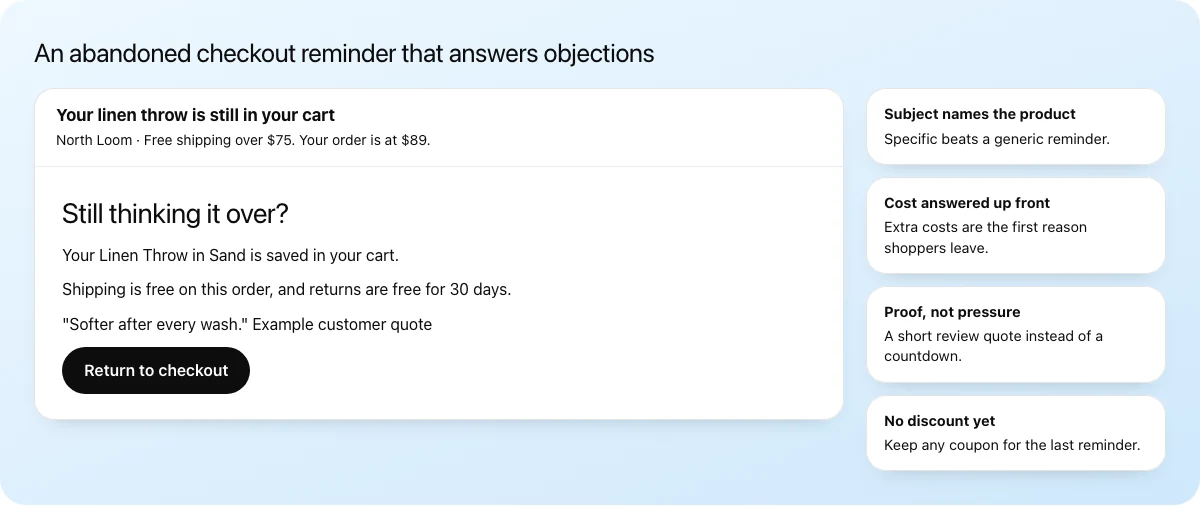
Abandoned checkout is often the highest-value flow, because the shopper typed an email address and got as far as shipping. Baymard's checkout research lists the reasons people leave: extra costs such as shipping and taxes come first (40% of US shoppers who abandoned, excluding those who were just browsing), then slow delivery (20%) and not trusting the site with card details (19%). Write the reminders to answer those objections instead of repeating "you forgot something". Our abandoned cart email guide has the full sequence with examples. In Trio, the abandoned checkout automation (Starter and up) sends up to three reminders on a schedule you set, holds sends during quiet hours at night and can add an optional coupon to the last one. Like every tool built on Shopify's abandoned checkouts, it only reaches shoppers who entered an email address.
Tier 2, this month: post-purchase and review request
The post-purchase email lands when the customer is paying the most attention, and many stores waste it on a cross-sell. Use the first one to thank the customer, set expectations about delivery and explain how to get the best out of the product. Sell later. Our post-purchase email guide breaks this flow into its stages.
The review request turns buyers into content for every other flow: the review quotes in your welcome and cart emails come from here. Time it from the order date plus delivery time plus the time it takes to use the product. In Trio, on paid plans, the review request goes out 7 days after the order by default (you can change the delay), with up to two reminders, and test or cancelled orders are skipped.
Tier 3, next: win-back, loyalty, birthday and back-in-stock
Win-back works best when the trigger comes from your own data. Look at the usual gap between a customer's first and second order. Set the win-back trigger at about one and a half times that gap, not at a round number copied from a template. Some tools only offer fixed windows: Trio's win-back runs after 30, 60 or 90 days of inactivity, so pick the first window above your own repeat gap.
Loyalty triggers give you a reason to email that is not a discount. Points earned, a new tier and points about to expire are all news the customer cares about. If you do not run a program yet, our ecommerce loyalty program guide covers the design choices first.
The difference shows when you compare a generic win-back email with one built on loyalty data. Move the slider:
You have enough points for free shipping on your next order.
Here is what is new since your last visit, picked from the collection you shopped.
Your points expire on March 1.
Use my pointsIt has been a while since your last visit.
Here is 15% off everything with code COMEBACK15.
Shop nowBefore you build: the automation brief, consent and deliverability
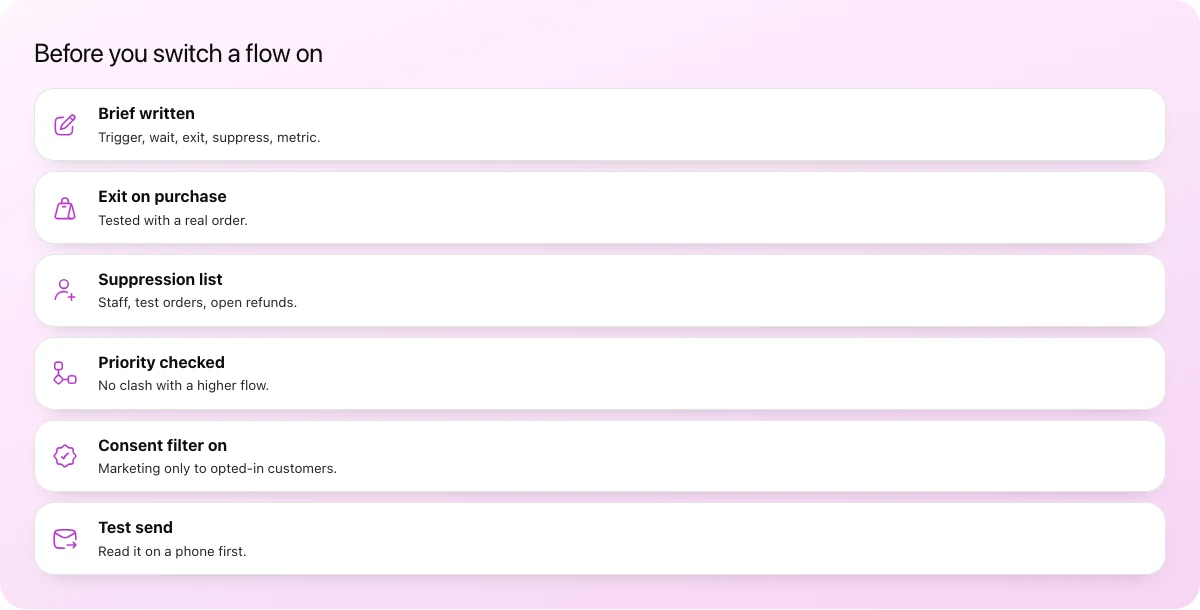
Most automation failures are decisions nobody wrote down: a coupon sent to someone who just bought, a review request for a cancelled order, a win-back email the day after a purchase. Before you open any flow builder, fill in five lines. It takes ten minutes.
The five-line automation brief
- Trigger: the exact event, and the data it depends on. "Checkout started" only exists for shoppers who typed an email.
- Wait: the delay before each message, and the hours you will not send (night-time, for example).
- Exit: the event that stops the flow for this person. For any flow that aims at a sale, it is an order.
- Suppress: who never enters. Staff accounts, test orders, customers with an open refund, people already in a higher-priority flow.
- Metric: the one number that decides whether the flow stays on, and the date you will check it.
Add an owner and a review date, and keep the briefs in one shared document. Here is a filled-in example you can copy:
| Line | Example: win-back flow |
|---|---|
| Trigger | No order for 75 days (median repeat gap is 50 days) |
| Wait | Email 1 on day 75, email 2 on day 90, no sends between 9 p.m. and 8 a.m. |
| Exit | Any order, or an unsubscribe |
| Suppress | Customers who received a discount in the last 30 days, staff and test accounts |
| Metric | Share of entrants who order within 30 days, versus a 10% holdout |
| Owner and review | Marketing lead, first check after 6 weeks |
Consent: what the law expects from automated email
Automated does not mean exempt. In the US, the FTC's CAN-SPAM compliance guide sets the baseline for commercial email: no misleading headers or subject lines, a clear statement that the message is an ad, a valid postal address, and an opt-out that works and is honored within 10 business days. Each email that breaks the rules can cost up to $53,088.
Transactional messages, such as an order confirmation, are exempt from most of those rules. Abandoned checkout, win-back and birthday emails are not: they are marketing. CAN-SPAM is an opt-out law, but the safer practice is to send these flows only to customers who accepted marketing in Shopify, which is also how Trio filters its marketing emails. If you sell to the EU or the UK, consent rules are stricter. This is a summary, not legal advice.
Deliverability: the sender rules mailbox providers enforce
Google's email sender guidelines apply to anyone emailing Gmail addresses. Every sender needs SPF or DKIM authentication and a spam rate below 0.3% in Postmaster Tools (Google recommends staying under 0.1%). Bulk senders, meaning more than 5,000 messages a day to Gmail, need both SPF and DKIM, plus DMARC, one-click unsubscribe and a visible unsubscribe link in marketing emails.
Automations help here more than campaigns do, because a relevant, expected message draws fewer spam complaints. In Trio, every marketing email carries an unsubscribe link and a preferences page, marketing sends respect Shopify marketing consent, and the Scale plan lets you send from your own domain.
Collision rules: keep automated flows from overlapping
Each flow looks reasonable on its own. The trouble starts when one customer qualifies for four of them in the same week. Set a priority order once, then apply it everywhere:
- Transactional emails (order and shipping confirmations), which Shopify sends.
- Abandoned checkout, because it is time-sensitive and closest to revenue.
- Post-purchase and onboarding.
- Review request.
- Loyalty news: points, tiers, expiry.
- Win-back and birthday.
- Campaigns and newsletters.
Then add the rules that make the order real:
- Exit on purchase. Every flow that aims at a sale ends the moment the customer orders.
- One discount in flight. A customer holding an unused welcome code does not also get a cart-recovery coupon.
- A daily cap. About one automated marketing email per customer per day, on top of any campaign you schedule.
- Recent-buyer suppression. Promotional flows skip anyone who ordered in the last 14 days, or whatever matches your delivery time.
- Quiet hours. No marketing sends at night in the customer's time zone, when you know it.
If your tool cannot pause one flow while another runs, get the same effect with tight exit conditions and shorter sequences. Here is how the rules play out for one customer over three months:
| Day | What the customer does | What they receive | Rule at work |
|---|---|---|---|
| 0 | Signs up through the email-capture section | Welcome email 1 with the promised code | Welcome starts |
| 2 | Starts checkout, then leaves | Checkout reminder about an hour later | Higher priority goes first |
| 3 | Places the order with the welcome code | Order confirmation from Shopify | Welcome and checkout flows exit |
| 5 | Nothing | How-to-use email | Post-purchase |
| 10 | Nothing | Review request, 7 days after the order | Review flow |
| 11 | Leaves a photo review | Thank-you email, loyalty points credited | One event, two actions |
| 80 | No second order yet | Win-back email with the points balance | Repeat gap passed, no discount in flight |
Shopify Flow and native Shopify automation: where they fit
According to the Shopify Help Center, Shopify Flow is a free app on the Basic, Grow, Advanced and Plus plans. You build workflows from triggers, conditions and actions, and some actions are restricted to higher plans. Flow is the right home for store operations: tagging customers after an event, alerting the team about a large order, hiding a sold-out product.
Customer-facing marketing email is a different job. Flow can start it, but writing, sending, consent and measurement belong to an email tool, whether that is Shopify Messaging or a dedicated app. The line between "send internal email" and "send marketing email" trips up a lot of merchants, so we wrote how to send emails from Shopify Flow to settle it. If you describe workflows to an AI assistant, our Shopify Flow AI prompt examples give you 20 starting prompts. For the full email side, including what Shopify's built-in tools cover, read the Shopify email automation guide.
Trio adds one trigger to Shopify Flow, "new approved review", so you can start your own workflow when a review goes live. There are no Trio actions in Flow today.
Choosing an ecommerce automation stack: native, best-of-breed or all-in-one
There are three ways to set this up on Shopify. The native path uses Shopify Flow plus Shopify Messaging, billed on your Shopify invoice. The best-of-breed path pairs a dedicated email platform such as Klaviyo or Omnisend with separate review and loyalty apps. The all-in-one path puts reviews, email and loyalty in one app, which is what we build. Trio is our product, so weigh the table with that in mind; every competitor figure comes from the vendor's pricing page or Shopify App Store listing, checked on November 25, 2026.
| What you need | Shopify Flow + Messaging | Klaviyo | Omnisend | Trio (ours) |
|---|---|---|---|---|
| Automated email flows | ✓ | ✓ | ✓ | yes, from Starter |
| SMS | yes, from $0.012 per US message | yes, paid add-on | yes, on Pro | ✗ |
| Sign-up pop-ups | Shopify Forms | ✓ | yes, incl. spin-to-win | no, inline section only |
| Product reviews | ✗ | yes, capped at 50 orders a month below the Marketing plan | ✗ | yes, unlimited |
| Loyalty program built in | ✗ | ✗ | ✗ | ✓ |
| Free tier | 10,000 emails a month | 250 profiles, 500 emails | 250 contacts, 500 emails | 250 contacts, 500 emails, no flows |
| First paid step | $1 per 1,000 emails after 10,000 | $20/month for 500 profiles | $16/month for 500 contacts (list price) | $29/month for 1,000 contacts |
| AI help | Sidekick edits emails from a prompt | Composer builds campaigns and flows | AI segment builder, product recommender | Trio AI plus six agents, with approval |
Read it as a set of trade-offs:
- Go native if your list is small, your volume fits Shopify's 10,000 free emails a month, and you do not need reviews or points inside your emails. Abandoned checkout emails are free on Shopify Messaging.
- Go best-of-breed if you need SMS, push or pop-ups, advanced segmentation and predictive analytics, and you have someone to maintain the integrations between three apps.
- Go all-in-one if you want reviews, email and loyalty to share customer data without integrations, and email-only fits your channel mix. Trio has no SMS today, and its free plan covers campaigns but not automated flows: those start on Starter at $29 a month, with a 14-day trial (see the plans).
For a tool-by-tool review with strengths and weak spots, see our best marketing automation tools for ecommerce.
AI marketing automation: what to delegate and what to keep
AI changed the slowest part of automation: writing and assembling. It did not change who is responsible for what goes out. A useful split:
Good jobs for AI:
- Drafting flow emails, subject line options and block rewrites in your brand's tone.
- Drafting replies to reviews, including the awkward 2-star ones.
- Summarizing what customers say in reviews, and suggesting segments.
- Proposing a send time from past opens, and reporting on what worked.
Keep a human on:
- Discount rules and amounts, and anything else that changes prices.
- The first send of any new flow, and any send to your whole list.
- Promises about delivery, refunds or product results.
- Public replies to angry customers, unless the rules are narrow and tested.
Trio is built on that split. Trio AI drafts campaigns, review replies and templates on paid plans, and six AI agents (the Triolets) prepare work by area: Stella for reviews, Mailo for emails, Fido for loyalty, Penny for analytics, Nova for content and Memo for customers. An agent reads your store data, prepares the action and shows an approval card. Anything that changes your store or emails customers runs after you approve it. There are two exceptions, both off by default: automatic replies to reviews at or above a star rating you choose, and the automatic apology email for unhappy reviewers. Agents work when you ask them; they do not run on a schedule overnight. More on the Trio AI agents page, and the risks of letting software answer customers are covered in how to automate review replies.

How to measure what your automations really earn
Every ecommerce marketing automation tool reports revenue, and every tool counts it differently. Before you compare numbers, find out three things: whether opens count or only clicks, how long the window is, and what happens when two emails touch the same order.
In Trio, an order is credited to an email or a loyalty reward when, in the 5 days before it, the same customer clicked a Trio email or used a reward code on the order. Opens do not count, the last touch wins, and the figure is shown by module, campaign and automation. Trio does not track total store revenue, sessions or conversion rate, so use Shopify Analytics for those.
Attribution tells you which flow touched an order. It does not tell you whether the order would have happened anyway. For your two or three biggest flows, run a holdout group:
- Keep 10% of eligible customers out of the flow, chosen at random.
- Run it for four to six weeks, or until each group has enough orders to compare.
- Compare the purchase rate of the two groups, not the attributed revenue.
Not every tool can split a holdout for you, and Trio has no holdout setting today. The fallback is to alternate: run the flow for two weeks, pause it for two weeks, and compare the purchase rate of the people who would have entered. It is noisier, because seasons and promotions shift between periods, but it beats trusting attributed revenue alone.
A worked example, with illustrative numbers: 2,000 abandoned checkouts in a month, 200 held out. If 8% of the reminded shoppers order against 3% of the holdout, the flow adds 5 points on 1,800 people, which is 90 orders. At a $60 average order, that is $5,400 of revenue the flow created, a figure you can defend in a budget meeting.
Beyond revenue, check three health numbers every month for each flow: revenue per recipient, unsubscribe rate and spam complaints. If complaints creep toward Google's 0.3% line, shorten the flow before you touch the copy.

A 30-day rollout plan
You do not need every flow on day one. You need the right four, built carefully, and a habit of checking them.
- Week 1: audit consent and authentication (SPF, DKIM, DMARC), then launch the welcome series and abandoned checkout with written briefs.
- Week 2: add the post-purchase email and the review request. Check the exits with a real test order.
- Week 3: add loyalty triggers and win-back, write your priority order and apply the collision rules.
- Week 4: start a holdout on abandoned checkout, read the first numbers and hand the drafting of the next campaign to AI, with your approval at the end.
Ecommerce marketing automation is not a feature you buy. It is a small system you design, write down and check. Start with the flows closest to a purchase, give every flow an exit, set the priority order, and measure with a holdout before you scale. When you are ready to see reviews, email and loyalty in one place, look at Trio's email marketing automations and try Starter free for 14 days.
Frequently asked questions
- What is ecommerce marketing automation?
- It is a set of rules that sends a message, a discount or a reward when a shopper does something in your store, such as signing up, leaving checkout or placing an order. Each automation has a trigger, rules about timing and exits, and an action. A newsletter scheduled for everyone at the same time is a campaign, not an automation.
- What should I automate first in my online store?
- Start with the welcome series and abandoned checkout reminders, because their triggers sit closest to a purchase. Add the post-purchase email and the review request next, then win-back, loyalty and birthday emails once the first four run cleanly.
- Is marketing automation worth it for a small store?
- Usually yes, because a handful of flows keep working without extra effort and most tools have a free entry point. Check what the free tier really includes. Some free plans cover campaigns but not automated flows, so the real starting cost is the first paid plan.
- What is the difference between Shopify Flow and an email automation app?
- Shopify Flow automates store operations with triggers, conditions and actions, such as tagging customers or sending an internal alert. An email automation app writes, sends and measures the marketing emails shoppers receive. Most stores use both, with Flow for operations and an email app for customer messages.
- How many emails should an abandoned cart flow have?
- Two or three reminders are a sensible ceiling. Send the first within a few hours without a discount, a second about a day later that answers objections such as shipping cost, and an optional last one. Stop the flow the moment the customer orders.
- How do I stop customers from receiving too many automated emails?
- Give every flow an exit condition, set a priority order between flows, suppress promotional flows for recent buyers and cap automated marketing emails at about one per customer per day. Review the whole system every quarter, not one flow at a time.
- How do I know if my automations actually make money?
- Use click-based attribution with a short window to see which emails led to orders, then confirm the big flows with a holdout group that does not receive the flow. The difference in purchase rate between the two groups is the revenue the flow really adds.
- Can AI run my marketing automation on its own?
- AI is good at drafting emails, subject lines, review replies and segment ideas. Discount rules, sends to your whole list and anything that changes prices deserve a human approval. In Trio, AI agents prepare the work and you approve it before it runs, except for options you switch on yourself, such as automatic replies to high-rated reviews.
- Do automated marketing emails need consent?
- In the US, CAN-SPAM requires honest headers and subject lines, a postal address and a working opt-out honored within 10 business days. US law works on opt-out, but abandoned checkout and win-back emails are still marketing, so the safe practice is to send them only to customers who accepted marketing. EU and UK consent rules are stricter, so check them if you sell there.
- Do I need SMS for ecommerce automation?
- Not to start. Email covers the core flows at a low cost per message, while SMS is usually billed per message or per credit bundle. Add SMS when you have a time-sensitive use case and a list that opted in to texts.
Related articles
Ecommerce email marketing step by step: which flows to build first, starting schedules, copyable emails, deliverability rules and costs. Start free wi…
November 25, 2026GrowthEcommerce Retention by Industry: Complete Guide (2026)Ecommerce retention by industry: benchmarks for 7 verticals, playbooks for 12, with reorder timing, review requests and loyalty. Find your next move.
November 25, 2026GrowthShopify customer retention: the complete guide (2026)Measure Shopify customer retention with built-in reports, time every email to your repeat window and win the second order. Copy the segments and start…
November 25, 2026